EN – 17
TRACTION DRIVE BELT
REPLACEMENT
Remove Traction Drive Belt
IMPORTANT: Save all hardware for reinstallation.
1. Stop engine, remove key and wait for all moving parts
to stop and for hot parts to cool.
2. Disconnect spark plug wire from engine.
3. Remove belt cover and belt finger as shown in
Figure 9 and Figure 10.
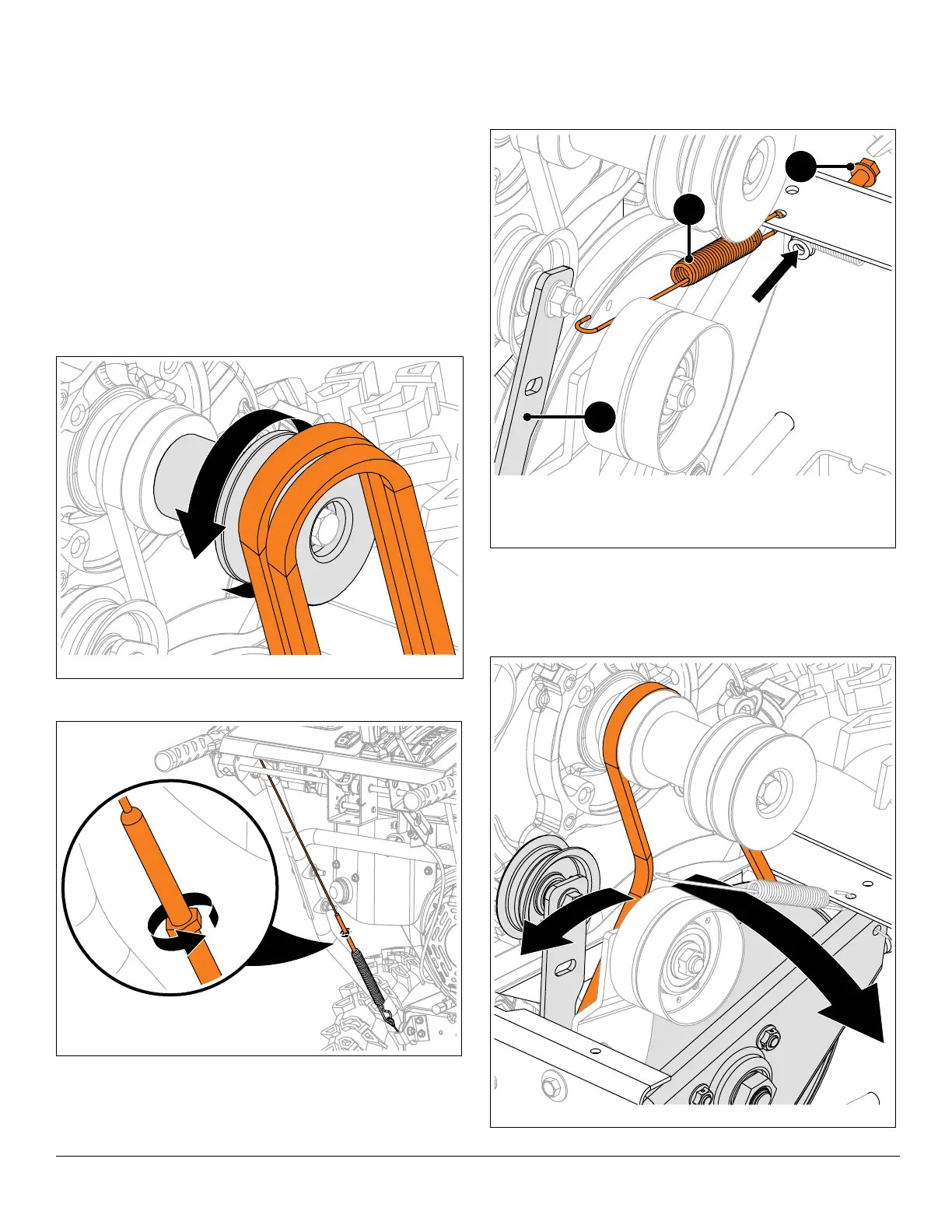
4. Slowly pull recoil starter handle while gently guiding
attachment belts off engine sheave. See Figure 27.
To assist belt removal, slowly pull recoil starter handle
while gently guiding belts out of attachment sheave.
5. Loosen traction drive clutch cable. See Figure 28.
See Figure 29.
6. Disconnect idler spring from traction idler arm.
7. Remove stop bolt from frame.
See Figure 30.
8. Rotate traction idler arm away from belt and rotate
swing gate assembly forward.
9. Remove belt.
Figure 29
1. Idler Spring
2. Traction Idler Arm
3. Stop Bolt
1
2
3




 To Next Page