ATI Series D12 Toxic Gas Transmitter with H10 Smart Sensor
Revision N (7/15)
Appendix A.
Printing Data Log Reports
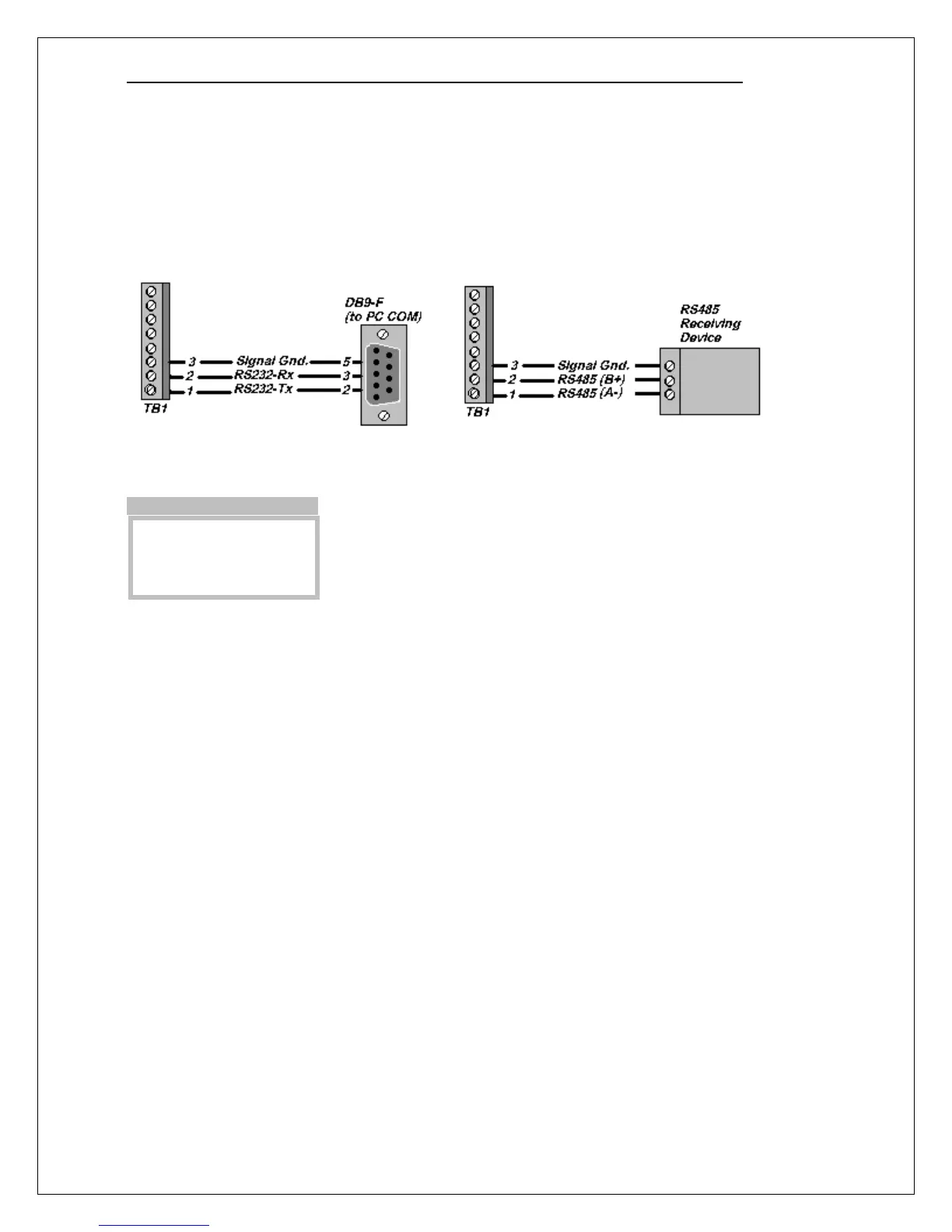
Serial Connection
The data log report may be sent to a printer or a computer over an RS232 connection, or in some cases,
an RS485 connection.
Communication Setup Page
The communication interface, baud rate, parity, number of data bits, and
number of stop bits are configured on the Communication Setup page.
Flow Control
The transmitter uses XON/XOFF flow control while sending a report. That is, once the data stream
has begun, it will continue until the XOFF character (19) is received. After sitting idle, the report
stream will begin again upon reception of the XON character (17).
An RS232 connection can support full duplex communication and is perfectly suited for XON/XOFF
flow control. However, an RS485 connection is only half duplex. It cannot receive while it is
transmitting and might miss the XOFF character, resulting in a buffer overflow at the receiving device.
A receiving device will send the XOFF character when its buffer is nearly full. Some older dot-matrix
printers will send an XOFF because they have a small receive buffers and cannot process characters
while the head is returning to start a new line. On the other hand, most computers have comparatively
large buffers and can easily accept the report stream without sending an XOFF. Therefore, an RS485
connection may work for sending reports to a computer.
The D12 features an additional method to help avoid losing data due to buffer overflow problems on
receiving devices that lack XON/XOFF capability (or have the capability but are using an RS485
connection). A programmable time delay of up to 10s may be inserted at the end of each report line.
This permits the receiver time to process more characters in its buffer and avoid an overflow. However,
this may be a method of trial and error until the proper delay setting is determined so that no characters
are missing from the report.
►Protocol=ASCII
Interface=RS232
Baud_Rate=9600
Parametrs=N,8,1
Menu>Setup>System>Commun



 To Next Page