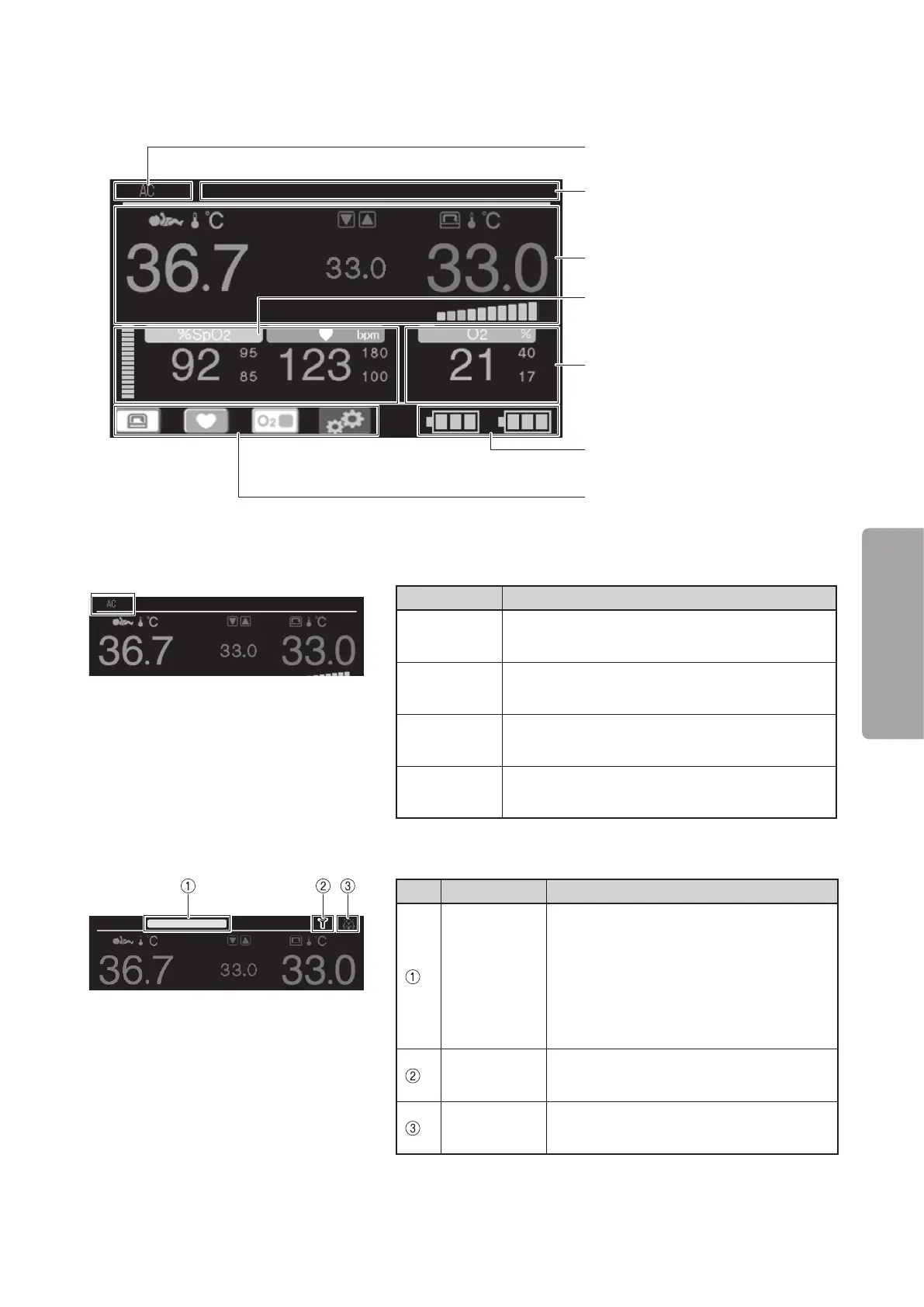
Display Screens
35
OPERATION
5-2.
Main screen
Power supply display area (see p.35)
Alarm display area (see p.35)
Temperature area (see p.36)
Pulse area (see p.36)
Battery status display area
(see p.38)
Oxygen area (see p.37)
Control switch display area
(see p.37)
J
Power supply display area
Display Description
AC
It displays when the unit is connected to an AC
power source.
BATT
It displays when the unit operates using power
from the built-in batteries.
DC12V
It displays when the unit operates using power
from an external DC power source (DC12V).
DC24V
It displays when the unit operates using power
from an external DC power source (DC24V).
J
Alarm display area
No. Name Description
Alarm
priority
indicator
Depending on the alarm priority level,
the alarm priority indicator is activated
as shown below.
High - Flashes red
Middle - Flashes yellow
Low - Lights up yellow
Alarm icon
Appears when an alarm is activated. (For
details, see “[12] Alarms”.)
Silence icon
Appears when the audible alarm is si-
lenced.



 To Next Page