OPERATION
Pulse Oximeter
57
8-3-1.
Setting SpO
2
Upper/Lower Alarm Limits
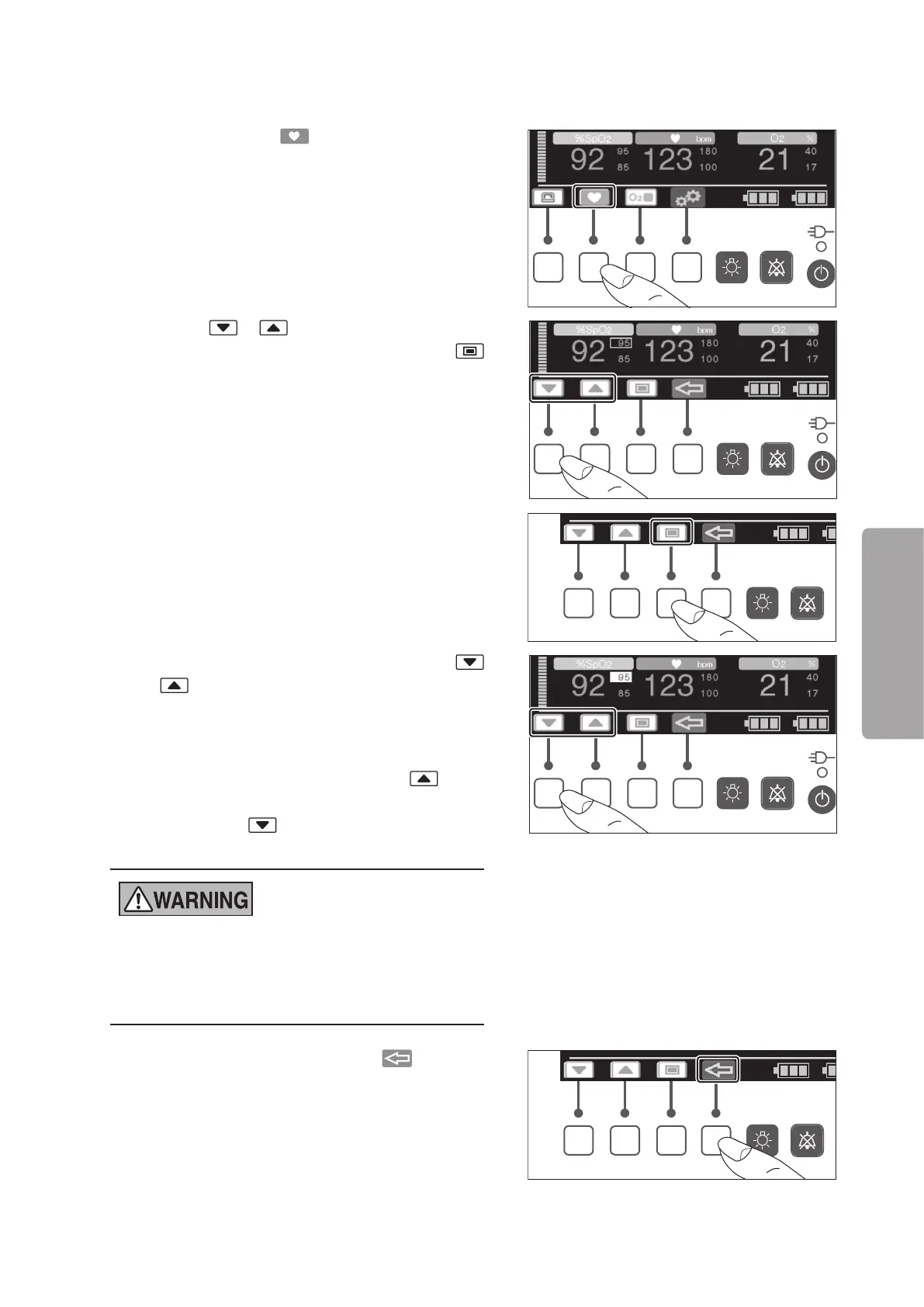
(1) When you press the switch, the cursor control
screen appears.
(2) Press the or switch to place the cursor on
the alarm limit you want to change. Press the
switch to highlight the selected alarm limit.
(3) While the alarm limit is highlighted, press the
or switch to change it to your desired value.
The upper alarm limit can be set in the range of 50-
99% in 1% increments. The lower alarm limit can be
set in the range of 45-95% in 1% increments.
To set the upper alarm to OFF, press the switch
when 99% is displayed. To set the lower alarm to
OFF, press the switch when 45% is displayed.
The setting will be displayed as “— — —”.
z
High oxygen concentrations may predispose a
premature infant to retinopathy. Therefore, the up-
per alarm limit for SpO
2
must be carefully select-
ed.
(4) The setup is finished when the switch is
pressed or a given period of time has elapsed.



 To Next Page