BE AWARE
WhenaDHCPserverisusedinthenetwork,andtheDHCPfunctionoftheM2is
enabled,theDHCPserverwillautomaticallyassignanIPaddresstotheM2.
InsomecasesthiscancauseproblemsbecausetheIPaddresswhichisrequiredtocontrol
thedeviceoverTCP/IPisnotalwaysknownfortheuser.Inthiscase,thedevicewillbe
lostinthenetwork.
Oneadditionalproblemisthat,whenthedevicebootsthenexttime,theIPaddressthat
theDHCPserverassignscanbedifferent.
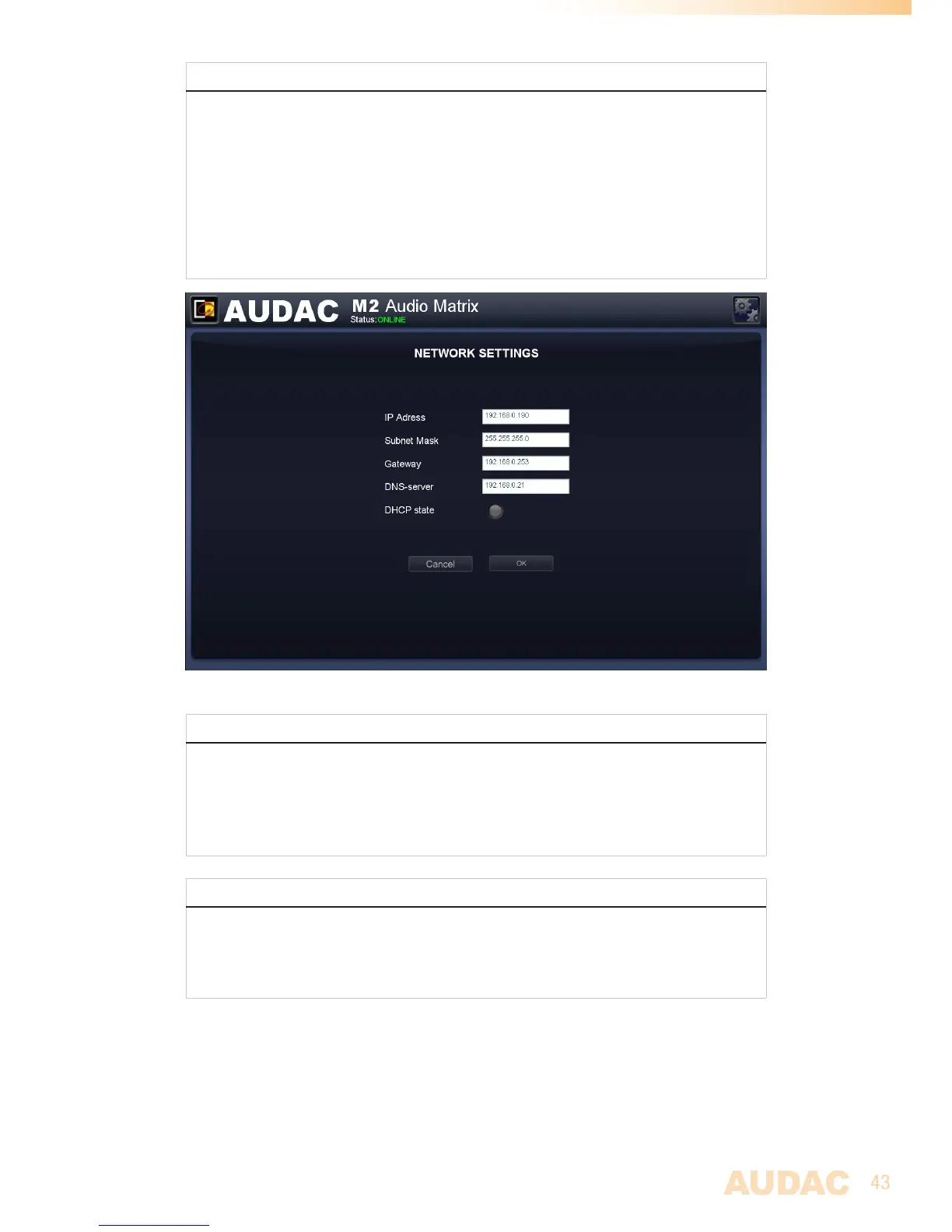
M2 Network settings
STANDARD NETWORK SETTINGS
IPAddress:192.168.0.190
SubnetMask:255.255.255.0
Gateway:192.168.0.253
DNSServer:192.168.0.21
DHCPState:Off
RETRIEVE IP ADDRESS
IncasetheIPaddressofthedeviceisunknownfortheuserandthedeviceislostinthe
network,theIPaddresscanberetrievedbyusingthe‘AUDACEthernetDiscoverer’Tool,
whichcanbedownloadedfromthefollowinglink:
http://www.audac.eu/Downloads/Ethernet_Discoverer.zip


 To Next Page