Chapter 7
Cascading
Thischapterexplainsthefiberinterconnectionpossibilitiesbetweenseveraldevices.Itguides
youthroughasetupprocessofaprojectwith5devicescascadedwithbymeansofthefiber
interconnectioninterface.
Principle
The(optional)fiberinterconnectioninterface(OPT2)makesitpossibletotransfer8
stereoaudiochannelsandonedatachanneloveronesinglefiberopticconductor.The
datachannelistransmittedautomaticallyandcan’tbeconfiguredbytheuser.The8
stereoaudiochannelswhichshouldbetransferredoverthefiberopticconductorcanbe
configuredbytheuser.
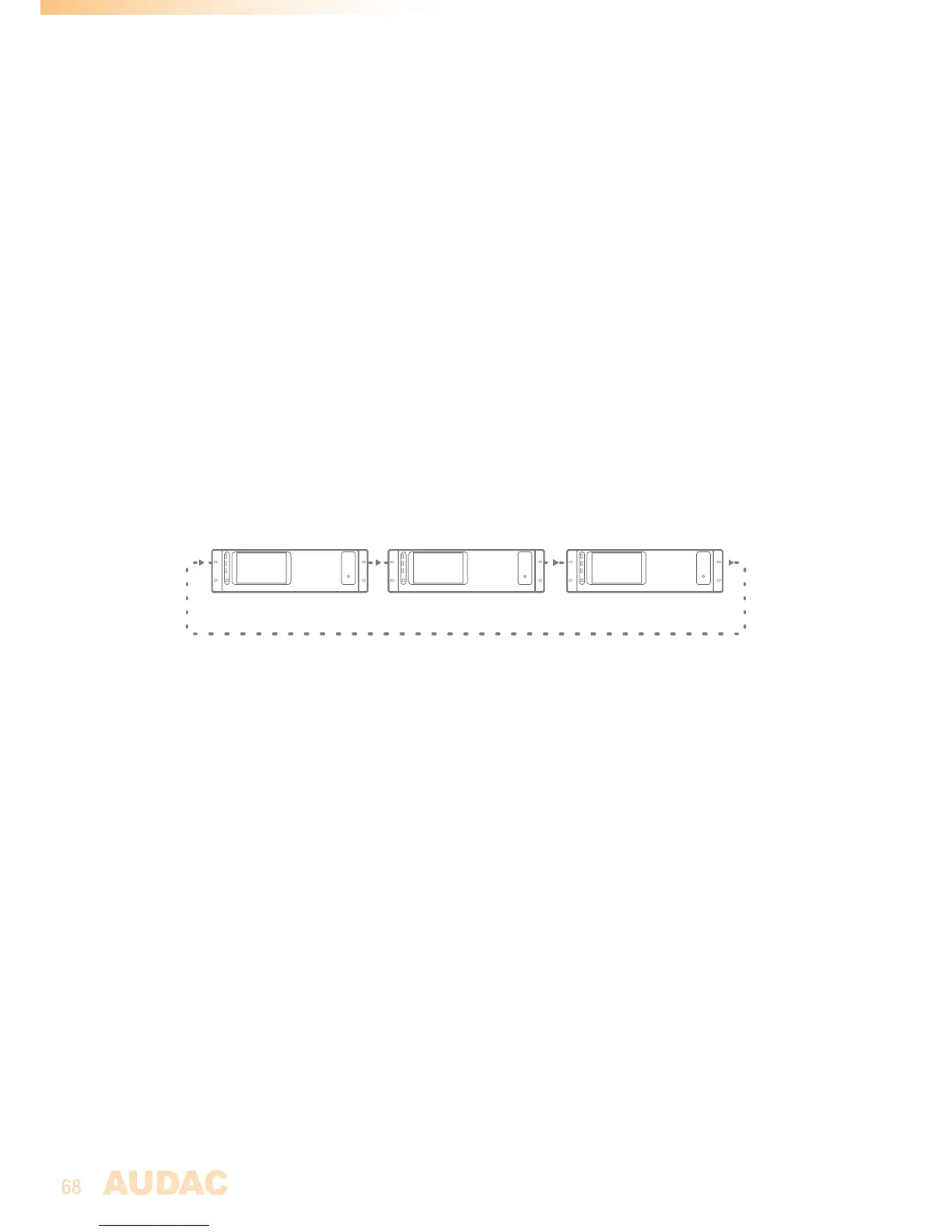
Thefiberinterconnectioninterfaceworkslikearingnetwork.Thismeansthateverydevice
hasonefiberinputandonefiberoutput.Thisringmustbeclosedinallcasesandthiscan
bedonebyconnectingtheoutputofthefirstdevicetotheinputoftheseconddevice.The
outputoftheseconddeviceshouldbeconnectedtotheinputofthethirddevice,andsoon.
Attheend,theoutputofthelastdevicehastobeconnectedtotheinputofthefirstdevice.
Thiswaytheringisclosedandthenetworkiscompleted.
R2R2R2
Tocontrolallthefunctionsofallthedevicesinonenetwork,onlyoneconnectionwiththe
ethernetnetworkofonedeviceintheringnetworkisrequired.Whenmultipledevicesare
connectedinaringnetwork,firstaselectionboxwillbedisplayedfromwhichyoucanselect
thedeviceyouwanttocontrol.
Eachdevicecantransfermultipleofhisinputchannelsthroughthefiberringnetwork.This
canbeanyinputofthedevice(Lineinput,PIaudioinput,Digitalinput,...).Theselectionof
whichinputsignalshouldbetransferedoverthefiberringnetworkcanbeselectedinthe
“Setup”menu,afterselectingthe“Fibersettings”window.
Everysignalwhichisreceivedthroughthefiberringnetwork,canbeusedasaregularinput
justasalltheotherinputs,canbeselectedthroughthewallpanels,andcanbepatchedto
anyoftheoutputzones.
Whenadevicetransfersanaudiosignaloverthefiberringnetwork,thereisthepossibility
totransferthesignaltoalldevicesinthesameringnetwork,ortotransferthesignalonly
tothenextdeviceintheringnetwork.Ifthesignalisonlyneededforthenextdeviceinthe
ringnetwork,theseconddevicecanusethischanneltotransferanothersignaltothethird
device,andsoon...


 To Next Page