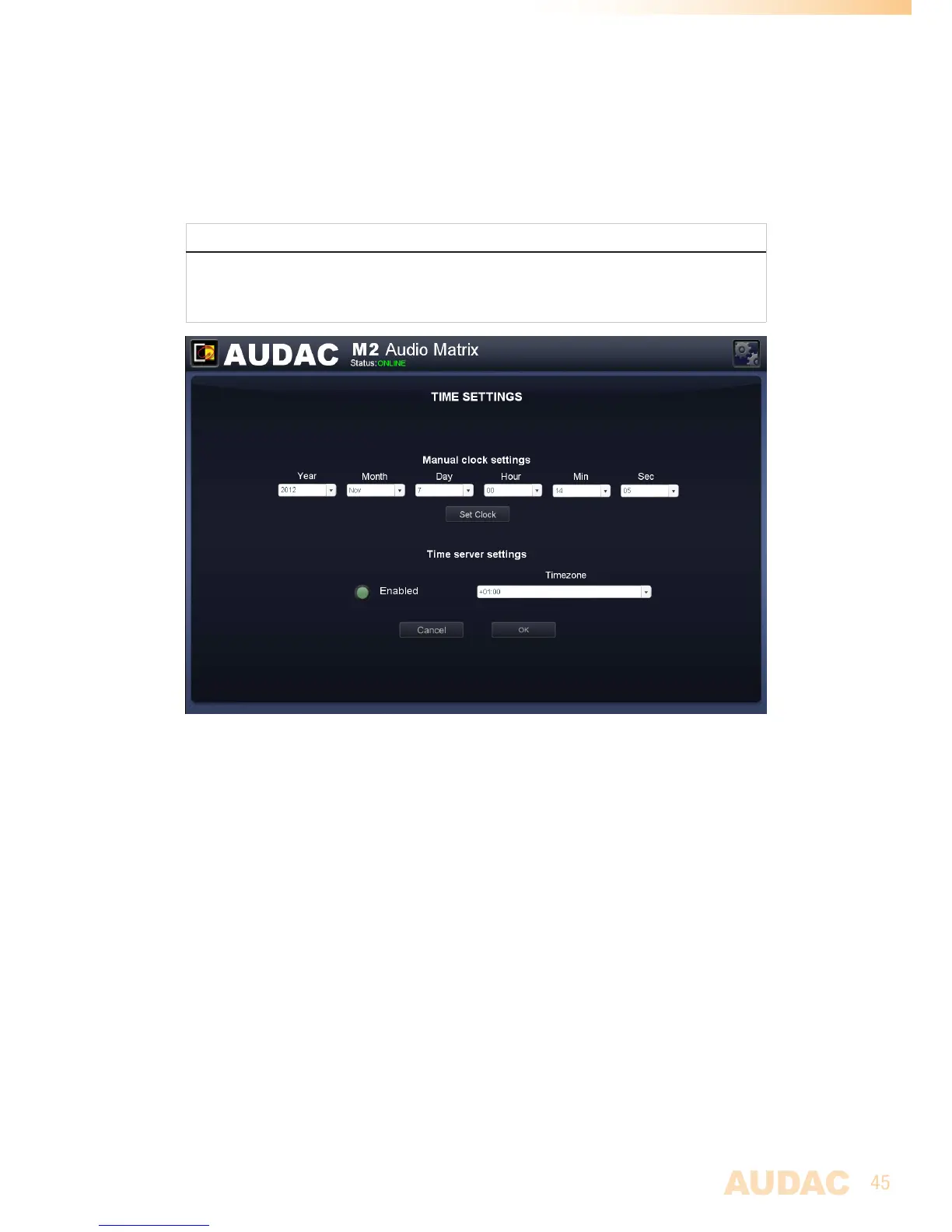
Asecondoptionissynchronisingtheinternalclockconstantlywithapublictimeserver.This
functioncanbeactivatedbyclickingthe‘Enabled’buttonunderthe‘Timeserversettings’
header.Subsequently,thetimezoneinwhichthedeviceislocatedshouldbeselected.
Incasethetimeserverfunctionhasbeenselected,theM2willtrytosynchroniseeveryfew
minuteswithapublictimeserver,makingsurethecurrentsettimeisalwaysaccurateand
won’texpire.
NOTE
ThetimeserverfunctioncanonlybeusedincasetheM2isconnectedtoaLAN
networkwithinternetaccess,becausethesynchronisationwiththetimeservershould
beestablishedoverinternet.
M2 Time settings
Settings >> System >> Address
Inthismenu,theaddressfortheM2canbeset.Theaddressisselectablebyusingthe
dropdownlistbetween‘001’and‘999’.
Whenmultipledevicesarecascadedwitheachother,auniqueaddressshouldbeassigned
toeveryconnectedunit.Additionally,adevicenamecanbeassignedtoeveryunittokeep
aclearoverviewofalltheconnectedunits.
Infactorydefaultconfiguration,theaddress‘001’willbeassignedtoeverydevice.
Aftertheaddressisselectedandthedevicenamehasbeenentered,clickthe‘OK’button
tosavethesesettings.


 To Next Page