14
For information on removing media drives, see the topic “Removing and Replacing Media Drives” in
the FastServe | Live Edit or FastServe | Ingest Administrator’s Guide.
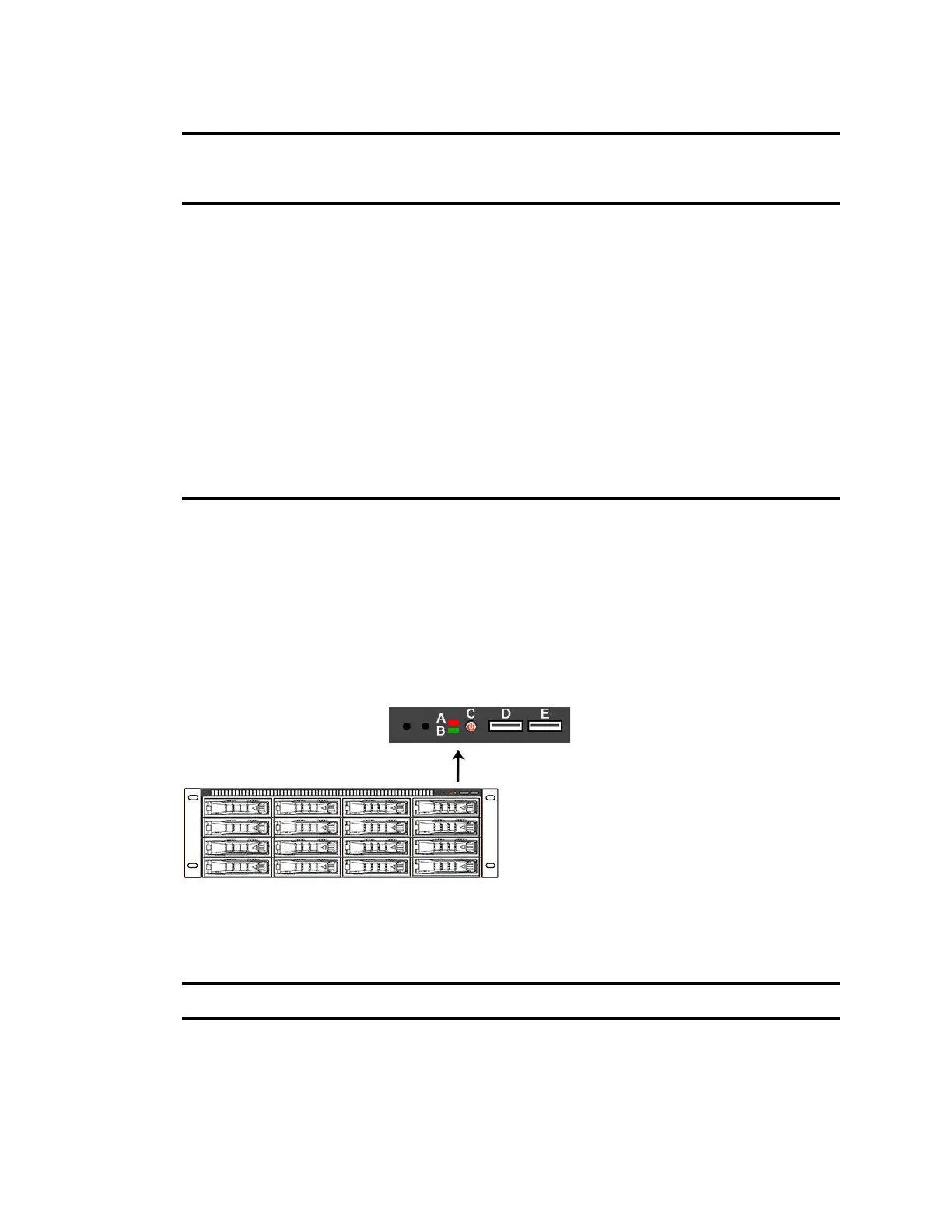
Server Front Panel and LED Control Panel
The server has one Power button on th
e top right part of the server. Both models contain activity
LEDs, storage error LED, and two USB sockets.
Server Front View and LED Control Panels
The following table describes the LED Control Panels shown in the previous figure.
Activity
(flashing)
Fast
flashing
Initializing - Indicates the media drive is
initializing. Occurs on initial array
creation, or when rebuilding.
None.
On solid Slow
flashing
Degraded drive - Can be seen on more
than one drive, and on the same or
different spans.
You have some time, but you
should plan on replacing the
suspect drive at your earliest
convenience.
On solid On solid Failed Data drive - Can be seen on more
than one drive, and on the same of
different spans.
Replace this media drive.
On solid Off Unused disk None
None None Drives are not properly connected. Remove and reinsert the media
drives properly.
Media Drive LEDs(Continued)
Power/Activity
(Blue) LED
Fault
(Red)
LED Drive State Action Required
LED Control Panel
Letter Description Description
A Red System error LED Illuminates red when an error is detected with the
server (fan, power supply, temperature, voltage).
B Power LED Illuminates green when the server is powered on.



 To Next Page