15
Drive Array
For FastServe | Live Edit / FastServe | Ingest server data integrity, RAID 60 configuration consisting
of
16 striped disks with dual parity is created.
n
The media drives have been pre-RAIDed at the factory to save time installing and configuring your
server.
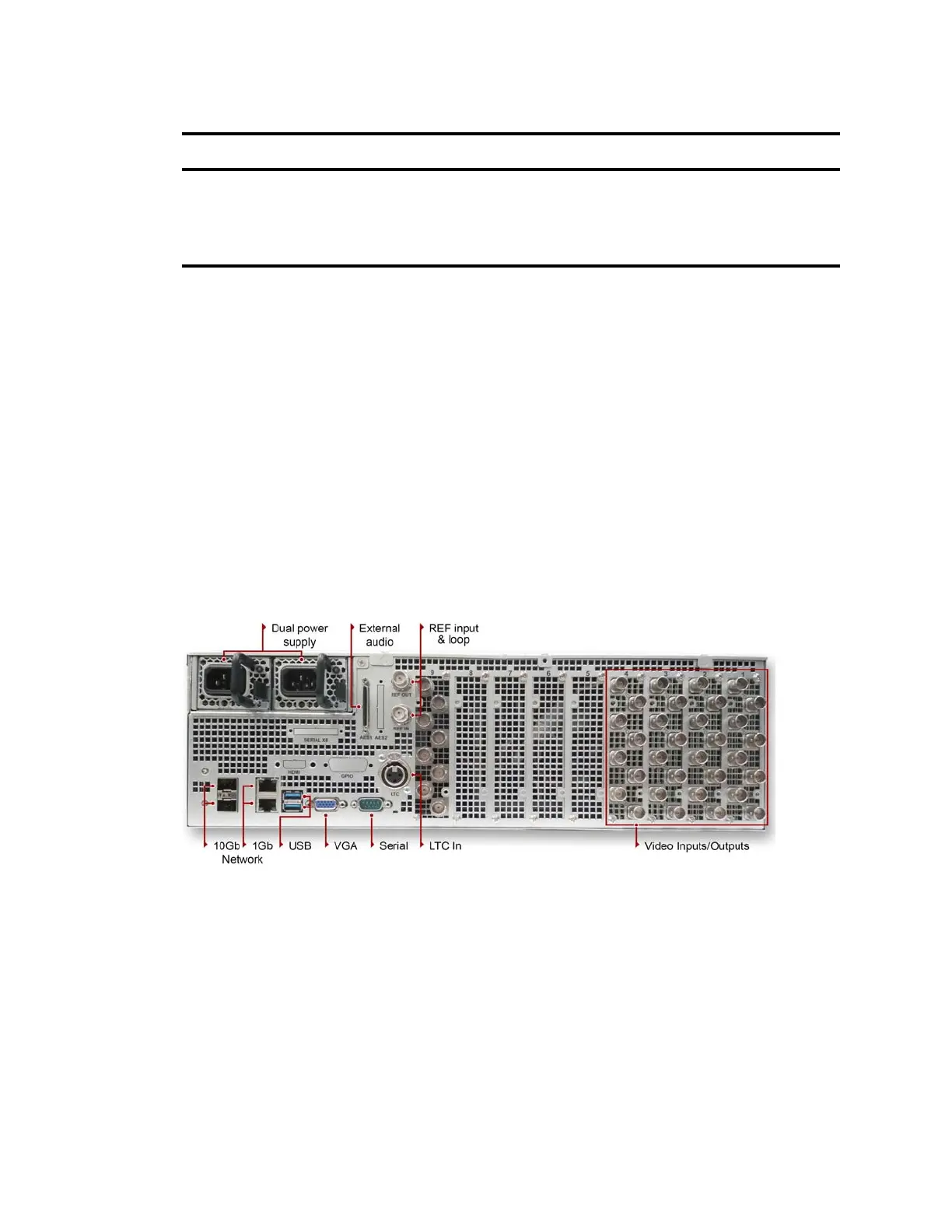
Avid FastServe | Live Edit / FastServe | Ingest Server - Rear Panel
The rear panel of theFastServe | Live Edit / FastServe | Ingest server provides access to the power
supplies, video port, 1 and 10 gigabit (Gb) Ethernet ports, VGA port, serial port, two USB connectors
for the keyboard, mouse, and so on. Reference IN and OUT sockets, LTC Input and Video Inputs/
Outputs according to current specification.
Avid FastServe | Live Edit / FastServe | Ingest - Rear Panel
Each of these components is described in the topics below.
Power Supplies
There are two power supplies accessible
fr
om the rear of the FastServe | Live Edit / FastServe | Ingest
server.
If a failure occurs on either one of the power supplies, you can pull the failed power supply out of the
server, a
nd install a replacement power supply without turning off the FastServe | Live Edit /
FastServe | Ingest server.
All server operations continue to run uninterrupted.
C System Drive activity LED
Power button
Indicates drive activity from the onboard SATA
controller and blinks when either of the system
drives is being accessed.
D_E USB Socket Two USB sockets.
LED Control Panel
Letter Description Description



 To Next Page