45
Configuration Procedures
The following table provides a checklist of tasks that must be performed when configuring the
FastServe | Live Edit / FastServe | Ingest before installing the OVS software.
Assigning an IP Address
Once you have the FastServe | Live Edit or FastServe | Ingest server connected to your network, you
should verify your network connection. This involves assigning a static IP address based on the
requirements for your site. This enables you to communicate with your shared storage infrastructure.
You should be able to get this information from your site’s Network Administrator.
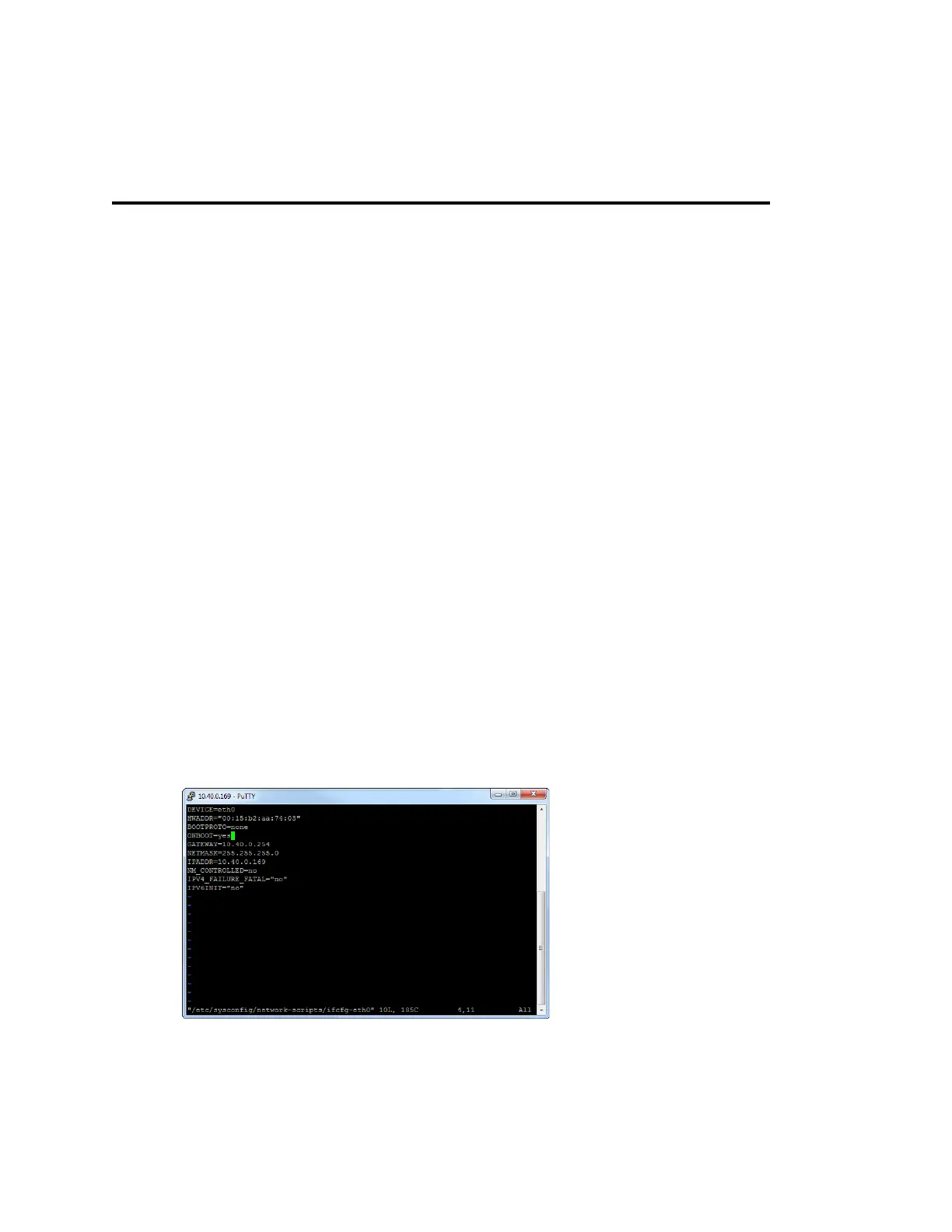
To assign an IP address for eth0 (1GB):
1. Connect to your FastServe machine with PuTTY or other terminal emulator.
Or connect a keyboard and a VGA
monitor directly to server.
You can also connect trough the IPMI console.
n
Log on as root.
2. Edit the network file according to your network specification.
vim /etc/sysconfig/network-scripts/ifcfg-eth0
3. Press Insert to enter the Editing mode.
b
Verify your network connection (IP address), as described in the topic “Assigning an IP Address” on
page 45.
b
Change your network configuration file, as described in the topic “Updating the Network
Configuration File” on page 46.
b
Install the newest kernel (for servers with freshly installed Linux), as described in the topic
“Installing Kernel” on page 47.
b
Configure the GRUB file, as described in the topic “Configuring the GRUB File” on page 48.
b
Configure the root file, as described in the topic “Configuring the Root File” on page 48.



 To Next Page