R5906167 /00 ImagePRO–4K Video Processor
23
4.2 Rear panel
About the rear panel
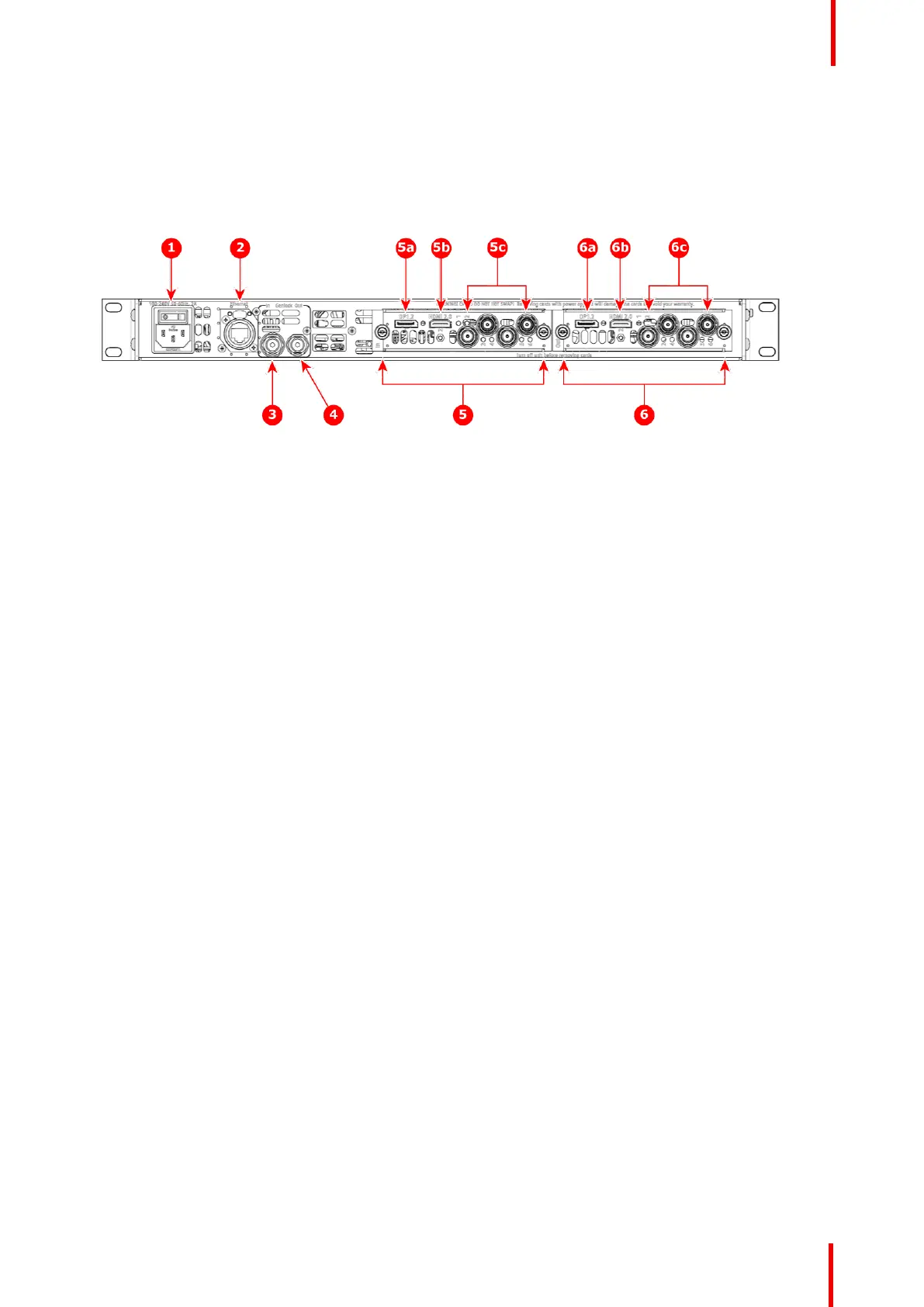
See Image 4-2 for an illustration of the ImagePRO–4K rear panel.
Image 4-2: Rear panel
1. AC power
2. Ethernet port
3. BNC: Genlock In
4. BNC: Genlock Output
5. Tri-Combo input card
5a. DisplayPort 1.2
5b. HDMI 2.0
5c. SDI 1 through SDI 4
6. Tri-Combo output card
6a. DisplayPort 1.2
6b. HDMI 2.0
6c. SDI 1 through SDI 4
Following are descriptions of each rear-panel control feature:
1. AC power
A single AC connector with a power switch connects the ImagePRO–4K to your facility’s AC power source
through the supplied power cord. The integral switch turns the unit on and off.
100-240 VAC, 50/60Hz, 125w
2. Ethernet port
One RJ-45 connector provides 1000/100/10 Mbps Ethernet communications with the ImagePRO–4K. Use
the Ethernet port for running the Web Interface, for diagnostics, and for connection to an external device.
The Ethernet connector is compatible with:
• Standard RJ-45 Ethernet cables
• Neutrik EtherCon® series cables
3. BNC: Genlock In
Genlock analog reference input is through a BNC connector with fixed 75 ohm termination and supports
Blackburst and Bi-level at SD and supports Tri-level at HD.
4. BNC: Genlock Output
An internal sync generator, capable of Bi-level and Tri-level sync signals, provides Genlock reference
output, which is capable of Bi-level and Tri-level sync signals.
5. Tri-Combo input card:
a) DisplayPort 1.2.
b) HDMI 2.0.
c) SDI 1 through SDI 4.
This card provides one 20-pin DisplayPort connector, supporting DisplayPort video signal; one 19-pin
HDMI connector, supporting an HDMI video signal; and 4 BNC connectors, supporting Single Link and
Quad Link signals, in SD, HD, 3G, 6G, and 12G SDI formats.
The features of this card include:
• Up to six (6) independent signals.
• One channel of DisplayPort video on a full-size DisplayPort connector.
• One channel of HDMI video on a Type A connector.
• Up to four independent SDI signals with support for SD, HD, 3G, 6G, and 12G in Single Link or Quad
Link (3G).
• An LED on each input channel that turns green when a valid sync is detected.
6. Tri-Combo output card:
a) DisplayPort 1.2.
Hardware Orientation



 To Next Page