R5906167 /00 ImagePRO–4K Video Processor
42
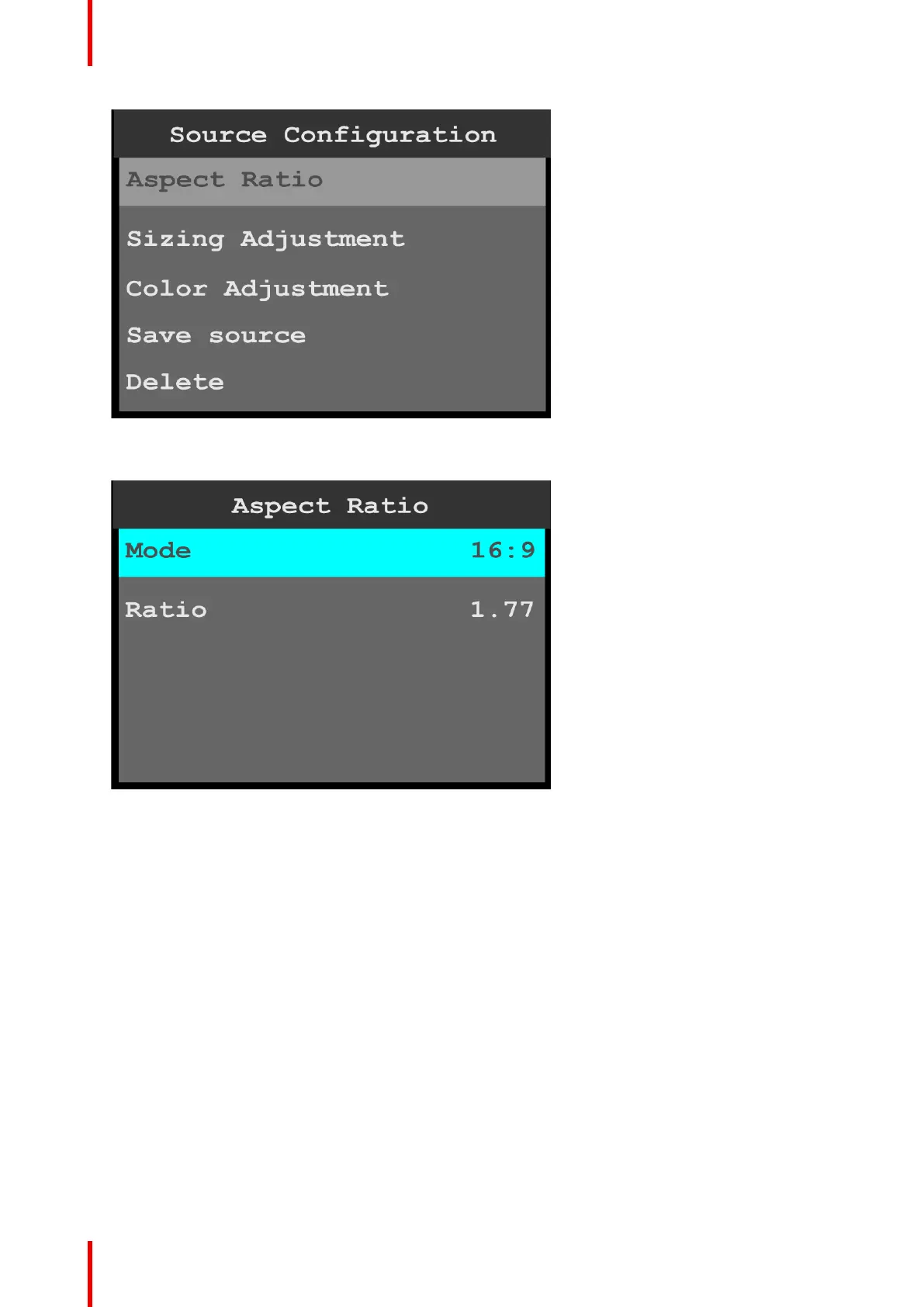
Image 6-13: Source Configuration menu
2. Scroll to and select Aspect Ratio to adjust the aspect ratio of the input source.
Image 6-14: Source Configuration: Aspect Ratio
a) Use Mode to select the general aspect ratio of the input source.
The modes are:
• 3:1
• 16:9
• 16:10
• 3:2
• 4:3
• 5:4
• 1:1
• Custom
b) Use Ratio to adjust the ratio of the height of the input source to its width.
If, for example, the Mode is 3:1, the Ratio is 3.00. Turning the adjust knob counter-clockwise, users can
adjust the ratio to any custom setting, for example from 2.99 to 1.78. Setting the Ratio to 1.77 sets the
Mode to 16:9.
3. Scroll to and select Sizing Adjustment to adjust the H Size, V Size, H Pos, and V Pos of the input source.
Reset returns the sizing adjustments to their initial settings.
4. Scroll to and select Color Adjustment to adjust the following color aspects of the input source:
• Overall contrast – Range: 50 to 150; Default: 100
• Red contrast – Range: 50 to 150; Default: 100
• Green contrast – Range: 50 to 150; Default: 100
Menu orientation



 To Next Page