27
DESCRIPTION OF OPERATION AND FUNCTIONS OF COMPONENTS
2 Doctor Unit Section
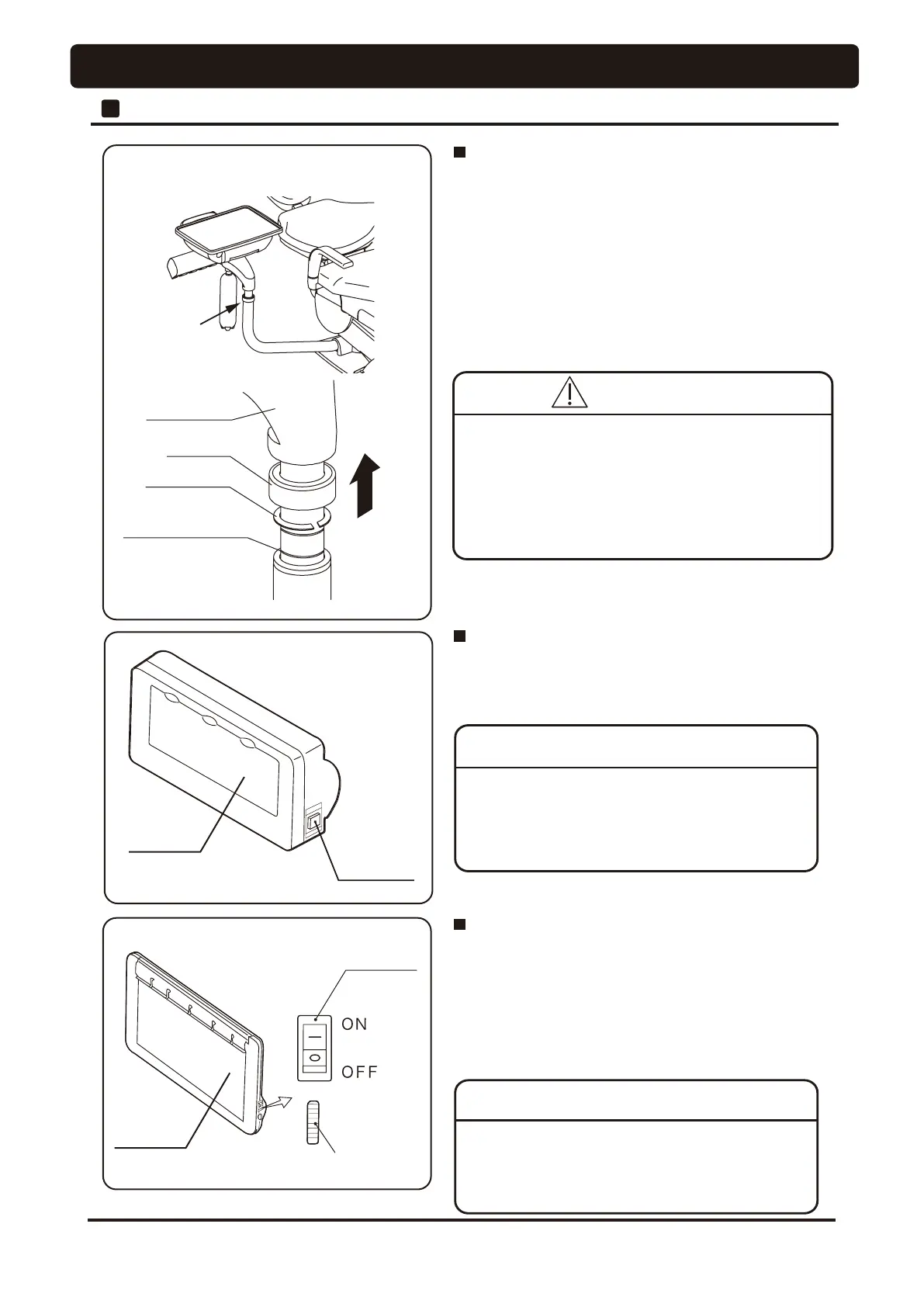
• Hold and slightly lift up the doctor table and front arm,
remove the collar to up side, lock ring will come up on the
front arm post .
• Slide up or down the lock ring to appropriate groove and
slide down the collar on front arm post. Lower the doctor
WDEOHWR¿[LWDWWKDWKHLJKW
Please FRQ¿UP that a table is ¿[HG to the lower course surely
then.
Table Height Adjustment
• Turn off the main switch before adjusting table height.
• Be sure to slide down the collar on the lock ring after
removing the lock ring.
3OHDVHFRQ¿UPZKHWKHrDWDEOHLV¿[HG,IWKHWDEOH
LVQRW¿[HGVXrely, it causes a fall and the accident
during operation.
Switch
Brightness control dial
Switch
Front Arm
Collar
Lock ring
Groove for
height adjustment
Screen
Screen
,QWUDRUDOVL]H¿OPYLHZHr (Optional)
• The screen light is lit when the switch is pressed, and the
screen light is off when the switch is pressed again.
• TXUQRIIWKHOLJKWZKHQWKH¿OPYLHZHr is not in use.
'HQWDOVL]H¿OPYLHZHr assists the observation
RI;UD\VDQGLWLVQRWXVHGIRr diagnoses or
H[DPLQDWLRQSXUSRVH
NOTICE
3DQRUDPDVL]H¿OPYLHZHr (Optional)
• The screen light is lit when the switch is turned to the upper
position (ON), and the screen light is off when the switch is
turned to the lower position (OFF).
• The screen brightness increases when the brightness control
dial is turned upward, and the screen brightness decreases
when the brightness control dial is turned downward.
• TXUQRIIWKHOLJKWZKHQWKH¿OPYLHZHr is not in use.
3DQRUDPDVL]H¿OPYLHZHr assists the observation
RI;UD\VDQGLWLVQRWXVHGIRr diagnoses or
H[DPLQDWLRQSXUSRVH
NOTICE
CAUTION




 To Next Page