34
DESCRIPTION OF OPERATION AND FUNCTIONS OF COMPONENTS
5 Dental Light Section
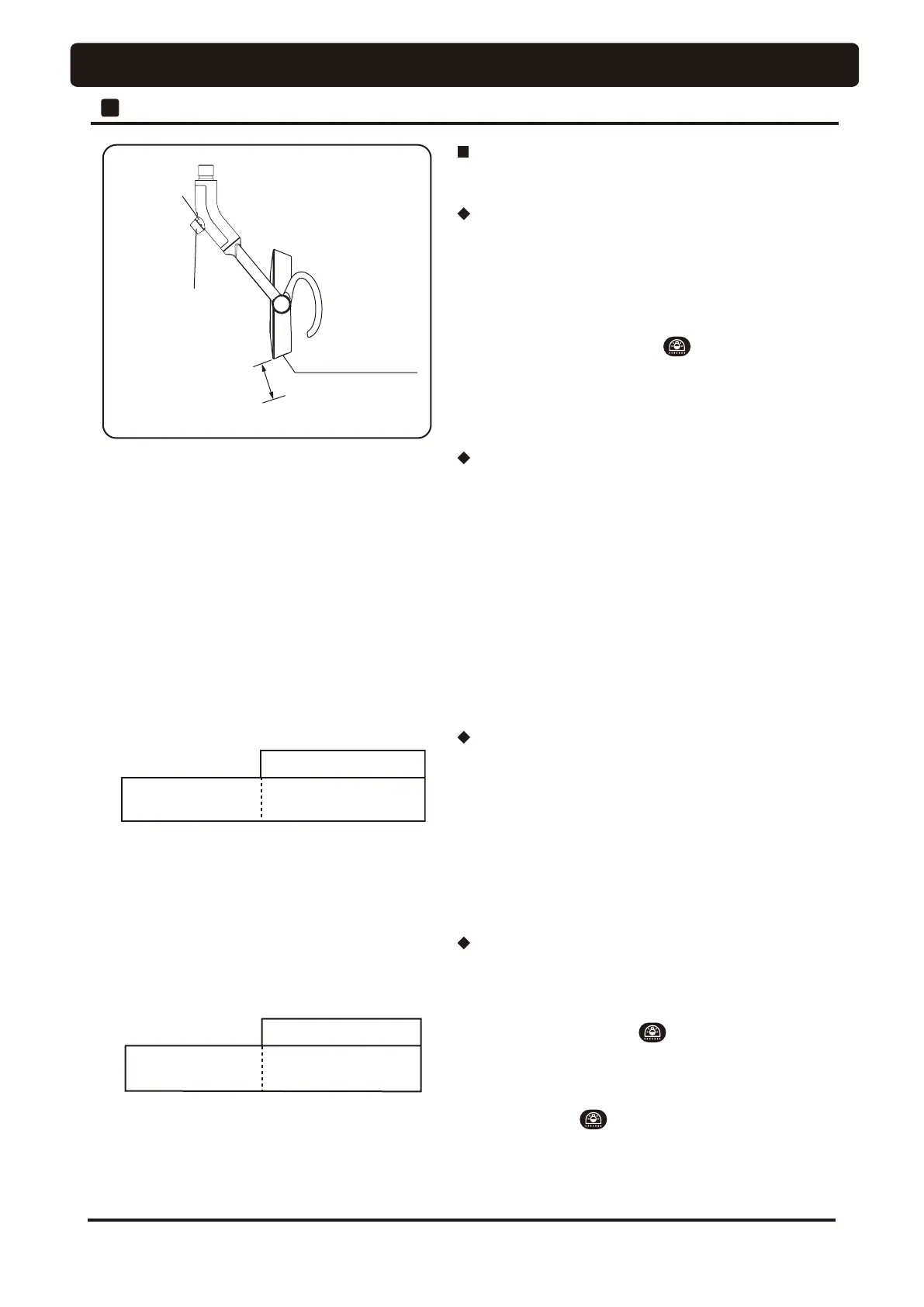
LED display
Intensity control
volume
Touch-less switch
Reaction distance
Approx. 65 mm or less
Normal treatment
mode
LED display
Light On (Green)
Blinks (Green)
Composite
mode
LED display
Main switch and operation switch
900 dental light (Type AL-920PAS)(Optional)
When the main switch of the dental unit is turned on, the
indicator shown in the figure is lit in green and the dental
light power is turned on.
The dental light may be turned on and off with the touchless
switch or the dental light switch on the operation panel
of the unit side.
Turning on and off of the light by the touch-less
switch
The dental light turned on when you shake your hand
within approximately 65 mm from the touchless switch
surface. It goes out when you shake your hand again
* If the surface of a touchless switch becomes unclean, this
may affect the sensitivity of the sensor.
Please wipe the surface of a touchless switch with a soft
cloth.
Intensity control volume
It can adjust intensity between 4,000 ~ 35,500lx by stepless
LQWHQVLW\FRQWUROYROXPHDVOHIW¿JXUH
Changing into composite mode
The indicator begins to blink in green and the mode
changes to the composite mode, when you hold your hand
within 65mm from the touchless switch for 2 seconds or keep
pressing dental light switch on the control panel for 2
seconds. The indicator is lit in green and the mode changes
to the treatment mode, when you leave your hand once and
hold it above the switch again for 2 seconds or keep pressing
dental light switch on the control panel for 2 seconds.
*When the light is turned off in the composite mode, it goes
on in the treatment mode when it is turned on again.




 To Next Page