BEFORE ASKING FOR REPAIRS
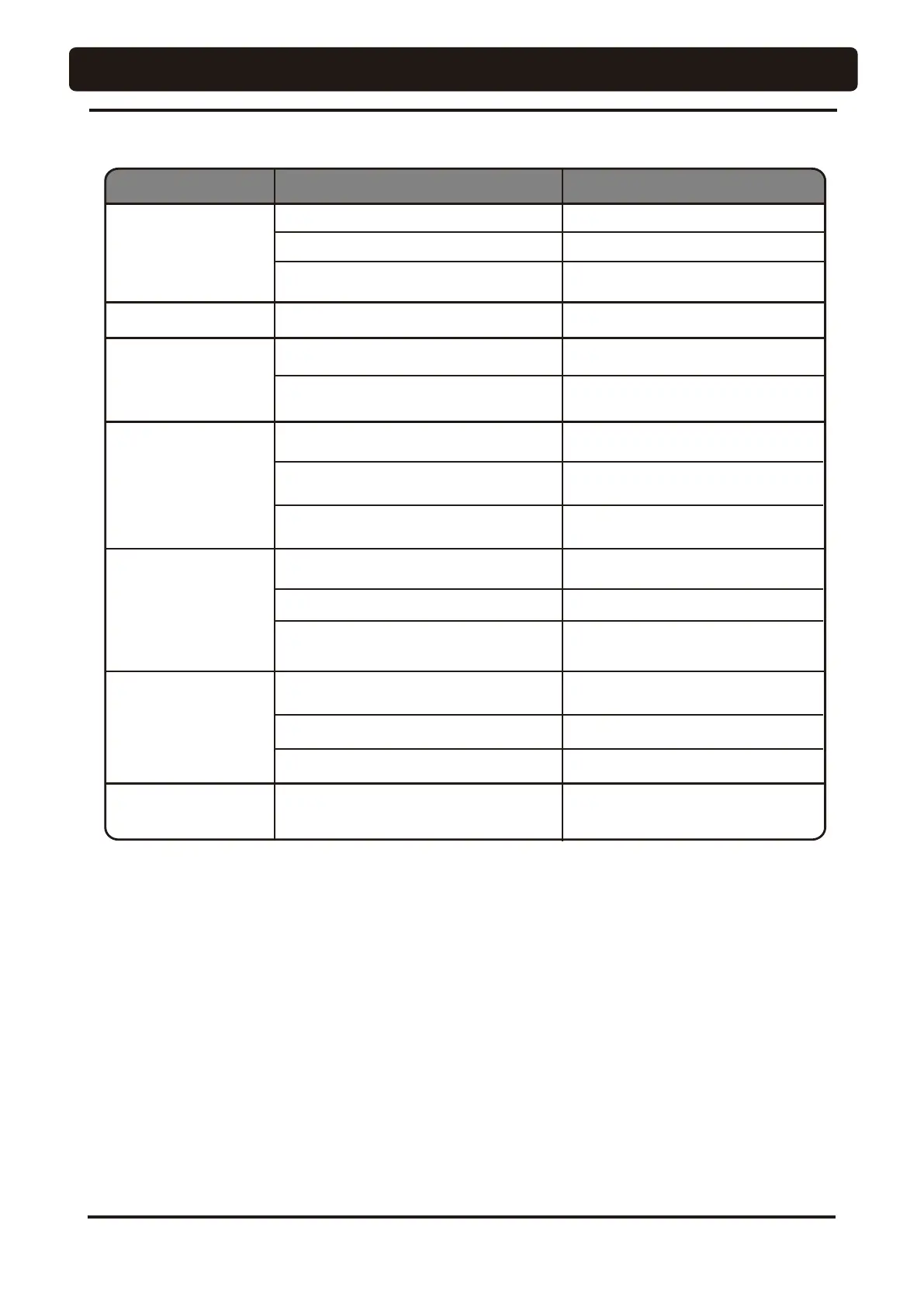
If any of phenomena described below has occurred, make the following checks before asking for repairs.
Phenomenon Check point and result Action to be taken
The product does not
work at all.
Main switch is not on.
Turn on the main switch.
Air compressor power is not on.
Turn on the power.
Equipment circuit breaker in the clinic
cabinet panel is not on.
Turn on the equipment circuit breaker.
The chair does not work.
Locking device for motion stop is activated. Unlock the device. See page 51.
Water is not supplied.
Water main valve is closed.
Open the water main valve.
No water is fed to cup.
(Sensor cupfiller type)
Water quantity adjust valve or knob of
handpiece, etc., is closed.
Open valve or knob.
Vacuum suction is not
executed.
Power of the vacuum pump has not been
turned on.
Turn on the power.
Solid collector filter is contaminated.
Clean the filter.
Vacuum handpiece filter is contaminated.
Clean the filter.
Saliva ejector does
not suck.
Saliva ejector filter is contaminated. Clean the filter.
If the unit does not normally work even if actions were taken upon checkup stated above, then stop using the
unit, turn off the main switch and contact your dealer or our office.
Water
overflows from
cup.
(Sensor cupfiller type)
Paper cup is wetted.
Paper cup is crushed (bend out of shape)
Cupfiller sensor is wet.
Cupfiller sensor is wet.
Wipe off and clean the surface of
sensor cupfiller.
Cup other than specified cup is used.
Use white or pale-color paper cup and
weight 5 oz or less for dental use.
Cup other than specified cup is used.
Replace paper cup.
Wipe off and clean the surface of
sensor cupfiller.
Replace paper cup.
Use white or pale-color paper cup and
weight 5 oz or less for dental use.
64




 To Next Page