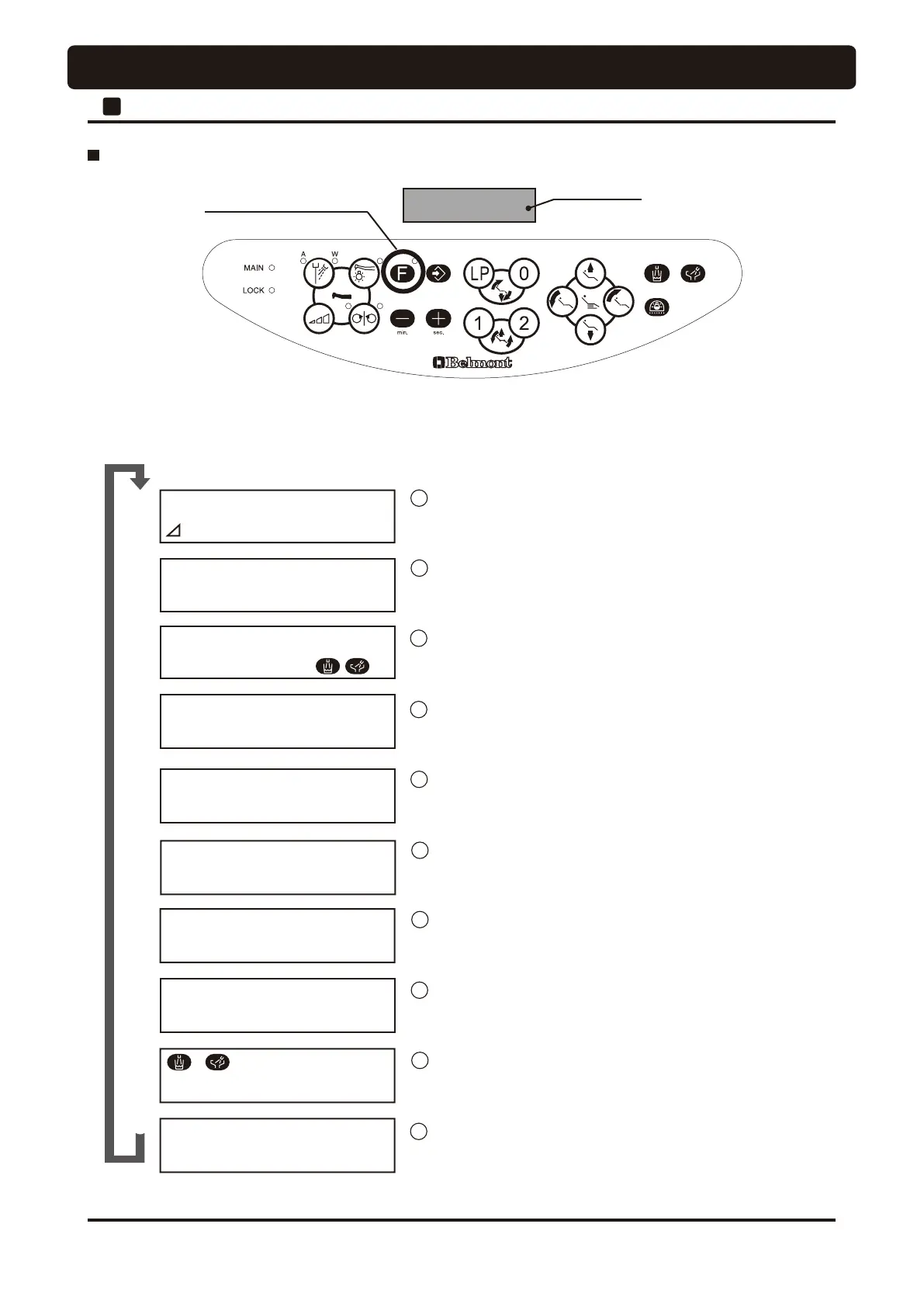
Function Switch
ղ
ճ
㸢㸲+3ࠈ㸠㸞㸲+3㸠
մ
յ
⑧
չ
㸟
ն
շ
ձ
㸲
'U180%(5㸲㸥ࠈࠈࠈࠈࠈЎ
)/86+287ࠈࠈࠈࠈࠈ㸻㸲Ў
%((3㸲21ࠈࠈ㸻㸲Ў
㸝㸢㸞㸲2))ࠈࠈ㸠㸞㸲21
/302'(㸲+2/'ࠈࠈ㸻㸲Ў
㸝㸢㸞㸲)227ࠈ㸠㸞㸲+2/'
635$<㸲㸩02'(ࠈࠈࠈࠈ㸻㸲Ў
㸝㸢㸞㸲㸧ࠈ㸠㸞㸲㸩ࠈ02'(
ࠈࠈࠈ㸲/,1.ࠈࠈࠈ㸻㸲㸺
㸝㸢㸞㸲,1'ࠈ㸠㸞㸲/,1.
$/$507<3(㸲㸥ࠈ㸻㸲Ў
㸥ࠈ㸦㸧/3㸨ࠈ386+
0/07㸲㸨67(3ࠈ㸻㸲Ў
㸝㸢㸞㸲㸨ࠈ㸠㸞㸲㸪67(3
㸷㸺㹁㹂㹄㹃㹉
պ
7,0(56(7ࠈࠈࠈࠈࠈ㸻㸲Ў
67$57
(Example) Case of "with switch tone"
(Example) Case of holder mode
Contents and sequence of function switch
• The contents of display on the indicator on the doctor control panel change sequentially each time when the function
switch is pressed to select a desired setup. Contents and sequence of function switch setup are described below.
*
Normal action is restored during setup if the next operation
is not applied within about 10 seconds.
Setup and operation of dental timer
Selection of doctor number
Selection and operation of flushout
Selection and change of key touch tone
Selection of handpiece light switching-on timing
Selection of alarm tone upon time-up of dental timer
Selection of number of steps of micromotor limit rotation speed
Selection of micromotor spray mode
Selection of interlocked action of cupfiller and bowl flush
Return to normal action.
1
2
3
4
5
6
7
8
9
10
43
2
Doctor Unit Section
OPERATION SETTING




 To Next Page