=
01
:
10
=
01:10
Start
Press once
Press once
STOP
67$57
Increase in
1 minute
Increase in
10 seconds
Press store switch
・・・
Dental timer 1
・・・ Dental timer 2
・・・ Dental timer 3
・・・ Dental timer 4
Press one of chair
preset switches
Press one of chair preset
switch to be called.
44
2
Doctor Unit Section
OPERATION SETTING
• A countdown timer is built in to the unit and can be set to a
maximum timer of 90 minutes and 50 seconds in 1 minute or
10 second increments.
• The timer has 4 programmable settings, which can be
recalled when used in conjunction with the chair preset
switch on doctor table control panel.
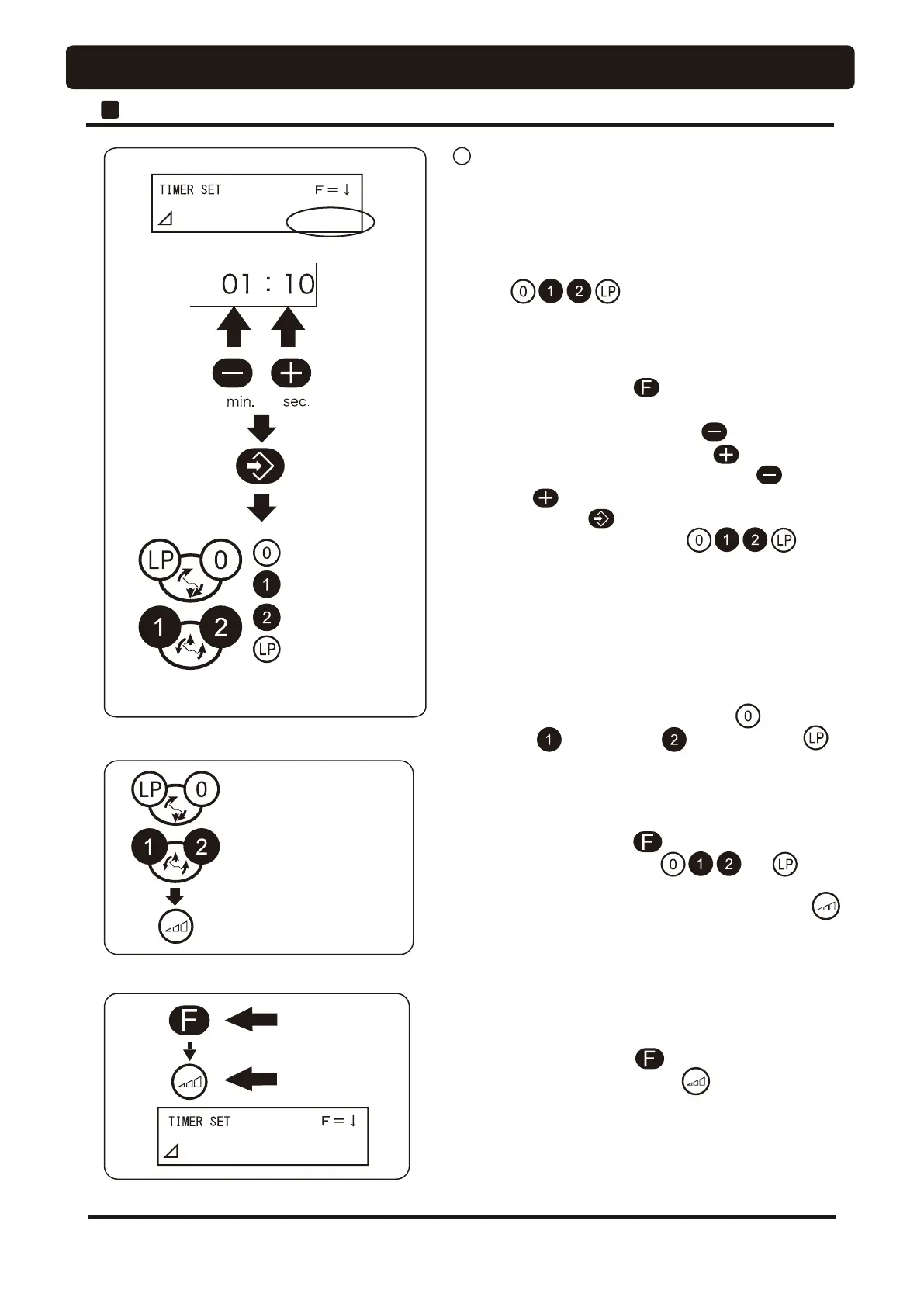
[Procedure for setup of preset timer]
1. Press the function switch once.
2. Set the desired time.
Increase in 1 minute by pressing ... switch
Increase in 10 seconds by pressing ... switch
Note : Time increases continuously when the switch
or switch is pressed and held)
3. Press store switch .
4. Press one of chair preset switches to
store the set timer to a particular preset number.
* When change the preset time or set the timer to other preset
number, repeat the procedures 1 ~ 4.
* Setting time is only the addition. Time increases
continuously when switch is pressed and held.
* The factory default setting is 3 minutes for ,
1 minute for , 2 minutes for and 5 minutes for .
[Procedure for use of preset timer]
1. Press the function switch once.
2. Press the chair preset switch or to be
called.
3. Start the timer by pressing rotation mode select switch
4. When the timer time is reduced to 00:00, the alarm sounds
to inform that the set length of time has elapsed.
[Timer cancellation]
This is the procedure for cancellation of the dental timer
during countdown action.
1. Press the function switch once.
2. Press rotation mode select switch to cancel the timer.
1
Setup of dental timer and operation




 To Next Page