26
DESCRIPTION OF OPERATION AND FUNCTIONS OF COMPONENTS
2 Doctor Unit Section
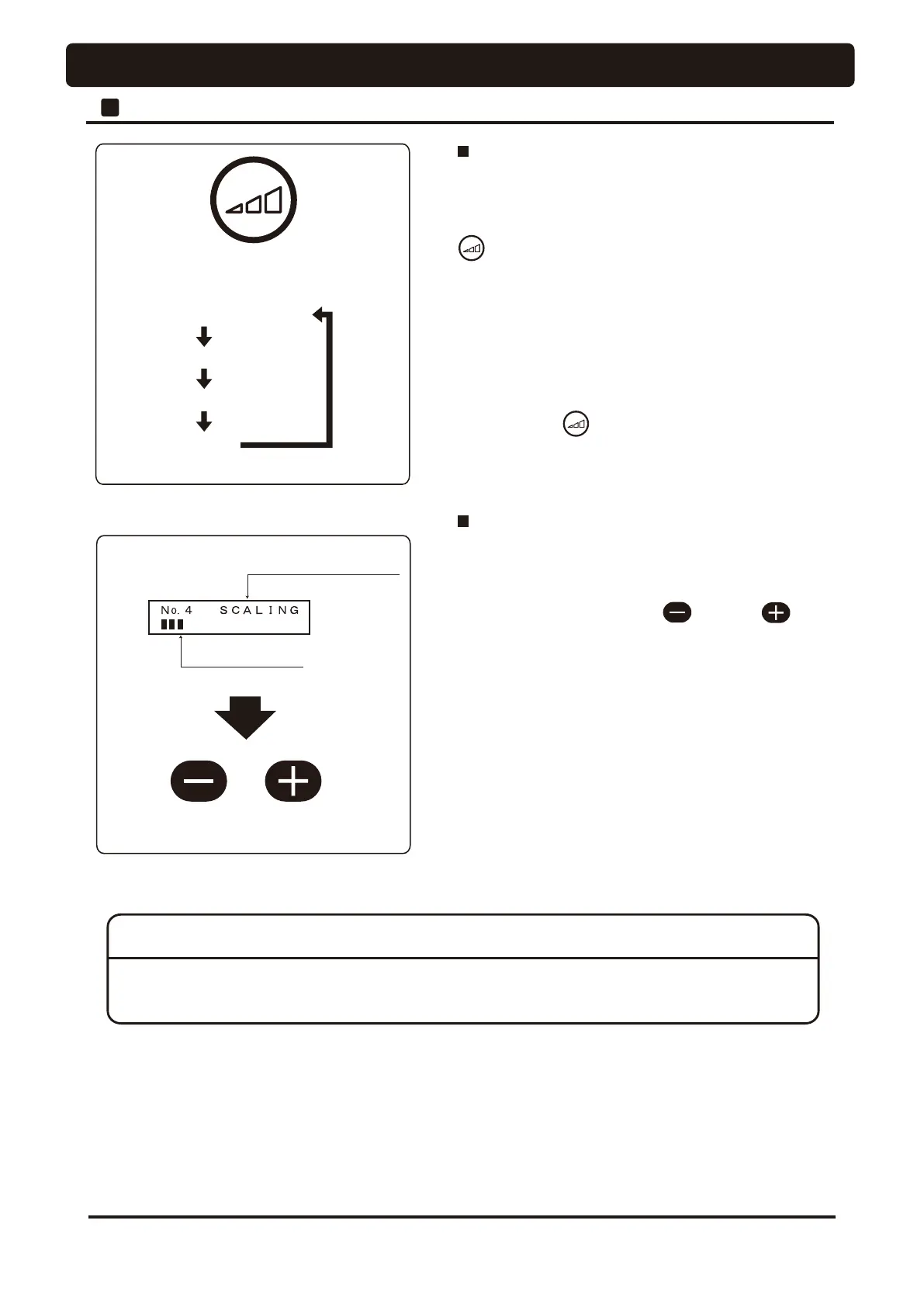
The selected mode is displayed
Bar graph (1 ~ 8)
Limit Rotation
SET 1
SET 2
SET 3
Micro motor rotation mode select switch
Operation and display of micromotor
There are two modes available, limit rotation (limit mode)
and preset rotation (preset mode) for micromotor rotation.
Either one of these modes can be selected by pressing this
switch.
The limit mode is a rotation mode providing an upper limit
speed in the rotation.
The preset mode (SET1 to SET3) keeps the rotation speed
¿[HGUHJDUGOHVVKRZWKHIRRWFRQWUROOHULVRSHUDWHG
Pressing this switch each time changes the speed
mode: Limit speed > SET1 > SET2 > SET3 > Limit speed.
Operation and display of scaler
When the electric scaler is picked up from the holder, the
selected mode is displayed on the indicator, either PERIO,
ENDO or SCALING.
For switching the mode, use the switch or switch
on the doctor control panel.
Sliding the foot controller pedal right and left can change
the output of the electric scaler.
When the pedal slides to the right-hand end, the output
becomes the PD[LPXP and the output is displayed by a bar
graph on the indicator even before the operation begins.
* The P-MAX,Varios170 scaler does not permit output
change during operation. Once stop the motion, adjust the
output, and restart the operation.
NOTICE
Carefully read the appendix of the optional handpiece operating manuals and other documents attached
to each scaler before use, and correctly use the scaler.




 To Next Page