SECTION 3 OPERATING THE BIS VISTA MONITORING SYSTEM
______________________________________________________________________
3-5
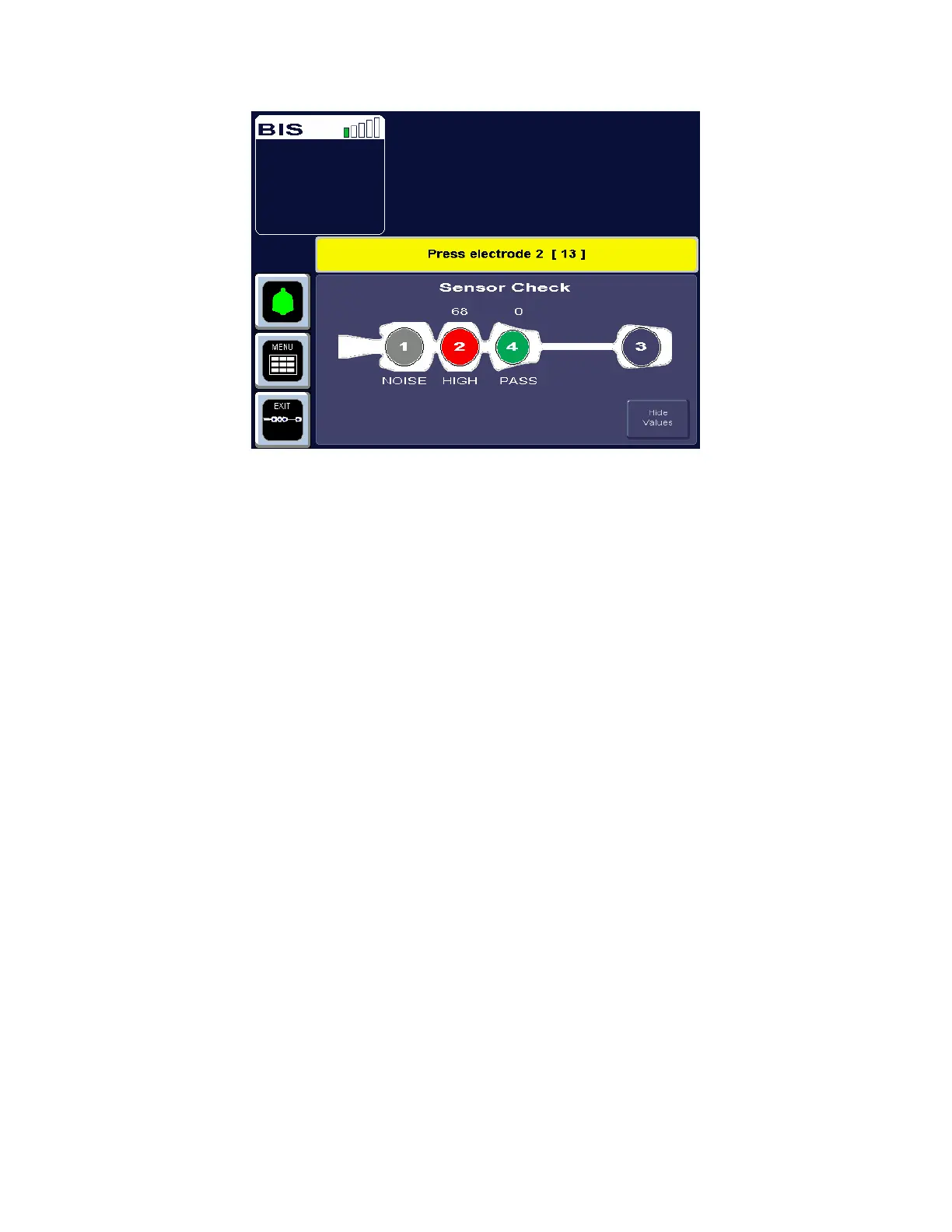
Figure 8 - Sensor Check Graphic Screen with Values Shown
In this display, the impedance value for each electrode, in kilo ohms, appears on the screen
along with its status:
PASS - An electrode passes if the impedance for that electrode is less than 7.5 kilo ohms.
The ground electrode (electrode #2) must be less than 30 kilo ohms to pass.
HIGH - An electrode is labeled “HIGH” if its impedance value is above 7.5 kilo ohms (30
kilo ohms for the ground electrode). As long as the combined impedance of electrodes #1
and #3 and the combined impedance of electrodes #1 and #4 are less than 15 kilo ohms,
and the ground electrode is less than 30 kilo ohms, the sensor check will be considered
successful.
NOISE - If the signal from the electrode goes beyond the measurable range, the label
“NOISE” displays.
POOR CONTACT - If the impedance check indicates that the electrode is not in contact
with the patient, the label “POOR CONTACT” displays.
To return to the previous display, press the [Hide Values] touch key.
To save this screen as the default screen, return to the menu system, press the [View/Save
Settings] touch key, then press [Save Active].



 To Next Page