SECTION 5 PREVENTIVE MAINTENANCE, CARE AND CLEANING
______________________________________________________________________
5-5
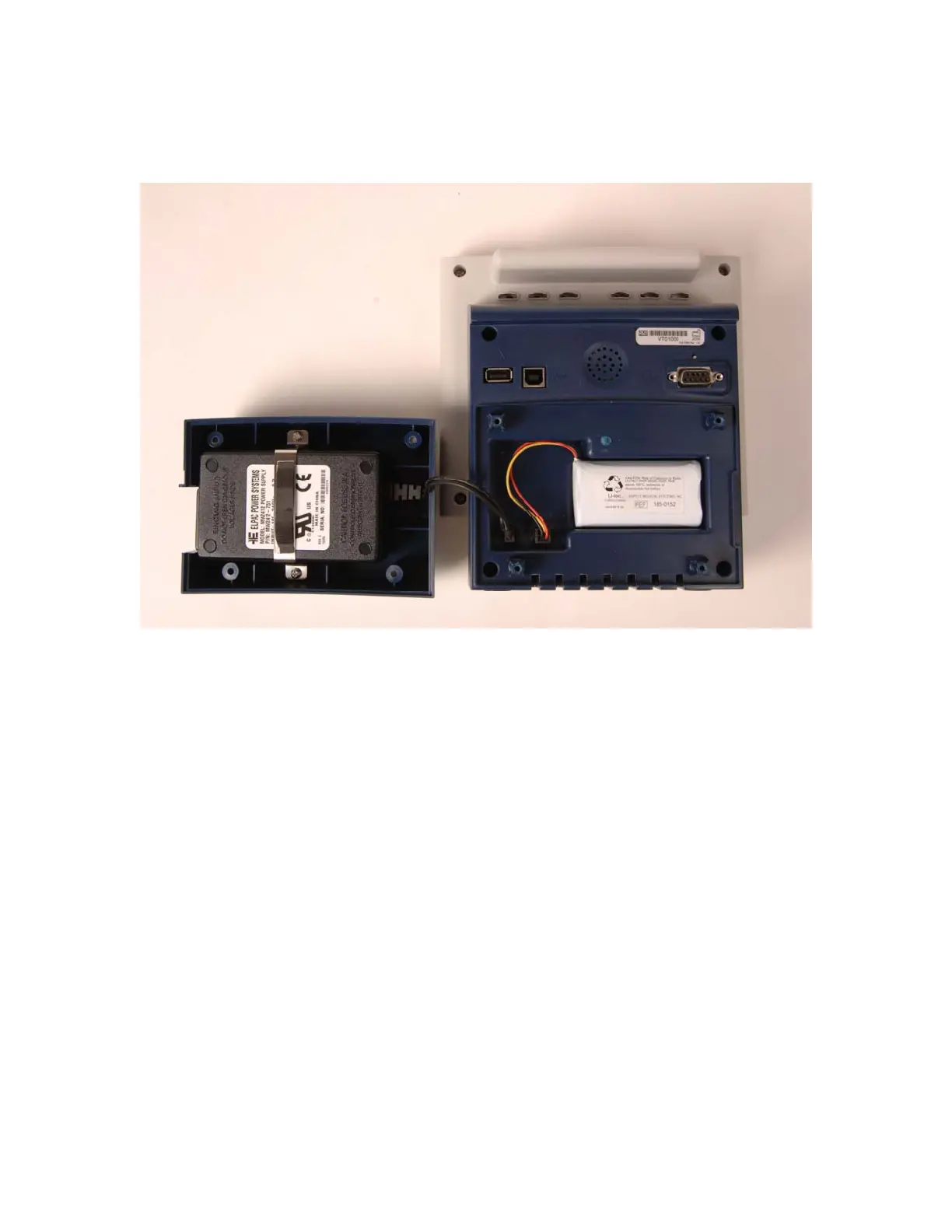
5.2.6 Replacing the Power Supply
Figure 36 - Replacing the Power Supply
WARNING:
POWER SUPPLY IS INTERNALLY FUSED. REPLACE POWER
SUPPLY ONLY WITH ASPECT MEDICAL SYSTEMS BIS VISTA
POWER SUPPLY.
To replace the power supply, you will need a Philips #2 screwdriver. Follow the instructions
below:
1. Unplug A/C line cord from the BIS VISTA monitor.
2. Lay the monitor screen-side-down on a scratch-free work surface so that the
Battery/Power Supply cover is accessible.
3. Remove 4 screws from the Battery/Power Supply cover and remove the cover. The
power supply is located inside the cover.
4. Unplug (squeeze and pull to remove) the battery and the power supply connectors.
5. Remove screws from the power supply bracket and remove the old power supply.
6. Insert new power supply into the cover, lining up the A/C power receptacle with the
cutout in the cover.
7. Reconnect the power supply.
8. Reconnect the battery.
9. Replace the cover and 4 screws (hand-tighten only) and reconnect the A/C power
cord.


 To Next Page