EasyManua.ls Logo

Blackmagicdesign Videohub - Page 51

Blackmagicdesign Videohub
119 pages
Print Icon
To Next Page IconTo Next Page
To Previous Page IconTo Previous Page
Loading...
51
Controlling Videohub with Software
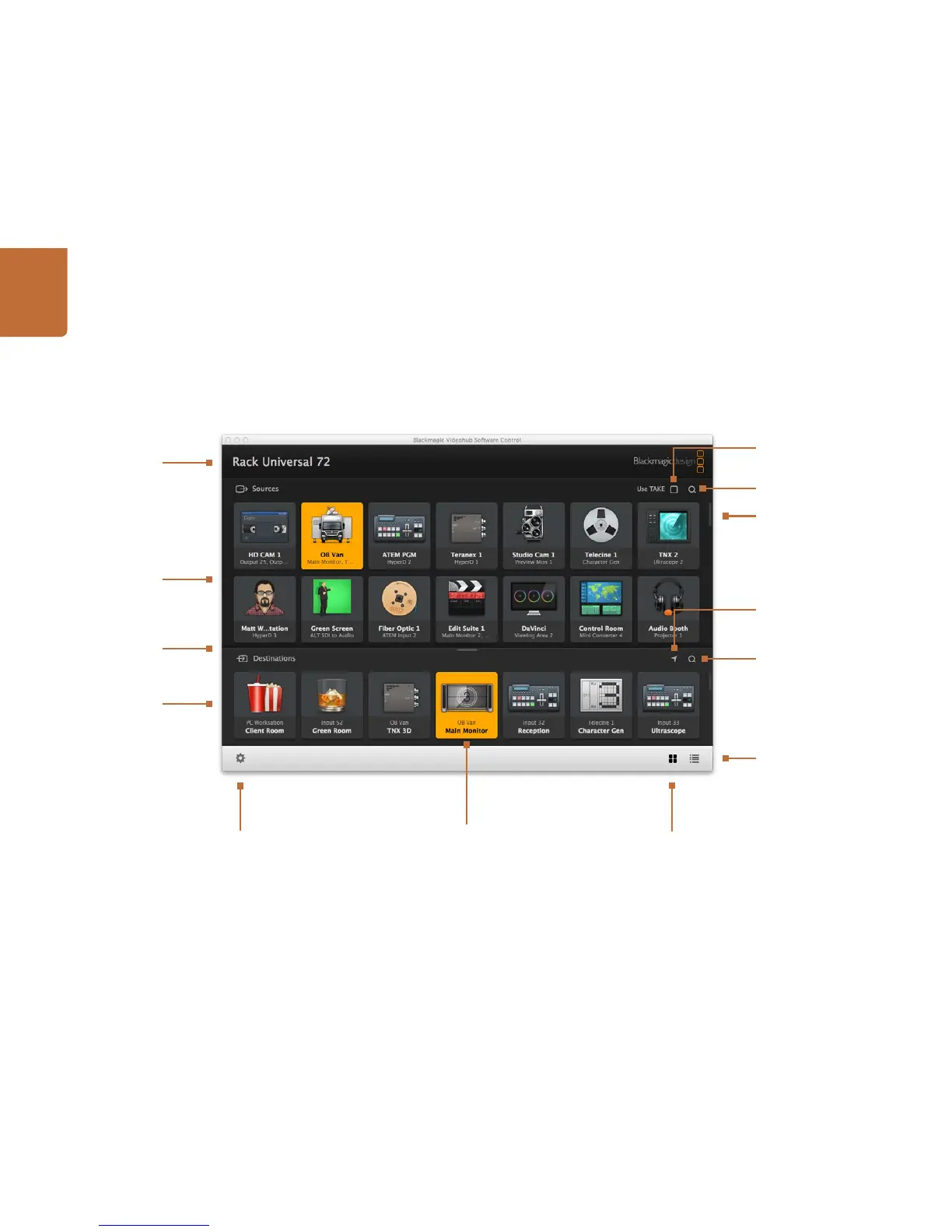
Blackmagic Videohub Control at a Glance
Click and drag the window edges to resize Blackmagic Videohub Control to fit your screen size. Drag the Divider Bar up
or down to reveal more or less of the "Sources" and "Destinations" areas and use the Scroll Bars to scroll the areas.
Scrollbars indicate
not all pushbuttons
are visible
Title Bar shows
Videohub type
Highlighted Pushbuttons
denote paired connections
Pushbutton View
List View
Sources Area
Destinations Area
Destinations Area
Search
Sources Area Search
Settings
Use TAKE
Reveal Source
Divider Bar

Table of Contents

Related product manuals