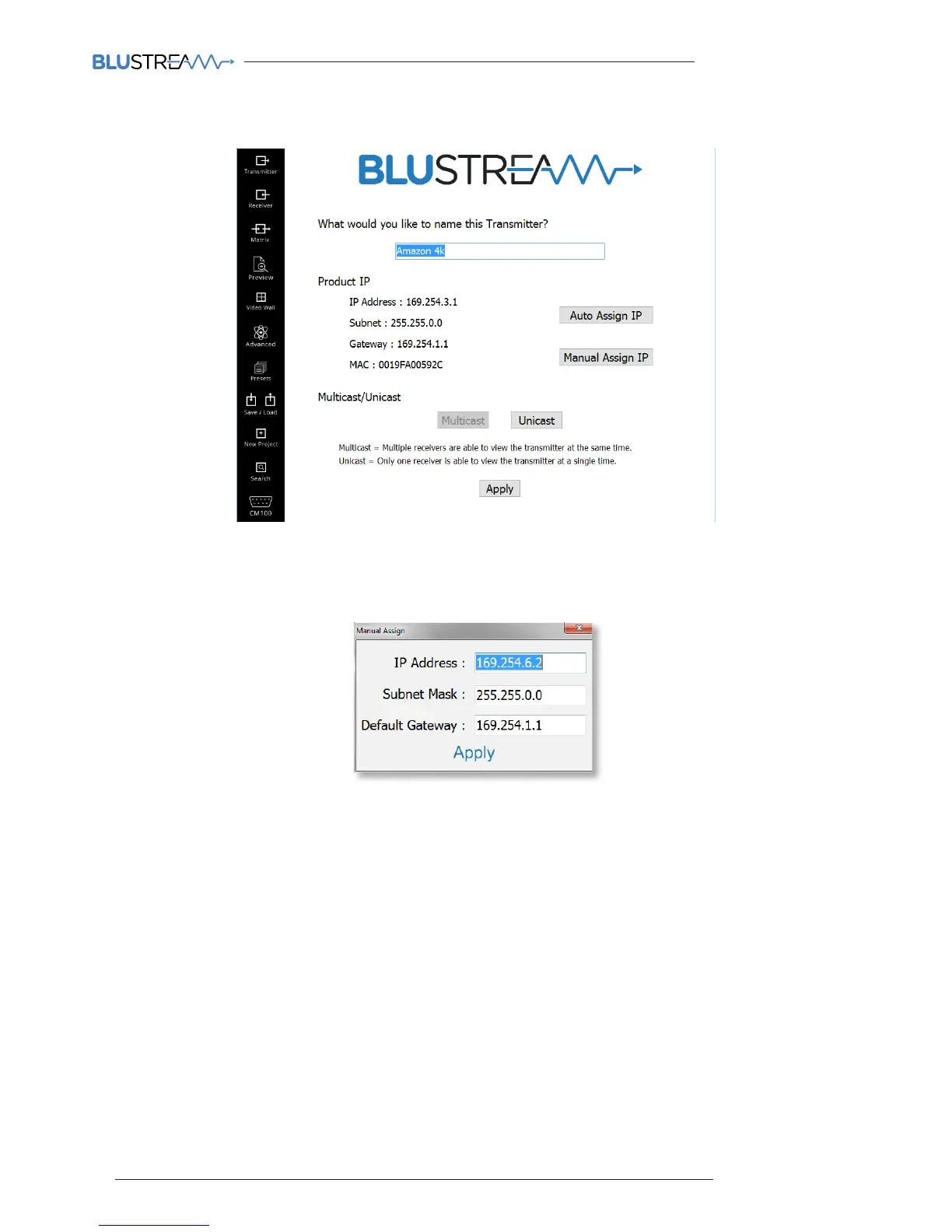
6) Transmitter configuration
The below image is the Transmitter summary screen
From this configuration page you can:
1. Name the Source device the transmitter will be connected to (i.e. Apple TV, Laptop, Blu-Ray etc.)
2. Auto Assign IP - the PC Wizard will assign the product IP address as explained on page 23. Manual Assign IP -
Installer can manually assign IP address details. For example:
Please note: It is not advised that IP address of Multicast products are manually confugured as the
Blustream CM100 and drivers are configured to the default PC wizard IP address range. Manually
assigning IP addresses will prevent the CM100 control module from working.
3. Multicast mode - standard default setting that allows multiple Receivers (display) to view the source (Transmitters)
at the same time.
4. Unicast Mode - setting that limits each Transmitter (source) to only be viewed by a single display (Receiver) at the
same time. This mode is not advised.
Press ‘CONTINUE’ when finished to apply the changes to the Blustream Transmitter. You will note the Transmitter will
automatically reboot itself in order for the settings to be applied. This may take a couple of minutes.
Check the product is powered and connected and click ‘OK’ to try again.
5. Repeat the Transmitter configuration process for all products.
Remember to not connect any additional Transmitter products until the previous unit has rebooted and been
assigned its new IP address.



 To Next Page