172
Using bass
Rev0.02
Selecting bass sounds
Now that we can hear the bass, let’s select a bass sound to
work with.
1.
Press PROGRAMMABLE RHYTHM
[ARRANGEMENT/PATTERN] so the PATTERN
indicator is lighted. (Pattern mode)
2.
Press PROGRAMMABLE RHYTHM [EDIT].
The Pattern Selection screen will appear.
fig.20-005d
3.
Press [F1] (SETUP).
The dialog for pattern setup will appear.
fig.20-006d
4.
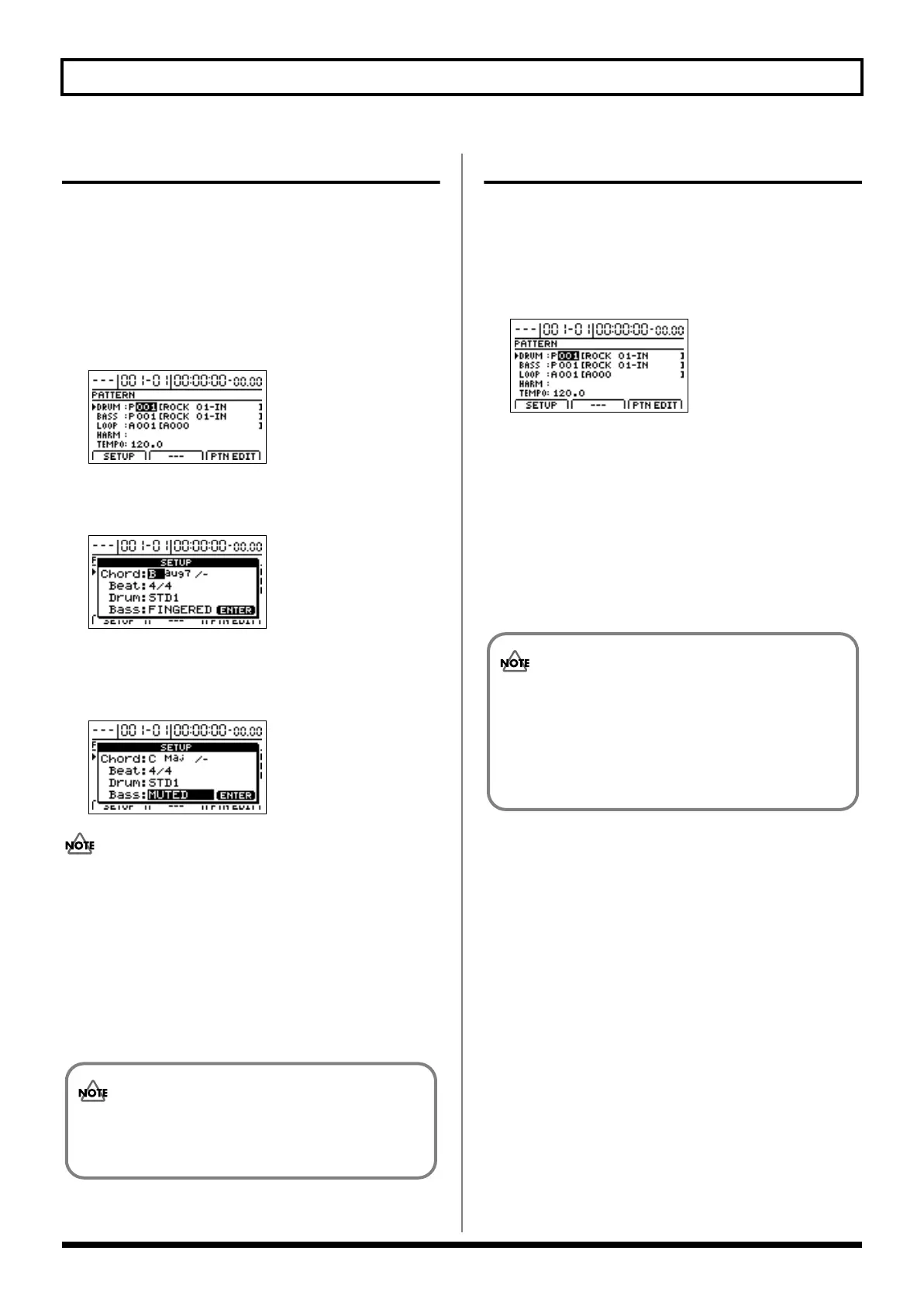
Move the cursor to “Bass” and use the TIME/VALUE
dial to select a bass sound.
The bass sound selection will change.
fig.20-050d
Although playback may stop for a period of 1 to 2
seconds when the bass sound is changed, this is normal
and is not the result of a malfunction.
5.
When you have selected the bass sound that you want
to use, press [ENTER/YES].
The Bass Pattern Selection screen will appear once again.
6.
If you wish to store the bass sound selection, save the
current song (p. 70).
Selecting bass patterns
1.
Press PROGRAMMABLE RHYTHM
[ARRANGEMENT/PATTERN] so the PATTERN
indicator is lighted. (Pattern mode)
2.
Press PROGRAMMABLE RHYTHM [EDIT].
The Pattern Selection screen will appear.
fig.20-005d
3.
Move the cursor to “BASS” and select a pattern using
the TIME/VALUE dial.
Playback of the newly selected bass pattern will start as
soon as the previously selected bass pattern has ended.
4.
When you have selected the bass pattern that you want
to use, press [EXIT/NO] to return to the top screen.
5.
If you wish to store the bass pattern selection, save the
current song (p. 70).
The bass sound selection is common to all bass
patterns. It is not possible to store a different bass
sound for each different pattern.
The user bass patterns and song bass patterns
contained in the BR-1200CD at the time of purchase
are empty; you won’t hear anything if you select one
of them. If you want to hear bass immediately after
setting up the BR-1200CD for the first time, select a
preset bass pattern.
BR-1200CD_e.book 172 ページ 2007年8月24日 金曜日 午前11時33分



 To Next Page