BRAILLO
l
B 650 SF
53
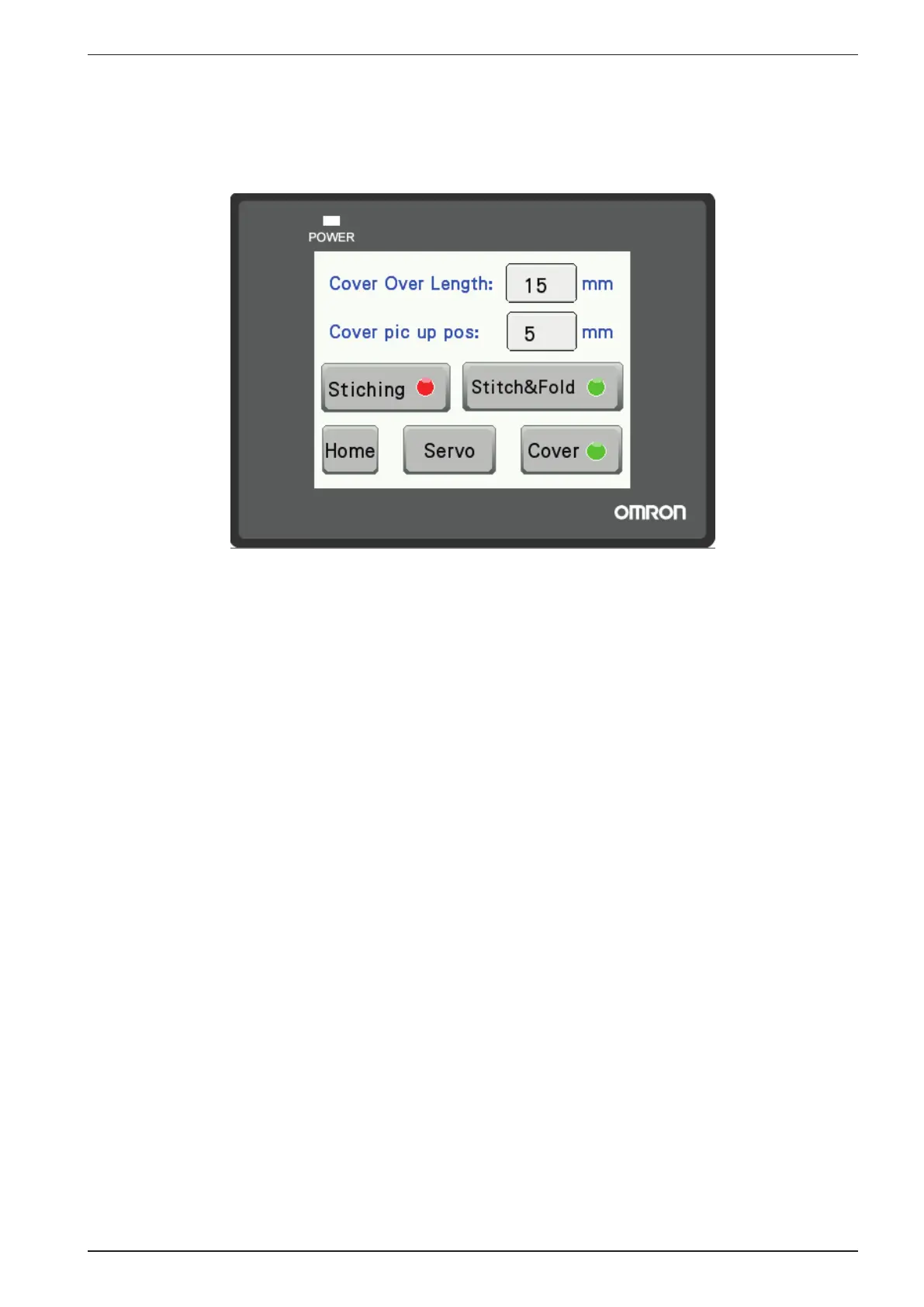
Setup Menu
- Cover over length
When the cover sheet is physically longer than the book, you need to compensate for this to be able to
get the cover positioned in the centre on top of the book. This value can be set from 0 to 50 mm. The
best way to nd the correct value is to learn by experience. Tap the number to change the value.
- Cover pick up position
This function is used to adjust the position of the cover sheet where the vacuum arm is picking up the
cover. It may be necessary to adjust this position if it becomes difcult to pick only one cover sheet
at a time. This is because different paper types may behave differently. The value can be set from 0 to
30 mm. We recommend that this adjustment is used in conjunction with the splitter and the vacuum
adjustment to ensure that just one cover sheet is picked at a time.
Tap the number to change the value.
- Stitching
Used to turn the stitching on or off, If turned off, the volumes will be folded but not stitched.
-Stitch&Fold
Used to turn off both the stitching and folding functions.
- Home
Return to the main menu.
- Servo
Enters the menu for the servo settings.
- Cover
This function is used to select if you want to make books with a cover sheet or not.



 To Next Page