BRAILLO
l
B 650 SF
92
4.16 Paper shoes - Adjustment
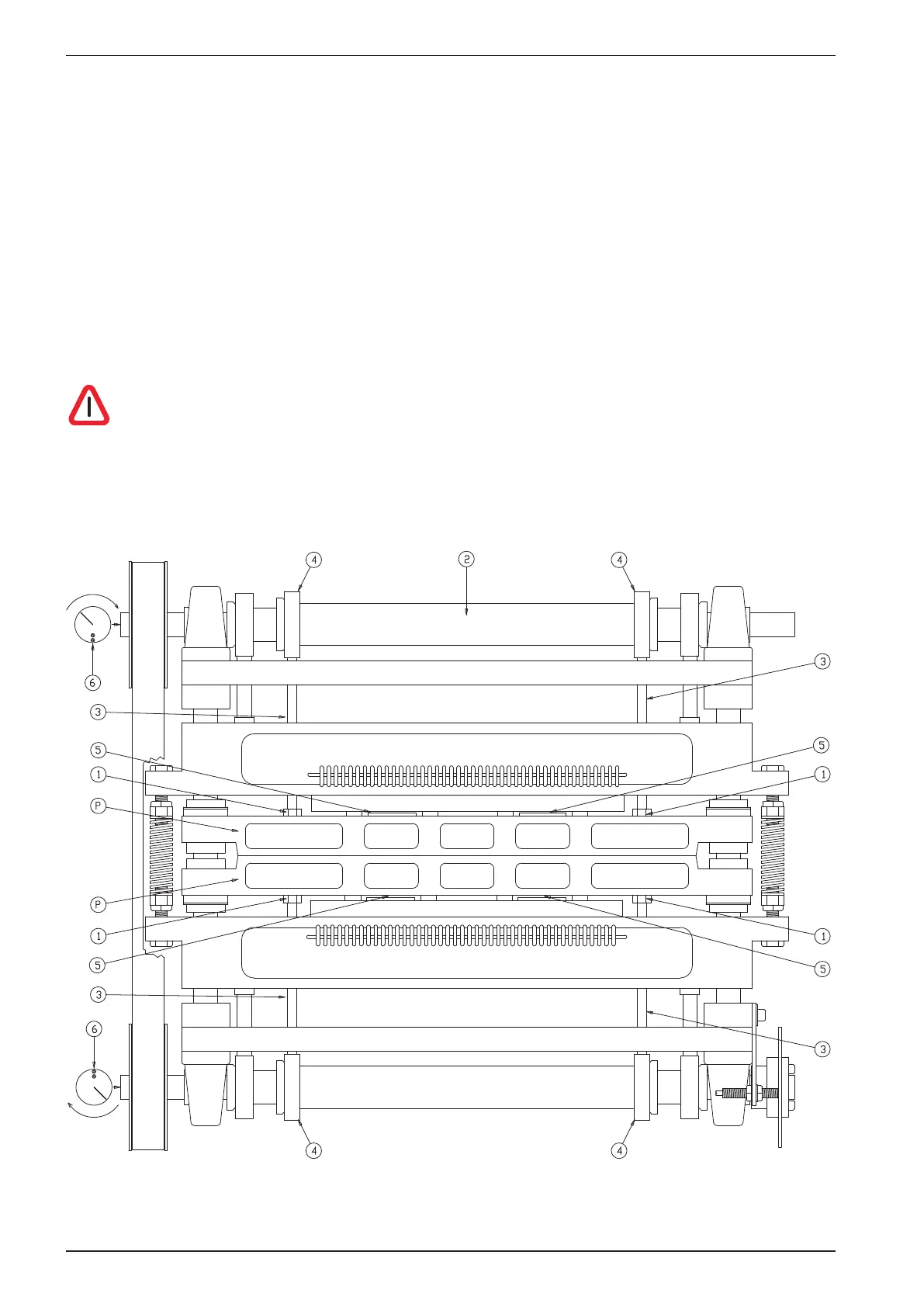
Place a sheet of paper between the paper shoes (P).
Turn the belt so the two points (6) at the end of the shafts (2) are pointing towards each other as shown
in the gure below.
Lock the shafts in this position with a wrench (vice-grip), e.g. at the end of the shaft (2).
Loosen the locking nuts (1), adjust the push rods (3) by turning them. Adjust the push rods against the
inner eccentric bearing (4) until the paper shoes (P) have a light pressure on the paper.
Check that the gap (5) between the press plates and the beam above, is equal on both upper and lower
units.
Secure the push rods (3) with the locking nuts (1).
Note! The function of the bearings (4), is to reduce the noise the printer makes while
running. It is a common misunderstanding that you can increase the pressure on the
papershoes by adjusting these push rods. This does not have any inuence on the dot quality!
U
U
T
R
T
U
T
T
Q
S
Q
Q
Q
V
U
p
p
V
S
S
S



 To Next Page