5 CLEANING
5.1 Cleaning the Monitor Cart
Before You Begin
Ensure that the system is fully shut down and disconnected from mains power before beginning
cleaning.
Risk of electrical shock: Prior to and during all cleaning and disinfection work, ensure that tracking
unit is disconnected from the Monitor Cart.
No Automatic Disinfection
Do not use automatic cleaning and disinfection procedures for any components.
Do not expose the Kick 2 to direct UV light, as it may damage equipment.
No Sterilization
Do not sterilize any components. High temperatures from sterilization may damage components.
Disinfectant Compatibility
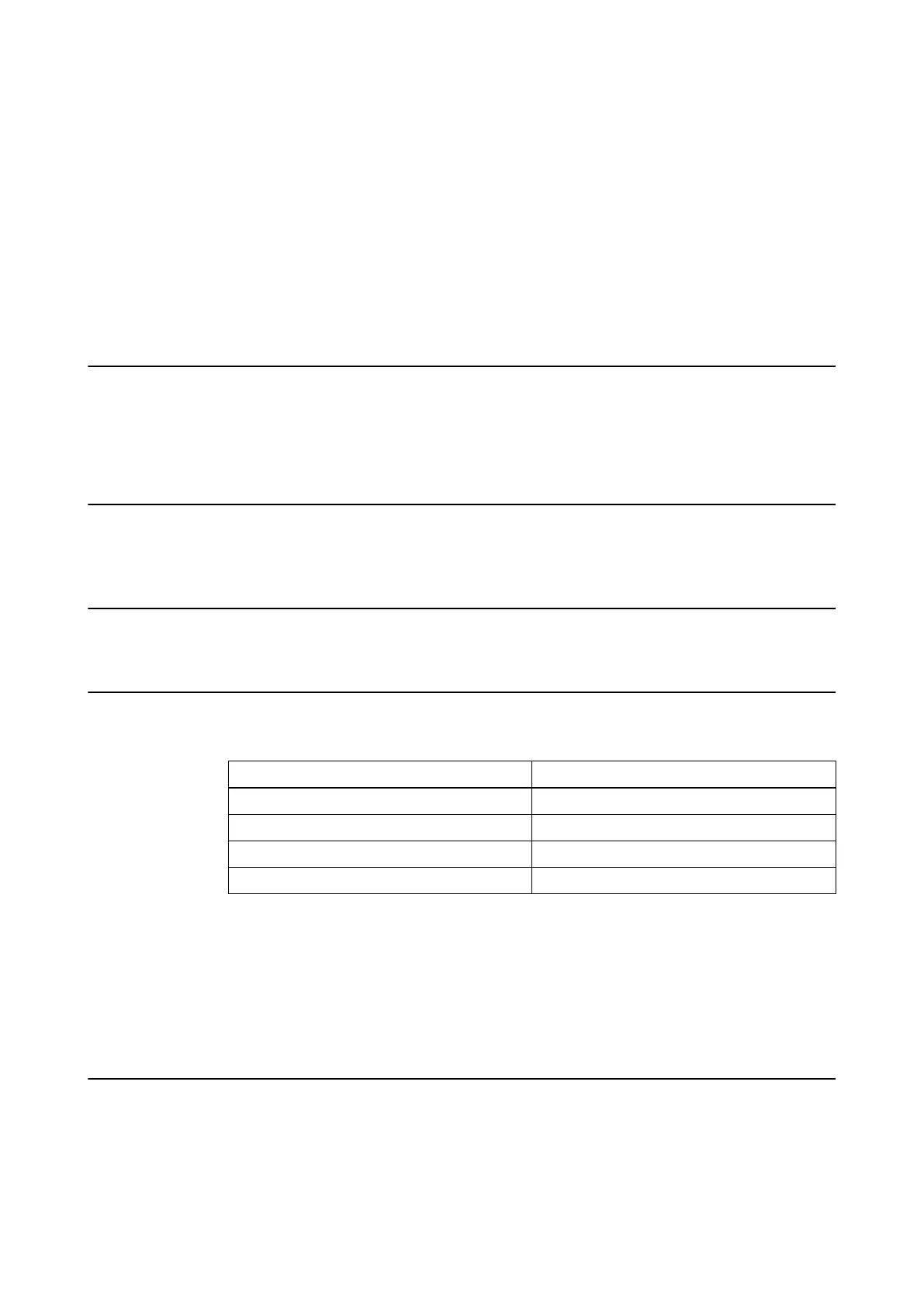
The Kick 2 shall only be cleaned using the following disinfectant types:
Disinfectant Type Example
Alcohol-based Meliseptol, Mikrozid AF Liquid
Alkylamine-based Incidin Plus 2%
Active oxygen-based Perform
Aldehyde/chloride-based Antiseptica Kombi - Flächendesinfektion
NOTE: Use only surface disinfectants released in your specific market.
NOTE: Surface disinfectants may leave a residue. This can be easily removed using a dry cloth.
Always closely follow the directions of the disinfectant manufacturer.
Using cleaning fluids, disinfection wipes or cleaning procedures others than those specified may
damage equipment. It is suggested to only use disinfectants verified by Brainlab to avoid
damaging the system.
No Liquids
Ensure that liquids do not enter the Kick 2 components, as this could damage the component
and/or the electronics. System components are not protected against the ingress of liquids.
Use only a moist cloth for cleaning. Other methods could allow liquids to enter the system and
cause damage.
CLEANING
System and Technical User Guide Rev. 1.3 Kick 2 Navigation Station 63



 To Next Page