System User Guide Rev. 2.5 Kolibri Ver. 2.0 77
MOBILE CAMERA STAND & CAMERA
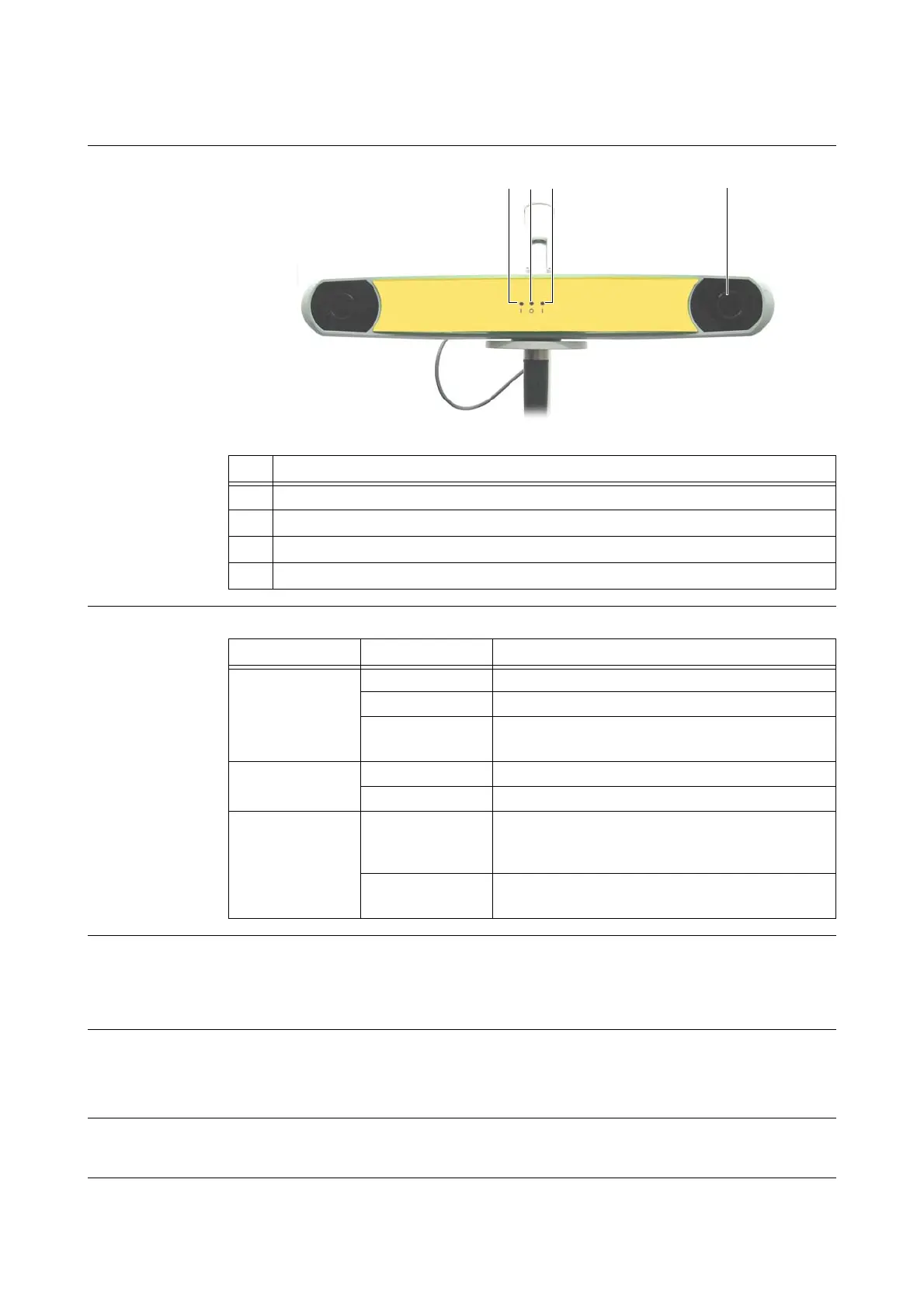
5.4.6 LEDs & Acoustic Signals of Kolibri Spectra Camera Kit
Illustration
Figure 38
Meaning of LEDs
Infrared LED Array The infrared LED array is located around the inner ring f.
The infrared LED array is a “Class I LED product”.
Do not directly view to the infrared LED array at a distance closer than 15 cm.
Acoustic Signals Camera emits two beeps when
• reset is performed
• power is applied to system
Warm-up Time Every time camera is powered on, it generally requires a warm-up time of two minutes. If camera is
stored at low temperatures, warm-up time may be longer.
No. Component
a
Power LED
s
Status LED
d
Error LED
f
Inner ring
LED Appearance Comment/Action
Power LED
a
flashes green Camera warming up
steady green Camera is ready for use
not visible
• Ensure that camera is plugged in
• Contact Brainlab support
Status LED
s
steady green Communication connection established
not visible Contact Brainlab support
Error LED
d
flashes amber
• Non-critical error detected
• Contact Brainlab support (even if navigation is still
possible)
steady amber
• Critical error detected
• Contact Brainlab support



 To Next Page