27
The active ow factor appears, and the next adjustment of the ow factor (adjusted
ow factor) can be read.
When the spreader is lled, this is automatically registered and a new calculation begins.
By pressing , it is also possible to start a new calculation. This is used, for instance,
when starting on a new task with a dierent application rate.
Press the
symbol on the Home menu.
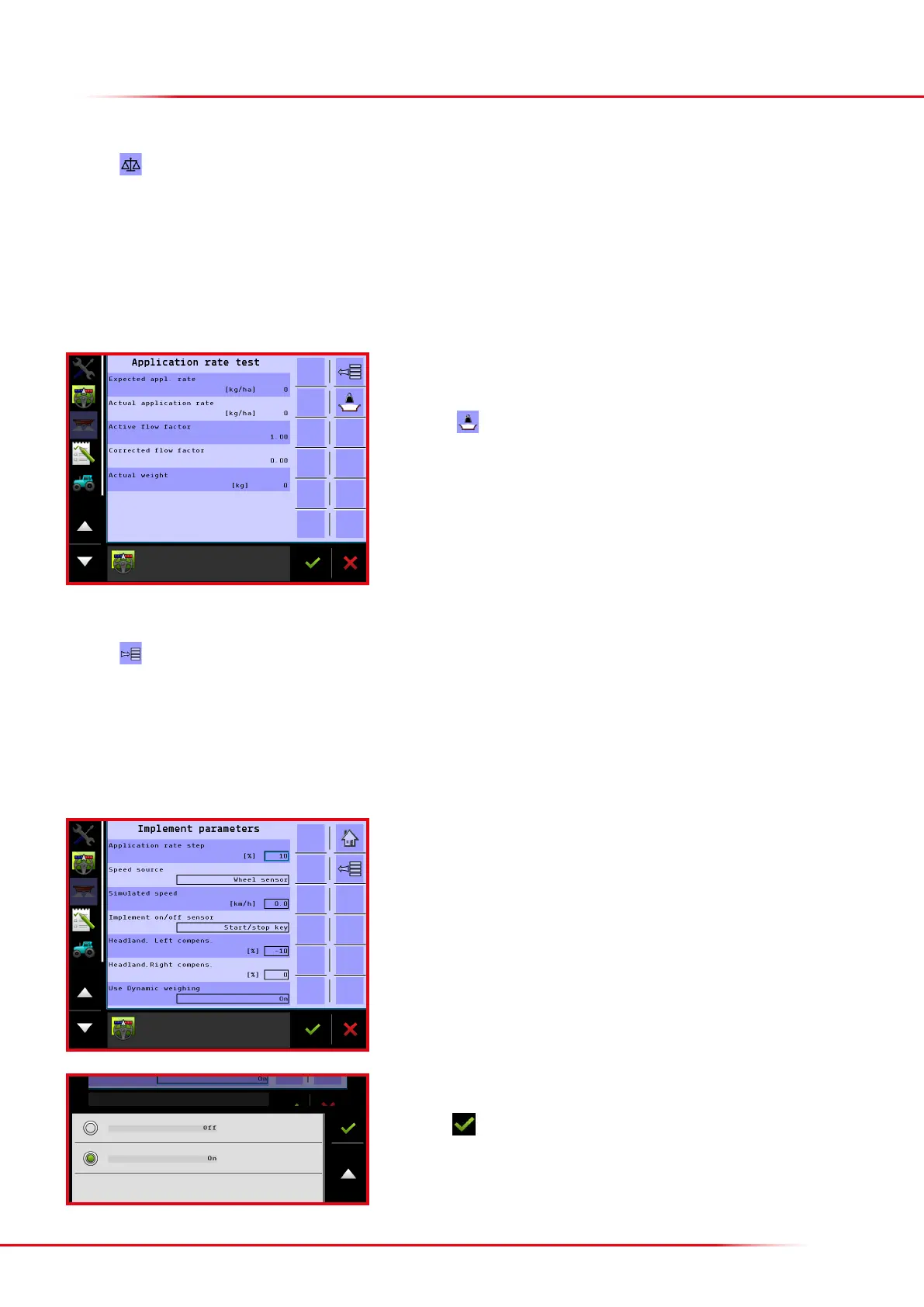
On this menu, it is possible to compare the application rate entered with the actual application rate, if the spreader has load cells. When dynamic
weighing has been activated, a new ow factor is continuously and automatically calculated. Dynamic weighing is activated when the implement
is delivered from the factory, but it can be deactivated if preferred. If dynamic weighing has been deactivated, weighing can still be used, but the
ow factor will not be automatically calculated or changed.
WEIGHING MENU
Press the eld “Use dynamic weighing” to activate or deactivate the function.
Activating/deactivating dynamic weighing:
Press the
key from the Home screen display.
Press “Machine”
Press “Implement parameters”
Select whether dynamic weighing should be activated or deactivated.
Finish with



 To Next Page