30
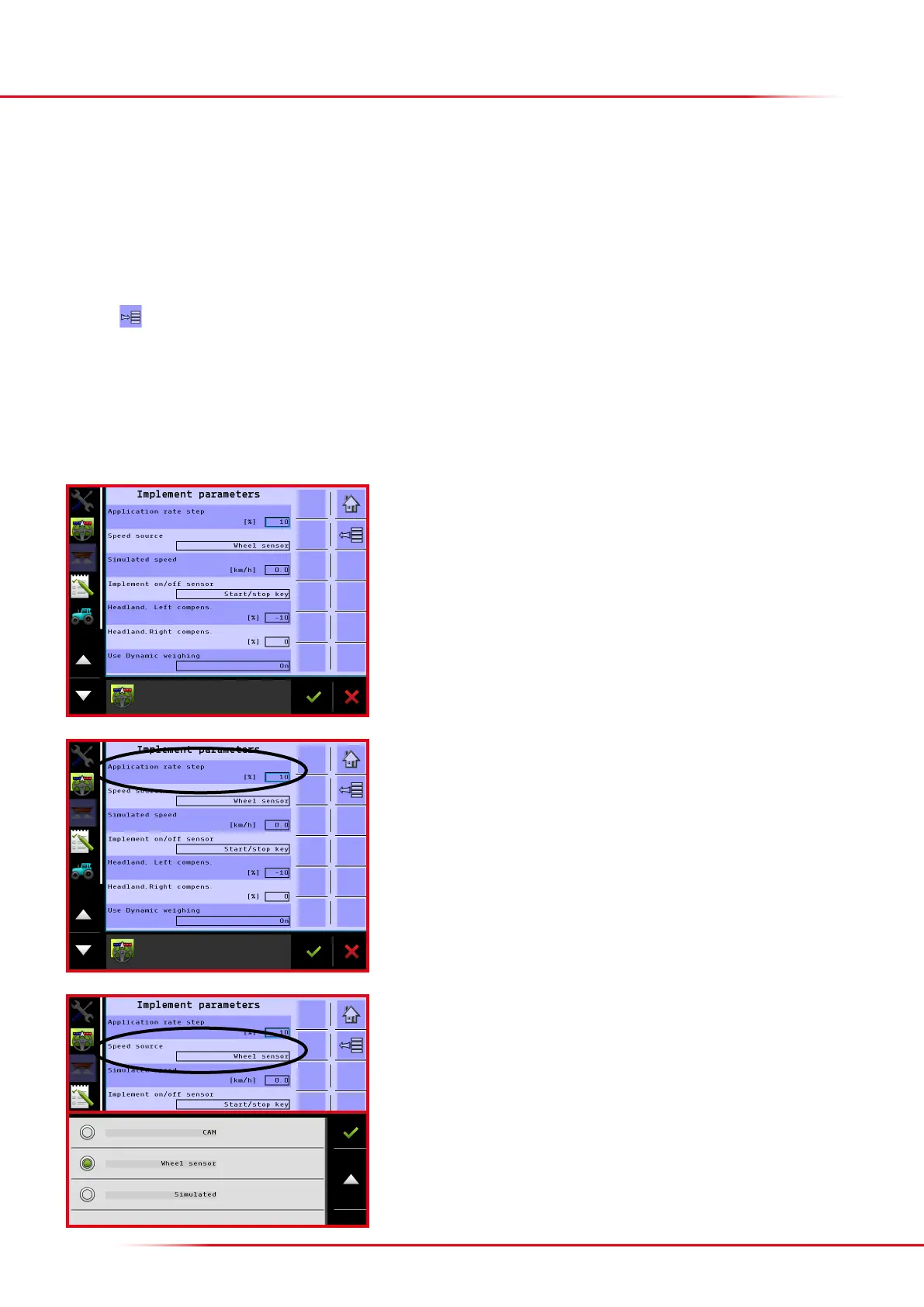
Implement parameter menu: On this menu, it is possible to change the various para-
meters (see an explanation of each individual parameter below).
On the implement parameter menu, it is possible to change the following parameters:
• Application rate step: Step size, %
• Speed source
• Simulated speed
• Implement on/o sensor: Choose between the on-screen start/stop button or an external button.
• Headland le/right complete: Automatic volume reduction for activating headland spreading
• Use dynamic weighing: Activating and deactivating dynamic weighing
Press the
key from the Home screen display.
Select “Machine”
Select “Implement parameters”
SETTING UP IMPLEMENT PARAMETERS
Speed source: It is possible to choose from among Wheel sensor, CAN or Simulated.
Wheel sensor: The forward speed is provided by a sensor mounted on the spreader’s
wheel.
This is not possible for a mounted spreader.
CAN: The forward speed is provided by the tractor’s terminal (GPS speed, tractor wheel
sensor, etc.). Must be selected and calibrated in the terminal’s basic set-up.
If “Simulated” is selected, the simulated speed must be entered in the “Simulated
speed” eld.
Application rate step: It is possible to enter the preferred step size for each keystroke
on the operation screen here.



 To Next Page