24
OPERATION SCREEN (HYDRAULIC SPREADING DISCS)
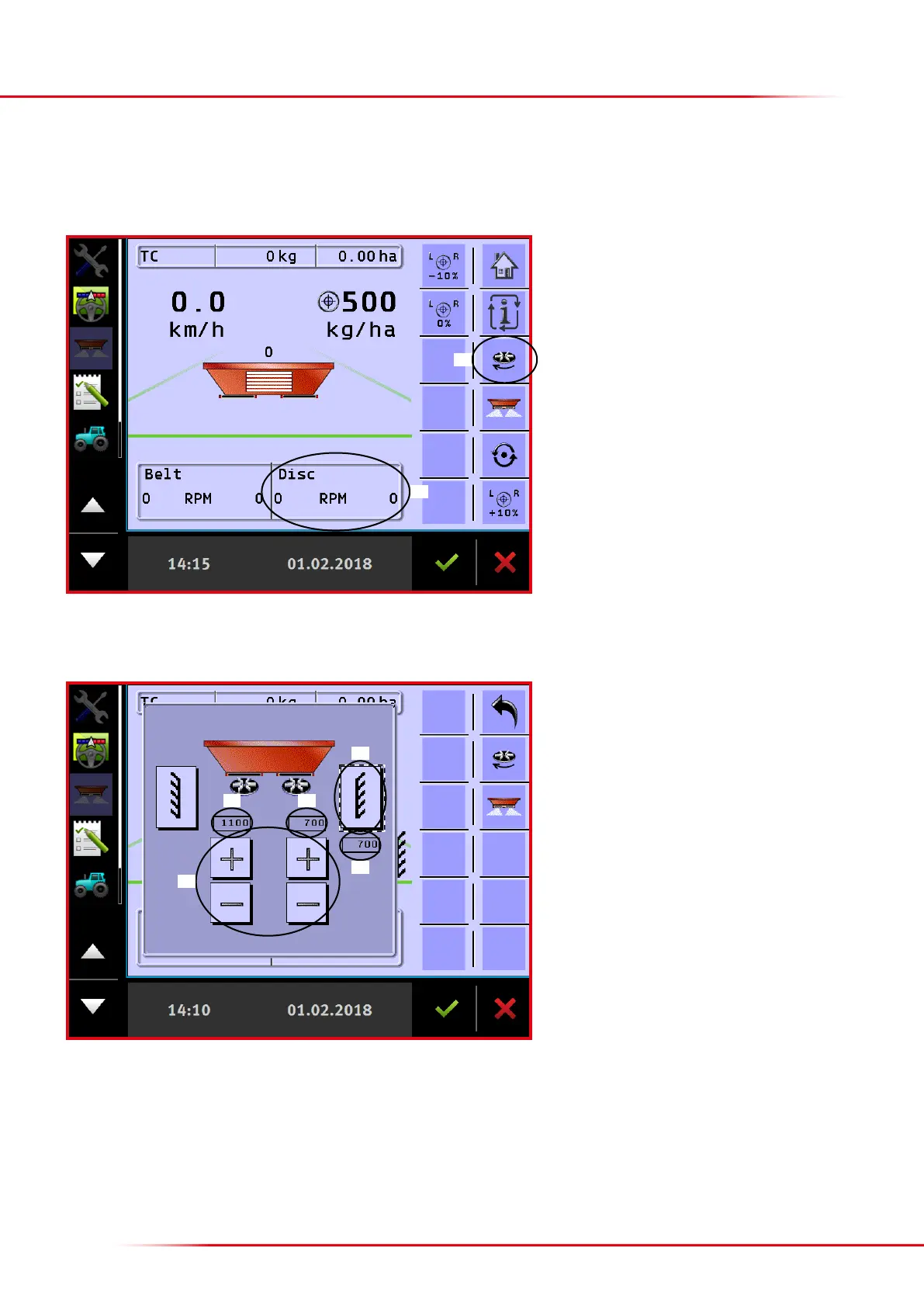
In addition to the functions described on the preceding pages, the following functions for hydraulic spreading discs are found:
1. Starts and stops the spreading discs.
2.
Shows the current disc speed for the right and le
side.
1. Shows the current speed set for the le disc.
2. Shows the current speed set for the right disc.
3.
The speed of each disc can be changed using the “+”
or “-” key. Alternatively, the preferred speed can be
entered by pressing “1” or “2”.
4.
Toggles between eld spreading and headland
spreading on the side concerned.
5.
Shows the headland spreading speed when headland
spreading is activated.
> entering the desired speeds for field and headland spreading
Field spreading: Enter the preferred speed in “2” when eld spreading is selected here.
Headland spreading: Enter the preferred speed in “1” or “2” when headland spreading is activated on the side in question.
Alternatively, the speeds can be entered under “Implement parameters” (see p. 31).
By pressing eld “2”, the following picture appears:
1
2
1 2
3
5
4



 To Next Page