Use : Standard use
32 Silver FC 00 511
EDGING A LENS
Edging Mode
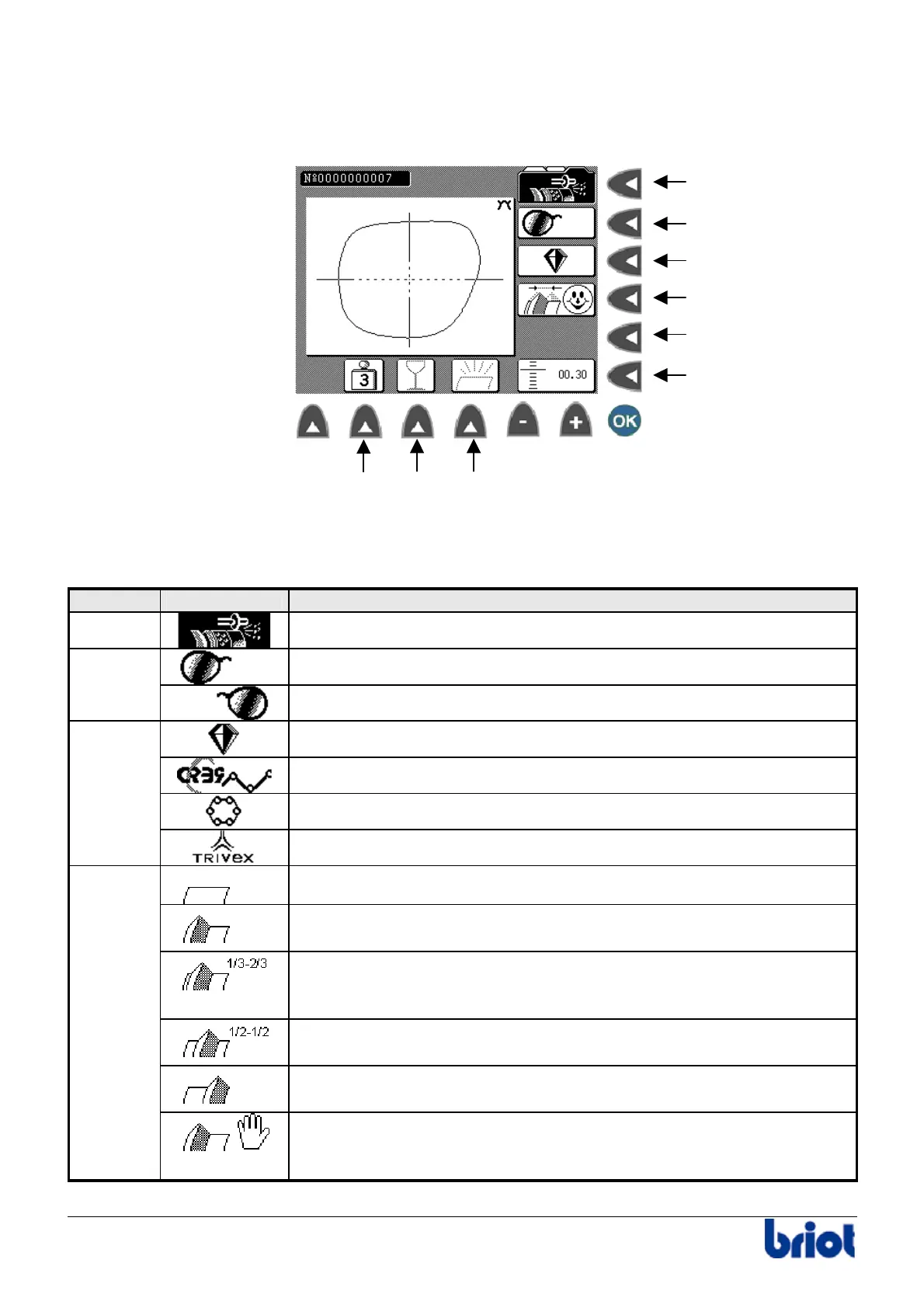
Functions : illustration
Functions : description
The following table describes each function with regard to the edging screen of the Silver.
Function Selection Description
Fct0
Edging Mode
Edging the right side
Fct1
Edging the left side
Glass lens
Organic lens
Polycarbonate lens
Fct2
Trivex lens (depends on the type of edging wheel mounted)
Rimless Finishing
Front Side Bevel:
The bevel is placed to the front of the lens.
1/3-2/3 Bevel:
The bevel is placed at 1/3 from the front face and at 2/3 from the rear
face of the lens.
½ – ½ Bevel:
The bevel is placed in the center of the lens.
Rear Side Bevel:
The bevel is placed to the rear side of the lens.
Fct3
Controlled bevel:
the bevel is positioned by the operator (see paragraph Controlling
the bevel of the lens before finishing below)
Fct 0
Fct 1
Fct 2
Fct 3
Fct 4
Fct 5
Fct 7 Fct 8 Fct 9



 To Next Page