Brocade MLX Series and Brocade NetIron XMR Hardware Installation Guide 223
53-1002373-02
Installing a Brocade MLX-32 router
3
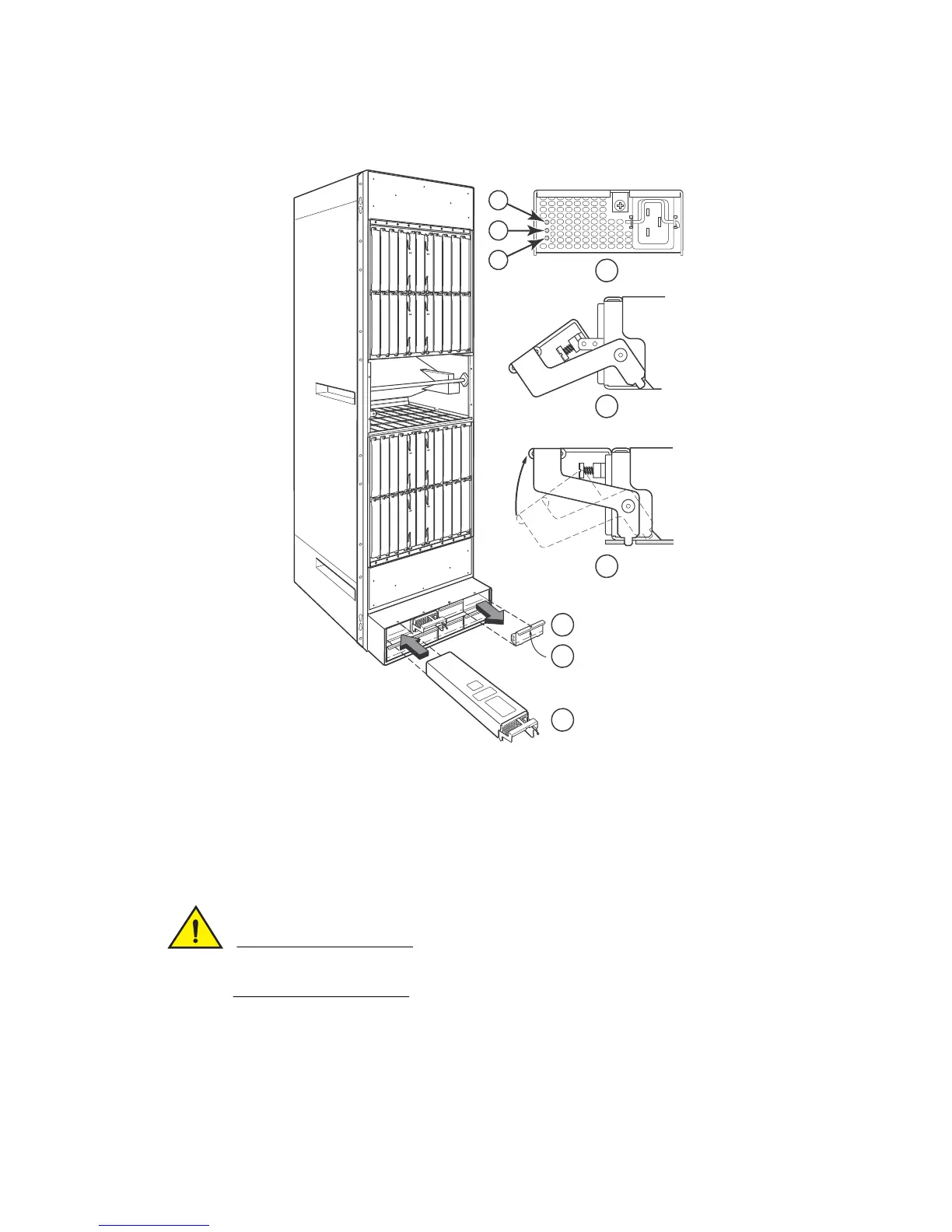
FIGURE 159 Installing a power supply in a Brocade MLX-32 router
Carefully follow the mechanical guides on each side of the power supply slot and make sure the
power supply is properly inserted in the guides. Never insert the power supply upside down.
4. Push the power supply front panel toward the back of the router to engage the backplane
connector.
5. Pull the release latch on the power supply front panel up to lock the power supply in place.
6. Install a blank power supply faceplate into each empty slot.
1 Power supply indicators 6 Latch handle locked
2 AC OK 7 Power supply blank cover
3 DC OK 8 Pull down on plunger to remove
4 ALM 9 Power supply
5 Latch handle open
Pwr
Active
Pwr
Active
Pwr
Active
Pwr
Activ e
Pwr
Active
Pwr
Active
Pwr
Active
Pwr
Activ e
AC OK
DC OK
ALM
5
6
7
8
9
1
2
3
4


 To Next Page
 Loading...

