Disassembly
2 - 14
Disassembly
Disassembly
Main frame / Covers / Upper thread guide
<For thread tension dial yellow, pink, green>
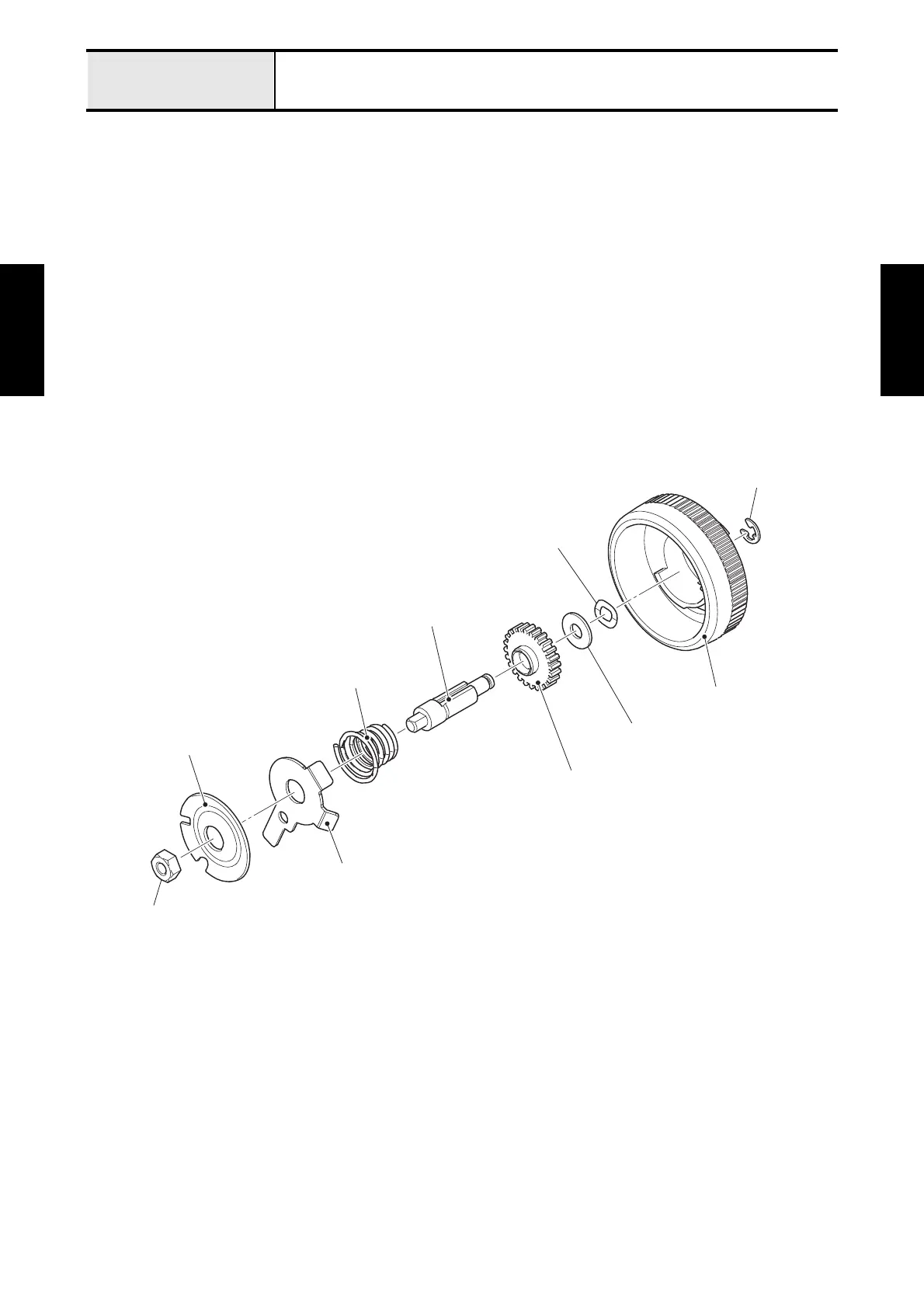
5. Remove the nut 1 M4 to remove the tension disc A, the tension release disc B and the spring (X77414)
from the thread tension shaft.
*Assembling note
• Fully tighten the screw after performing "Thread tension adjustment".
6. Remove the retaining ring E3 to remove the thread tension dial, the wave washer and the washer plain
M4 from the thread tension shaft.
7. Remove the thread tension nut from the thread tension shaft.
Fig. 2-12
Retaining ring E3
Nut 1 M4
Tension disc A
Tension release disc B
Spring (X77414)
Thread tension shaft
Thread tension nut
Thread tension dial
Wave washer
Washer plain M4






 To Next Page