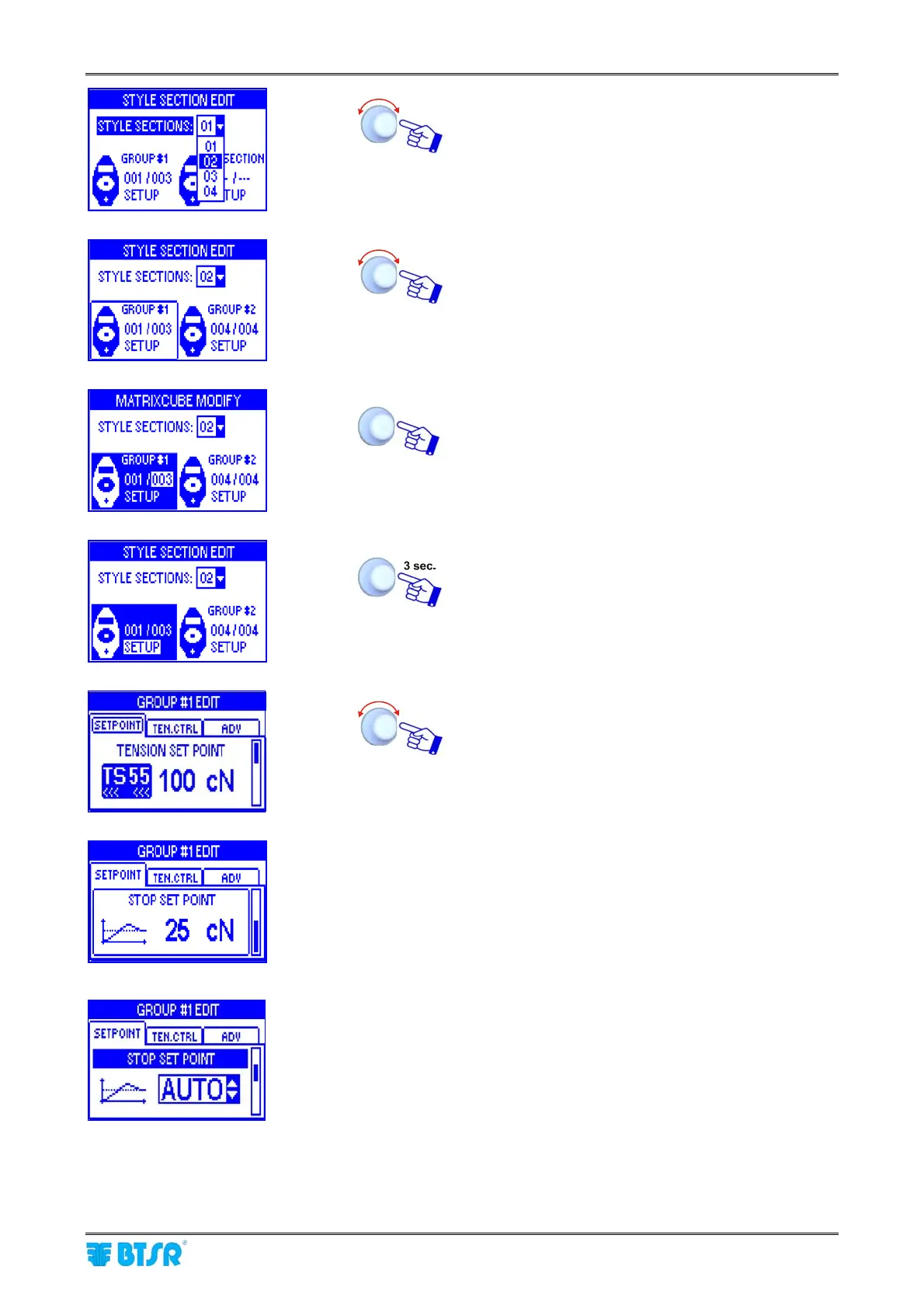
Style Programming
MATRIX CUBE - 59 -
Set the number of sections [1-8] (e.g. 02).
Select GROUP #1.
Set the identification number of the last device
belonging to the first section (003) and confirm.
To start setting the parameters related to section 1
(GROUP #1).
Set the operation parameters in the SETPOINT,
TEN.CTRL, ADV windows, operating as described
on paragraph – Navigation throughout the Display
Windows.
On the SETPOINT window you may program:
- The nominal feeding tension (TENSION SET
POINT 1 to 999 cN – default 100 cN)
- The hold tension when the machine is stopped
(STOP SET POINT 12 to 999 cN – default 25 Cn
or AUTO)
If the parameter is set to AUTO, the hold tension
when the machine is stopped is automatically
defined by the system. The system stores the
tension value when the machine switches to
STOP status, during the deceleration stage; this
value will be the new starting tension for the next
cycle.











 To Next Page