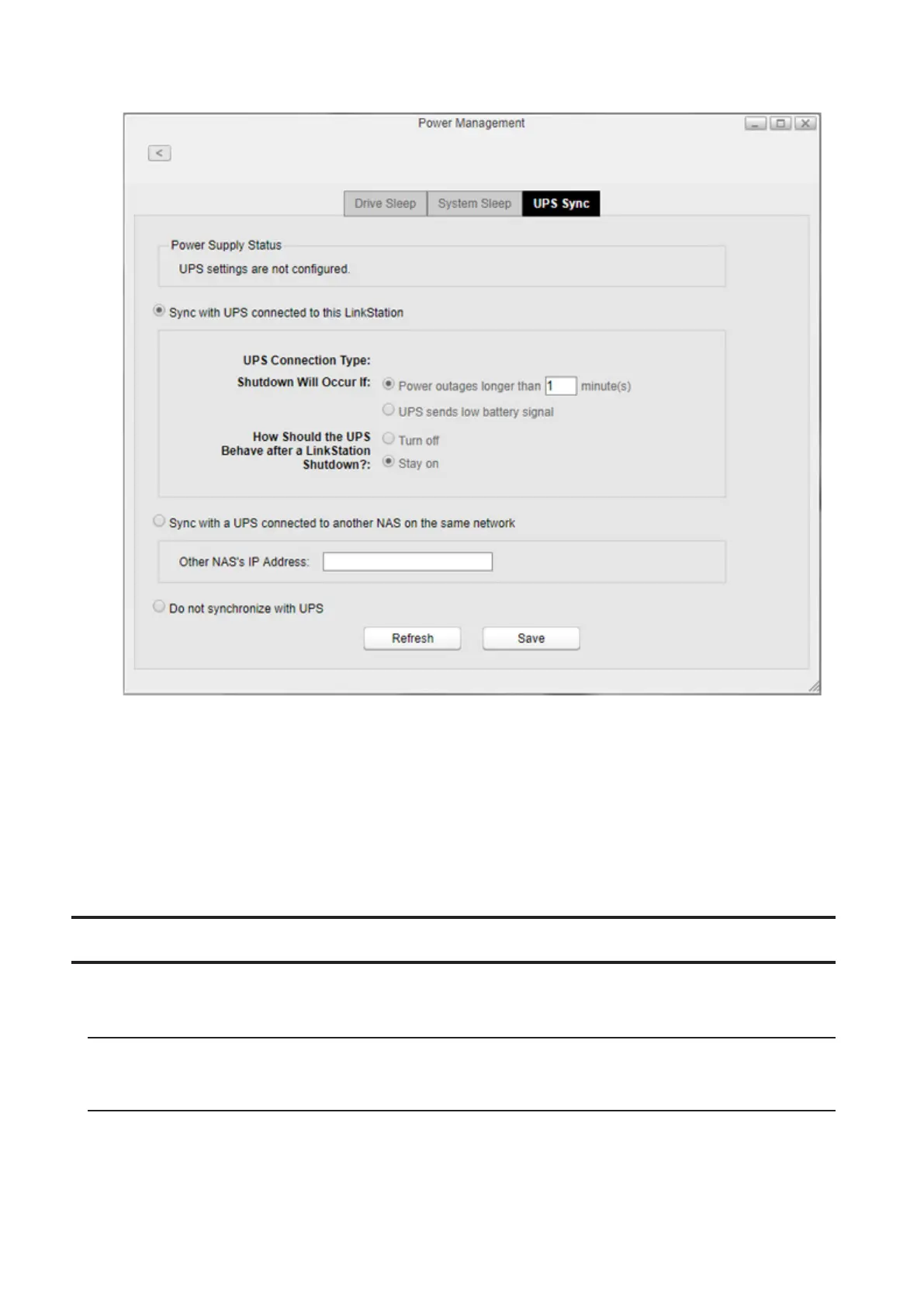
8 Configure the desired settings, then click Save.
Notes:
• If the LinkStation is connected directly to a UPS, select “Sync with UPS connected to this LinkStation”. If a different
Buffalo NAS device is connected to the UPS, select “Sync with a UPS connected to another NAS on the same
network”. After making this selection, enter the IP address of the Buffalo NAS device that will be the sync source
into “Other NAS’s IP Address”.
• When the LinkStation restarts after an automatic shutdown, such as from a power outage or power supply issue,
verify that the power supply has been restored. If the LinkStation is turned on while it is still running on the UPS
and the power supply has not been restored, the automatic shutdown will not occur, even after the specified
time has elapsed.
Firmware
Check the firmware version or update the LinkStation’s firmware. There are two ways to update the firmware.
Online Update
If a new firmware is available, a message and button are displayed in Settings.
Manual Update
You can update the LinkStation’s firmware manually.
1 Download the latest firmware image file from the Buffalo website and save the firmware image file to the
LinkStation’s shared folder.
95













 To Next Page