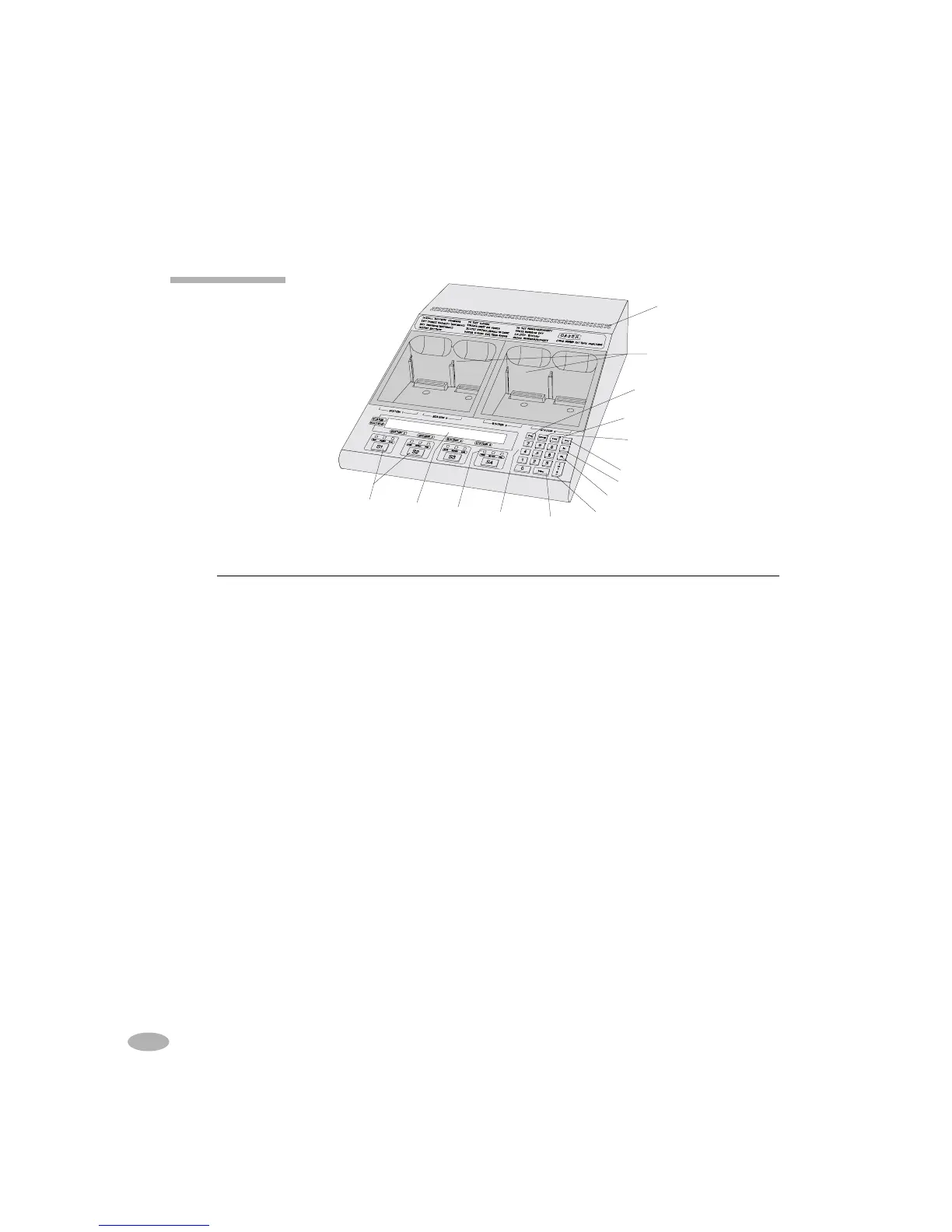
Operating Principles
Components
8 C7000 & 7000ER Battery Analyzer V3.5
Component Function
Battery Stations Take Battery Adapter.
Prog Key Access service programs and Target Capacity.
Print Key Print labels and reports.
CCode Key Access battery parameters.
Esc
Key Exit menus or cancel changes.
Fn Key Shortcuts to common functions when pressed with a second
key.
Alt Key Reset to factory defaults when pressed with the 0 key after
a firmware upgrade or as a general system reboot.
ENTER Key Save settings and start servicing.
Menu Key Access menu.
Numeric Keypad Enter numeric parameter settings.
LED Indicators Provide current status of batteries in service. Activated
when a service starts.
LCD View status for each station and detailed service
information.
Station Keys View C-Codes, details of a service, or as cursor keys in
editing mode.
Battery Stations
Prog Key
Print Key
CCode Key
Esc Key
Fn Key
Alt Key
ENTER Key
Menu Key
Numeric
Keypad
LED
Indicators
LCD
Station
Keys
Ventilation Grill



 To Next Page