Services and Upgrades 13
Replacing the Station Fuses
Each station is protected by its own fuse. An open
station fuse is identified by the
absence of charge or discharge current with a battery in service, and/or a message
shown on the display, such as code 160 (Bad fuse or driver).
Standard Model (C7000-1, C7000-2, C7000-9)
1. Remove all batteries and adapters, turn off the analyzer and unplug power
cord.
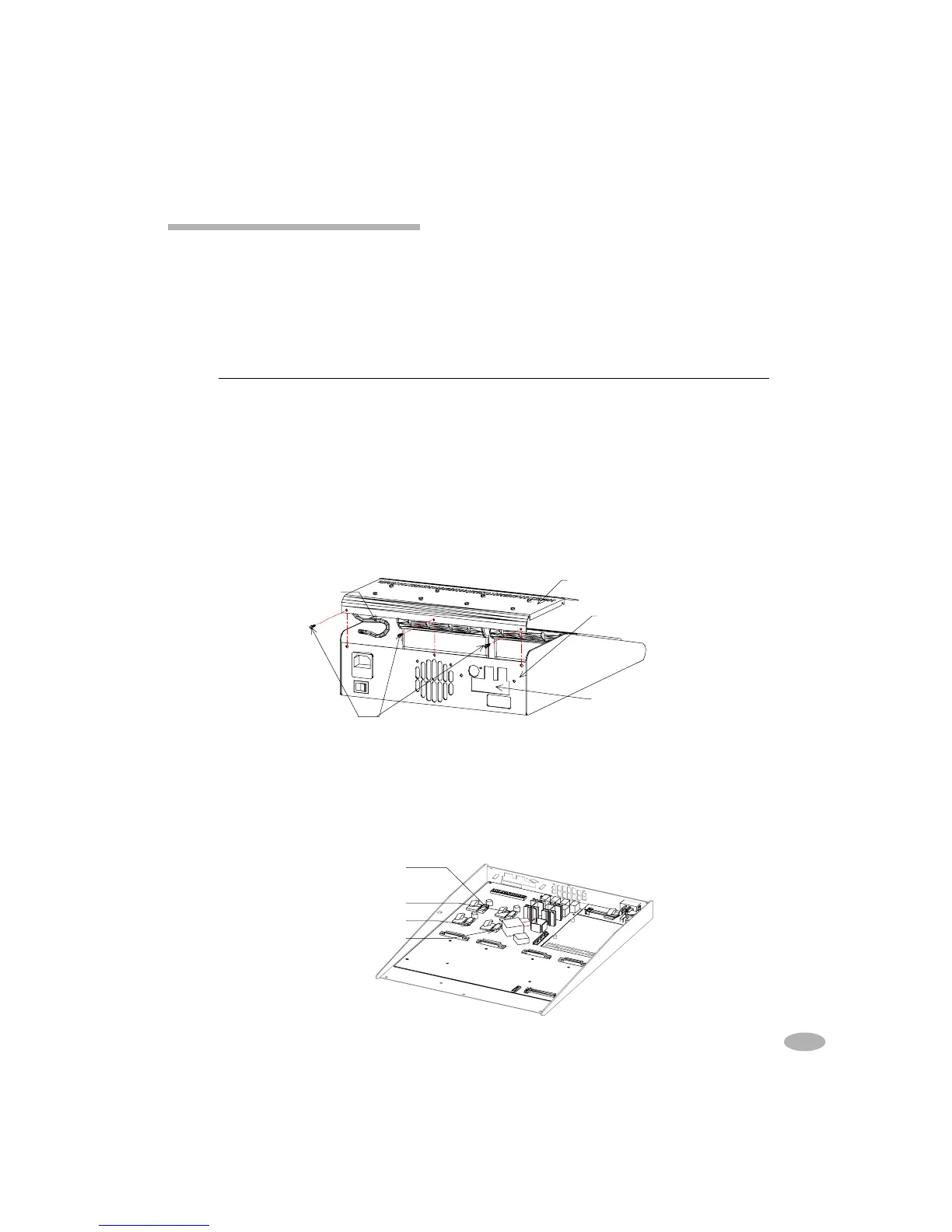
2. Unscrew the 3 screws located on the rear. The cover will still be attached to
the analyzer by a grounding strap. Put the cover to one side.
3. Remove the open fuse from the holder, taking care
not to touch any of the
electrical components
. The station fuses are located in the left rear corner of
the analyzer on the motherboard:
Model Station Fuse Size Replacement Cadex P/N
All F2.5 Amp 250V 5 x 20 mm Littlefuse 217 02.5 52-526-0250
Top Cover
Option Port
Option Board Label
Ground Strap
Rear Cover Screws
Station 1 Fuse
Station 2 Fuse
Station 3 Fuse
Station 4 Fuse
69



 To Next Page