Menu Operations
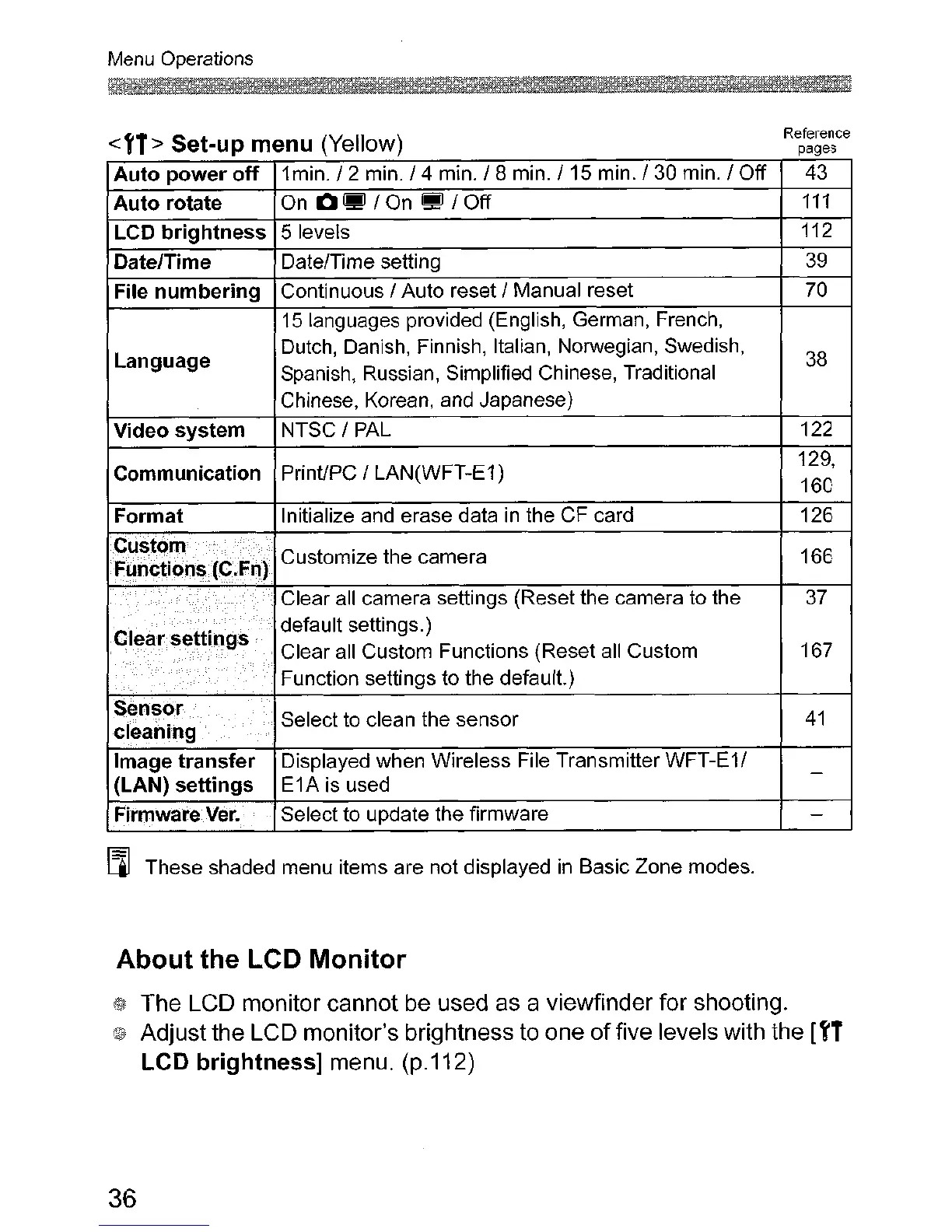
<'1> Set-up menu (Yellow)
Reference
pages
Auto power off
1min.
f 2 min. f 4 min. f 8 min. f 15 min. f 30 min. f Off 43
Auto rotate On
o.
f On • f Off
111
LCD brightness 5 levels 112
Date/Time DatelTime setting
39
File numbering Continuous I Auto reset f Manual reset
70
15 languages provided (English, German, French,
Language
Dutch, Danish, Finnish, Italian, Norwegian, Swedish,
38
Spanish, Russian, Simplified Chinese, Traditional
Chinese, Korean, and Japanese)
Video system NTSC
f PAL
122
Communication PrinUPC
I LAN(WFT-E1)
129,
160
Format Initialize and erase data
in
the CF card
126
Cti~t()m
Customize the camera
166
Func~io.ns.{C.Fn)
Clear all camera settings (Reset the camera to the
37
Clear
settings
default settings.)
Clear all Custom Functions (Reset all Custom 167
Function settings to the
default)
Sensor
Select to clean the sensor
41
cleaning
Image transfer
Displayed when Wireless File Transmitter WFT-E1/
-
(LAN) settings
E1A
is
used
Fhmwal"eVer.
Select to update the firmware
-
[ll These shaded menu items are not displayed
in
Basic Zone modes.
About the LCD Monitor
The LCD monitor cannot be used as a viewfinder for shooting.
Adjust the LCD monitor's brightness to one
of
five levels with the ['1
LCD brightness] menu. (p.112)
36












 To Next Page