Menu Operations
I1!II3m.l
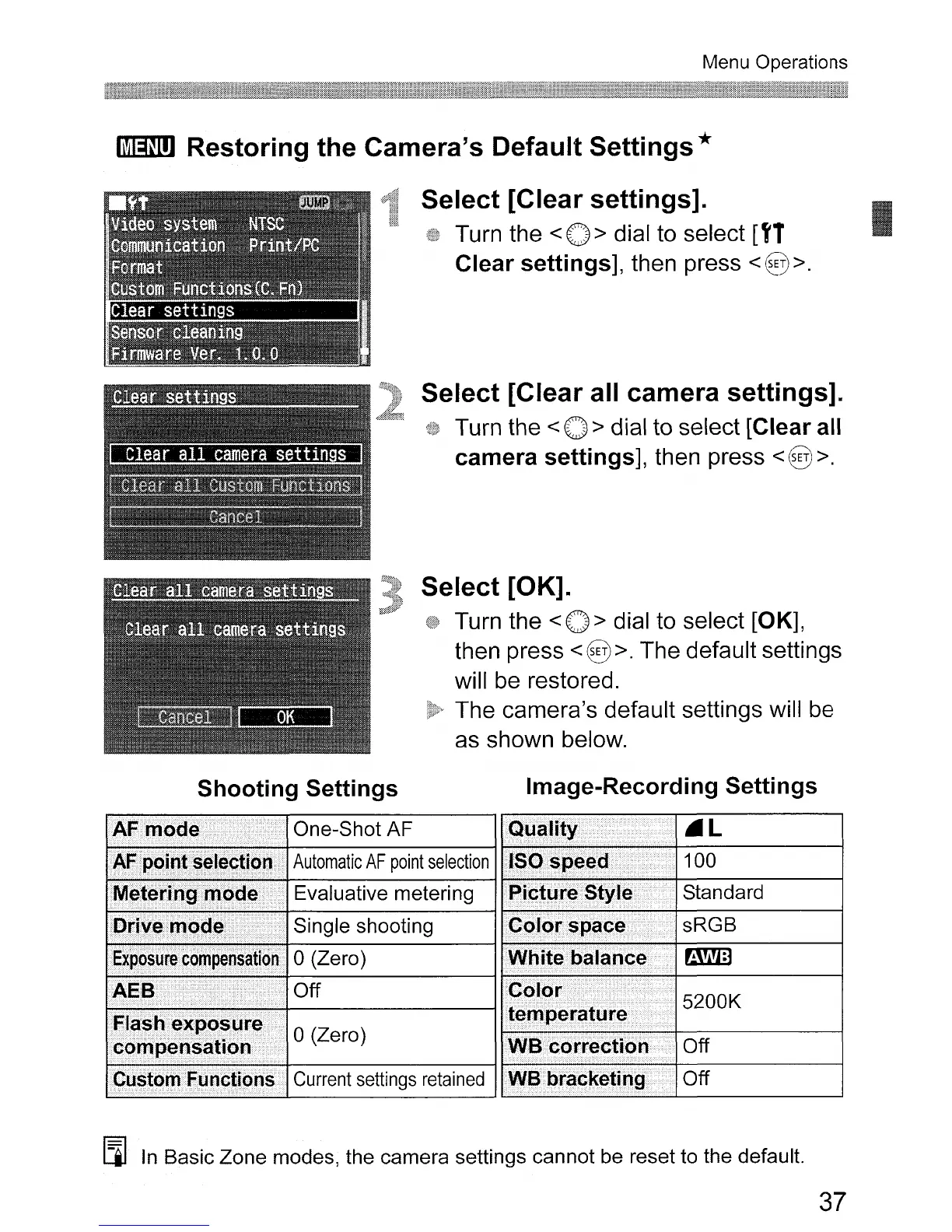
Restoring the Camera's Default Settings *
Select [Clear settings].
Turn the <0 > dial to select
[tT
Clear settings], then press
<§>.
Select [Clear all camera settings].
Turn the < 0 > dial to select [Clear all
camera settings], then press
<§>.
Select [OK].
Turn the < 0 > dial to select [OK],
then press <§ >. The default settings
will
be
restored.
The camera's default settings will
be
as shown below.
I
Shooting Settings
Image-Recording Settings
One-Shot
AF
.L
Automatic
AF
point
selection
100
Evaluative
metering
Standard
Single
shooting
sRGB
o
(Zero)
~
Off
5200K
o
(Zero)
Off
Current settings
retained
Off
Eil
In
Basic
Zone
modes,
the
camera
settings
cannot
be
reset to
the
default.
37












 To Next Page