108
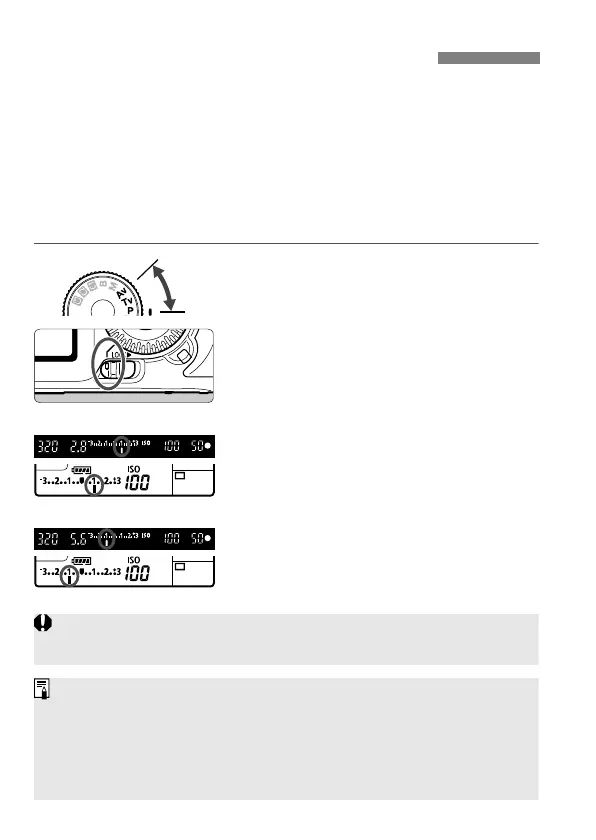
Exposure compensation can increase (brighter) or decrease (darker)
the standard exposure set by the camera.
Although you can set the exposure compensation up to ±5 stops in 1/3-
stop increments, the exposure compensation indicator on the LCD
panel and in the viewfinder can only display the setting up to ±3 stops. If
you want to set the exposure compensation setting beyond ±3 stops,
you should follow the instructions for [2 Exp. comp./AEB] on the next
page.
1
Set the Mode Dial to <d>, <s>,
or <f>.
2
Set the Quick Control Dial switch
to <J>.
3
Set the exposure compensation
amount.
After pressing the shutter button
halfway (0), turn the <5> dial.
4
Take the picture.
To cancel the exposure
compensation, set the exposure
compensation amount back to <E>.
Setting Exposure CompensationN
Increased exposure for a brighter image
Decreased exposure for a darker image
If the [
2 Auto Lighting Optimizer
] (p.77) is set to anything other than
[
Disable
], the image may still look bright even if a darker exposure has been set.
The exposure compensation amount will remain in effect even after you
set the power switch to <2>.
Be careful not to turn the <
5
> dial and change the exposure compensation
inadvertently. To prevent this, set the Quick Control Dial switch to <
R
>.
If the amount set exceeds ±3 stops, the end of the exposure level
indicator will display <I> or <J>.



 To Next Page