55
The <1> Full Auto mode takes care of everything, whereas the <C>
Creative Auto mode enables you to easily change the picture’s
brightness, depth of field, color tone (Picture Style), etc. The default
settings are the same as the <1> (Full Auto) mode.
* CA stands for Creative Auto.
1
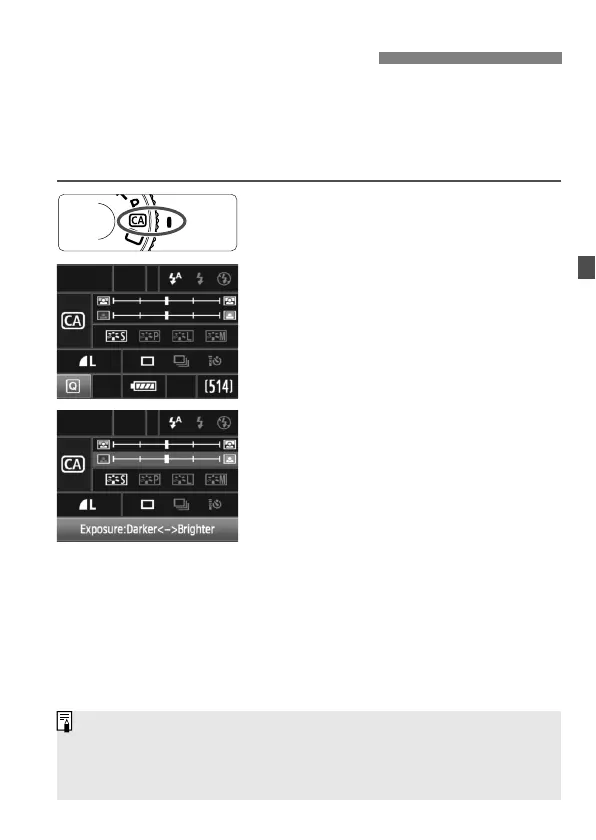
Set the Mode Dial to <C>.
The Creative Auto screen appears on
the LCD monitor.
2
Press the <Q> button.
You can use <9> to select a
function. (7)
For details about each function, see
page 56-57.
3
Set the desired setting.
Use <9> to select a function.
A brief description of the selected
function is displayed on the screen’s
bottom.
Turn the <
5> or <6> dial to
change the setting.
4
Take the picture.
Press the shutter button completely to
take the picture.
C Creative Auto Shooting
If you change the shooting mode or if the power turns off via auto power off
(p.46) or by the power switch being set to <2>, the Creative Auto settings
will revert to the default. However, the image-recording quality, self-timer
and remote control settings will be retained.



 To Next Page