119
The built-in flash and external Speedlite settings can be set with the
menu. The [External flash ***] menu options for external Speedlites are
applicable only to an attached EX-series Speedlite compatible with
the respective functions.
The setting procedure is the same as setting a camera menu function.
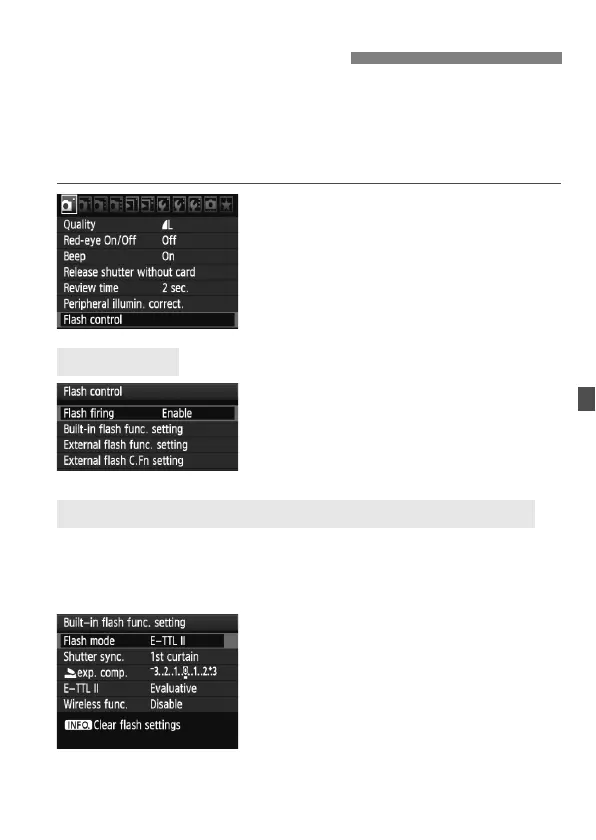
Select [Flash control].
Under the [1] tab, select [Flash
control], then press <0>.
The flash control screen will appear.
Normally, set this to [Enable].
If [Disable] is set, both the built-in
flash and external Speedlite will
not fire. This is useful when you only
want to use the AF-assist beam.
The [Built-in flash func. setting] and [External flash func. setting]
menus can set the functions listed on the next page. The functions
displayed under [External flash func. setting] will vary depending on
the Speedlite model.
Select [Built-in flash func. setting]
or [External flash func. setting].
The flash functions will be displayed.
The functions not dimmed can be
selected and set.
3 Setting the FlashN
[Flash firing]
[Built-in flash func. setting] and [External flash func. setting]



 To Next Page