81
3 Creating and Selecting a Folder
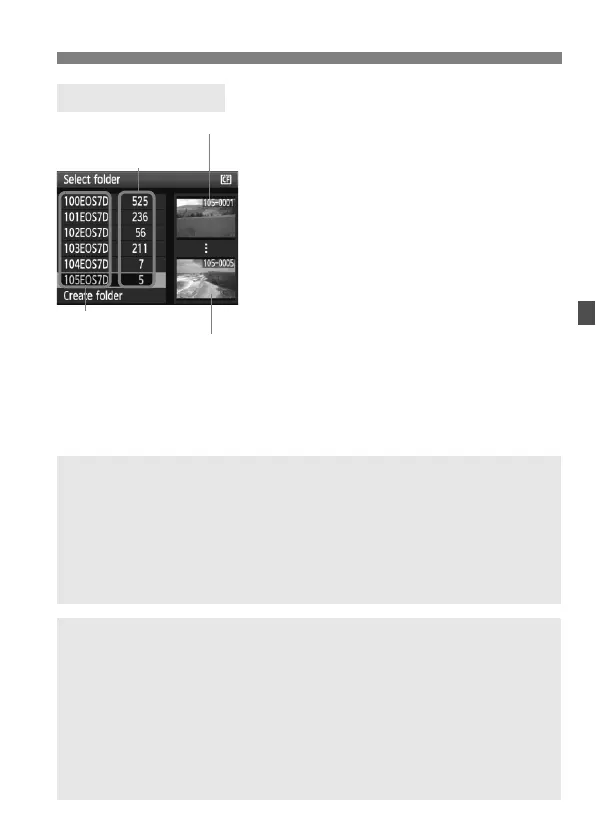
With the Select folder screen
displayed, turn the <5> dial to select
the desired folder, then press <0>.
The folder where the captured
images will be saved will be selected.
Subsequent captured images will be
recorded into the selected folder.
Selecting a Folder
Number of images
in folder
Folder name
Lowest file number
Highest file number
About Folders
As with “100EOS7D” for example, the folder name starts with three digits
(folder number) followed by five alphanumeric characters. A folder can contain
up to 9999 images (file No. 0001 - 9999). When a folder becomes full, a new
folder with a higher one-up folder number is created automatically. Also, if
manual reset (p.85) is executed, a new folder will be created automatically.
Folders numbered from 100 to 999 can be created.
Creating Folders with a Personal Computer
With the card open on the screen, create a new folder named “DCIM”. Open
the DCIM folder and create as many folders as necessary to save and
organize your images. The folder name must follow the “100ABC_D” format
where the first three digits is 100 - 999 followed by five alphanumeric
characters. The five characters can be a combination of upper- or lower-case
letters from A to Z, numerals, and an underscore “_”. There can be no space in
the folder name. Also, folder names cannot have the same three-digit number
such as “100ABC_D” and “100W_XYZ” even if the letters are different.



 To Next Page