47
Before You Start
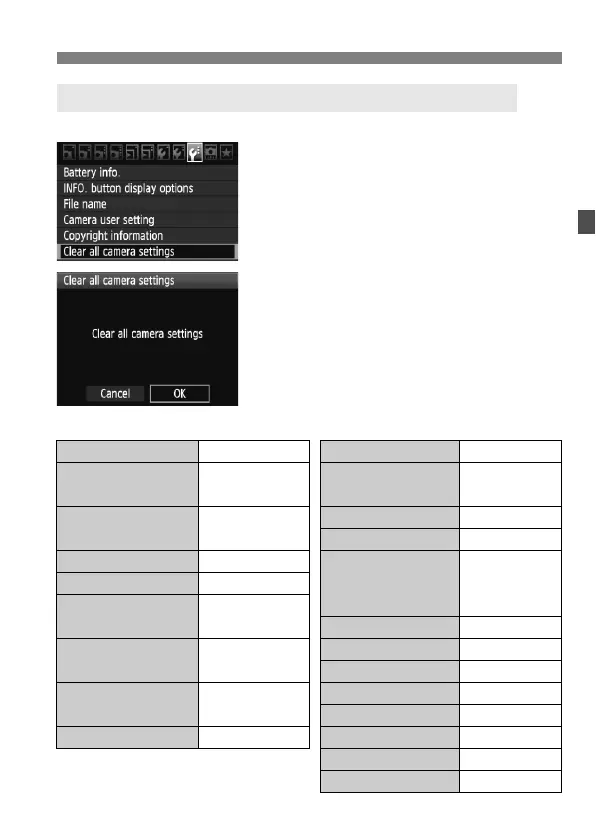
The camera’s shooting settings and menu settings can be reverted to the default.
1
Select [Clear all camera settings].
Under the [7] tab, select [Clear all
camera settings], then press <0>.
2
Select [OK].
Turn the <5> dial to select [OK],
then press <0>.
Setting [Clear all camera settings]
will reset the camera to the following
default settings:
3 Reverting the Camera to the Default SettingsN
Shooting Settings Image-recording Settings
AF mode One-Shot AF Quality 73
AF area
selection mode
Auto selection
19-point AF
One-touch
RAW+JPEG
1
73
Metering mode
q (Evaluative
metering)
Picture Style Standard
Auto Lighting Optimizer
Standard
ISO speed A (Auto)
Peripheral
illumination
correction
Enable/
Correction
data retained
ISO Auto
Max.: 3200
Drive mode
u (Single
shooting)
Color space sRGB
Exposure
compensation/AEB
Canceled
White balance Q (Auto)
WB correction Canceled
Flash exposure
compensation
0 (Zero)
WB-BKT Canceled
File numbering Continuous
Custom Functions Unchanged File name IMG_
Auto cleaning Enable
Dust Delete Data Erased



 To Next Page