182
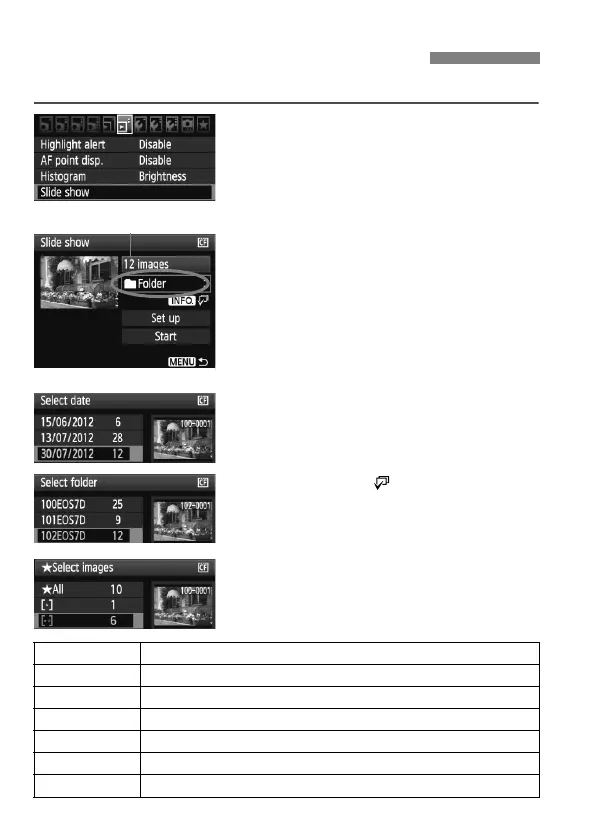
You can playback the images in the card as an automatic slide show.
1
Select [Slide show].
Under the [4] tab, select [Slide
show], then press <0>.
2
Select the images to be played
back.
Turn the <5> dial to select the item,
then press <0>.
All images/Movies/Stills
Turn the <
5
> dial to select one of the
following: [
j
All images
],
[
k
Movies
]
or [
z
Stills
]. Then press <
0
>.
Date/Folder/Rating
Turn the <5> dial to select one of
the following: [iDate], [
nFolder] or
[9Rating].
When <z > is displayed
brightly, press the <B> button.
Turn the <5> dial to select the
setting, then press <0>.
3 Slide Show (Auto Playback)
Number of images to be played
Item Playback Description
jAll images All the still photos and movies in the card will be played back.
iDate
Still photos and movies taken on the selected shooting date will be played back.
nFolder
Still photos and movies in the selected folder will be played back.
kMovies Only the movies in the card will be played back.
zStills Only the still photos in the card will be played back.
9Rating
Only the still photos and movies with the selected rating will be played back.



 To Next Page