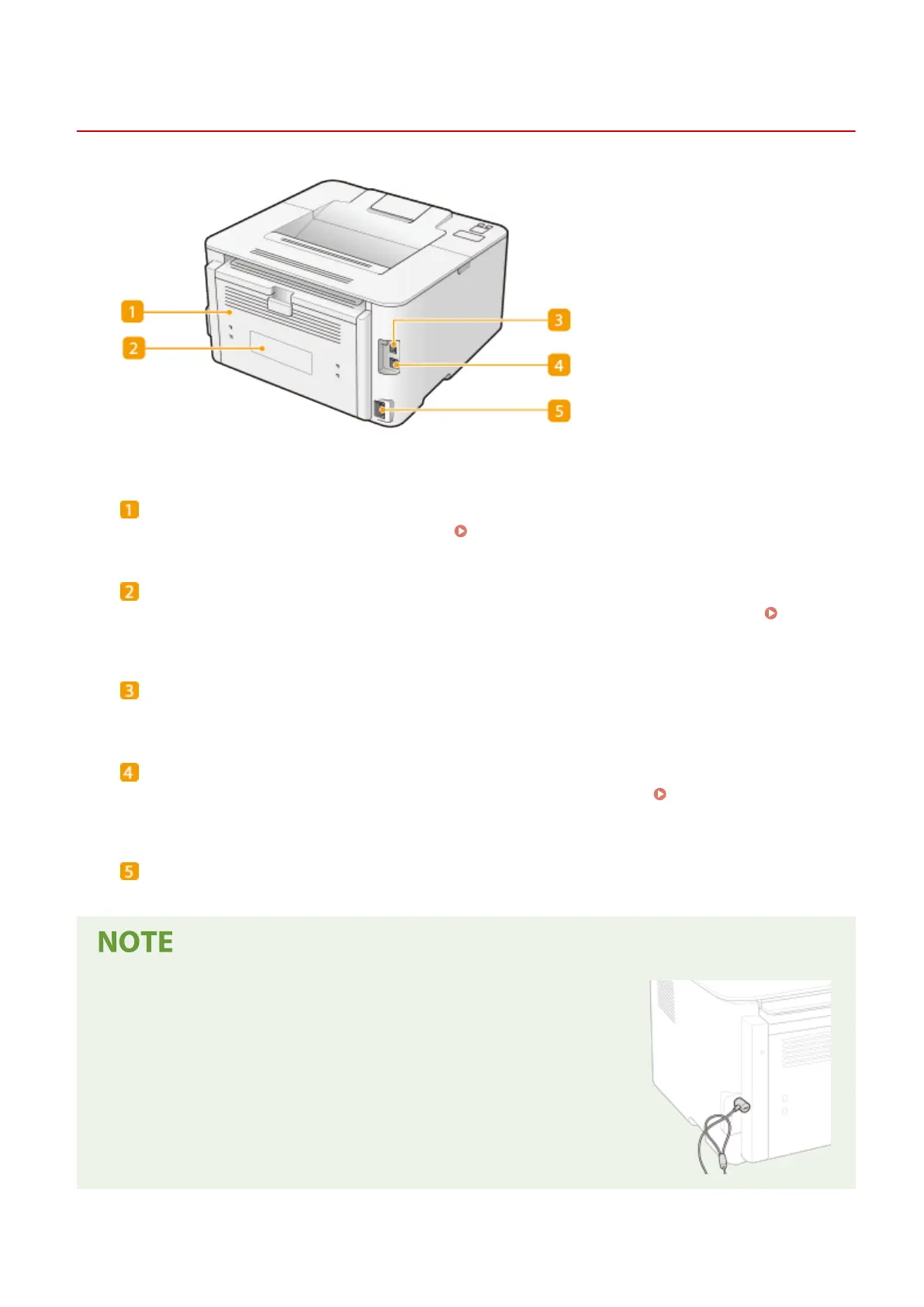
Back Side
23FJ-01E
Back cover
Open the back co
ver when clearing paper jams.
Clearing Paper Jams(P. 297)
Rating label
The label sho
ws the serial number, which is needed when making inquiries about the machine.
When a
Pr
oblem Cannot Be Solved(P. 302)
USB port
Connect a USB cable when connecting the machine and a computer.
LAN port
Connect a LAN cable when connecting the machine to a wir
ed LAN router, etc.
Connecting to a Wired
LAN(P
. 24)
Power socket
Connect the po
wer cord.
Anti-theft Security Slot
● This machine is pr
ovided with a security slot, to which you can attach
security wire or equivalent.
● The hole of the security slot is 1/8" (4.2 mm) wide and 3/8" (8.1 mm) high.
● For inquiries about the security slot, contact your local authorized Canon
dealer.
Basic Operations
78














 To Next Page