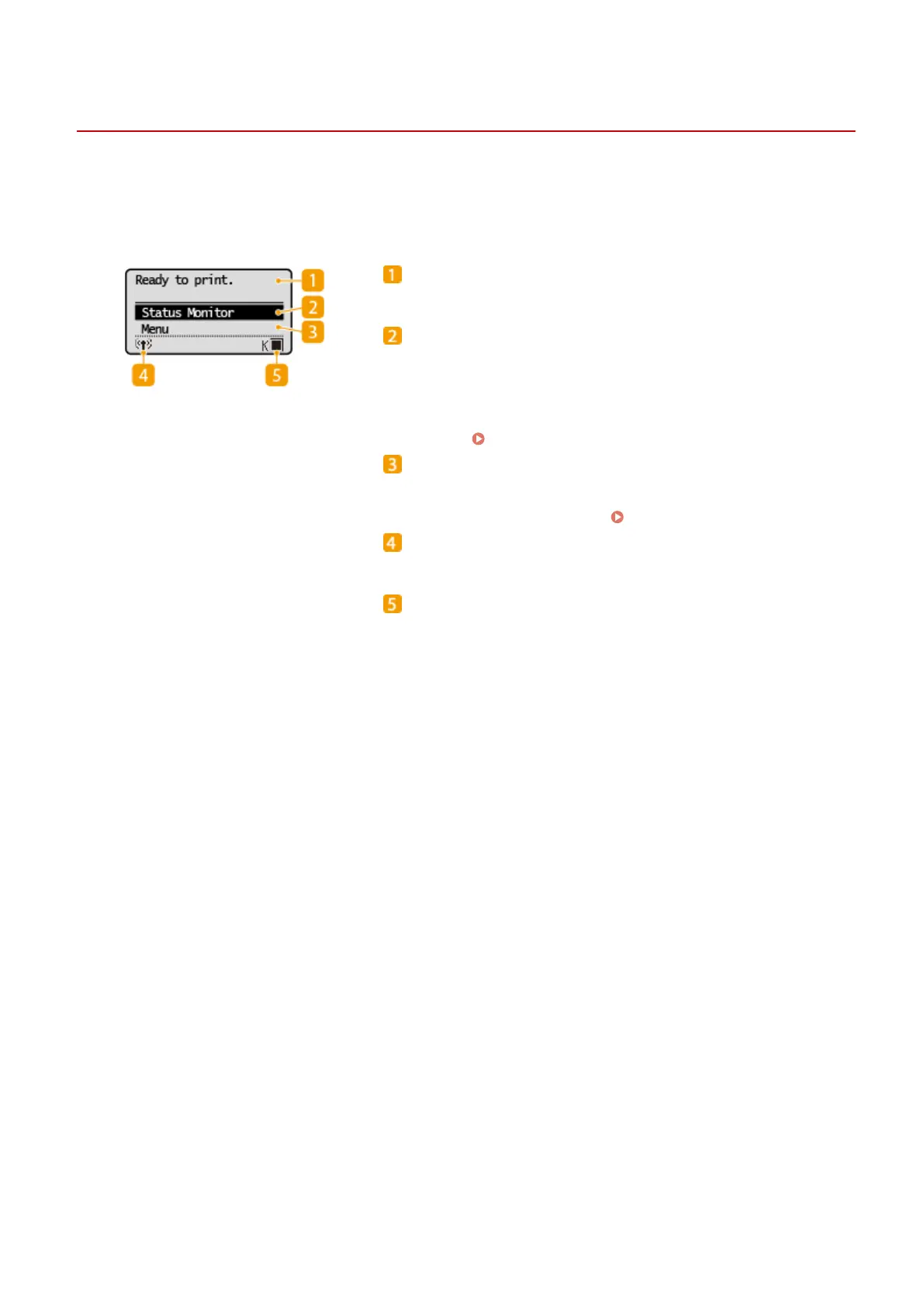
Home Screen
23FJ-01S
The Home scr
een is displayed when the power is turned ON. Use this screen to specify settings for and register
functions.
Status indication
Displays the curr
ent status or messages.
<Status Monitor>
Select to check the printing status, to vie
w the usage history, or to
view the network settings such as the IP address of the machine.
You can also check the status of the machine, such as the amount
remaining in the toner cartridge, etc. or whether any errors
occurred.
<Status Monitor> Screen(P. 88)
<Menu>
<Printer Settings>, <Pr
eferences>, and many other machine
settings start from this button.
Setting Menu List(P. 195)
Wi- Fi icon
Displayed when the machine is connected to a wir
eless LAN.
Amount r
emaining in the toner cartridge
Displays the amount remaining in the toner cartridge in stages.
Basic Operations
87














 To Next Page