Relocating the Machine
23FJ-04E
The machine is heavy
. Make sure to follow the procedure below when moving the machine to avoid injury, and also
make sure to read the safety precautions before you begin.
Important Safety Instructions(P. 2)
1
Turn OFF the machine and computer.
● When you turn OFF the machine, data that is waiting to be printed is deleted.
2
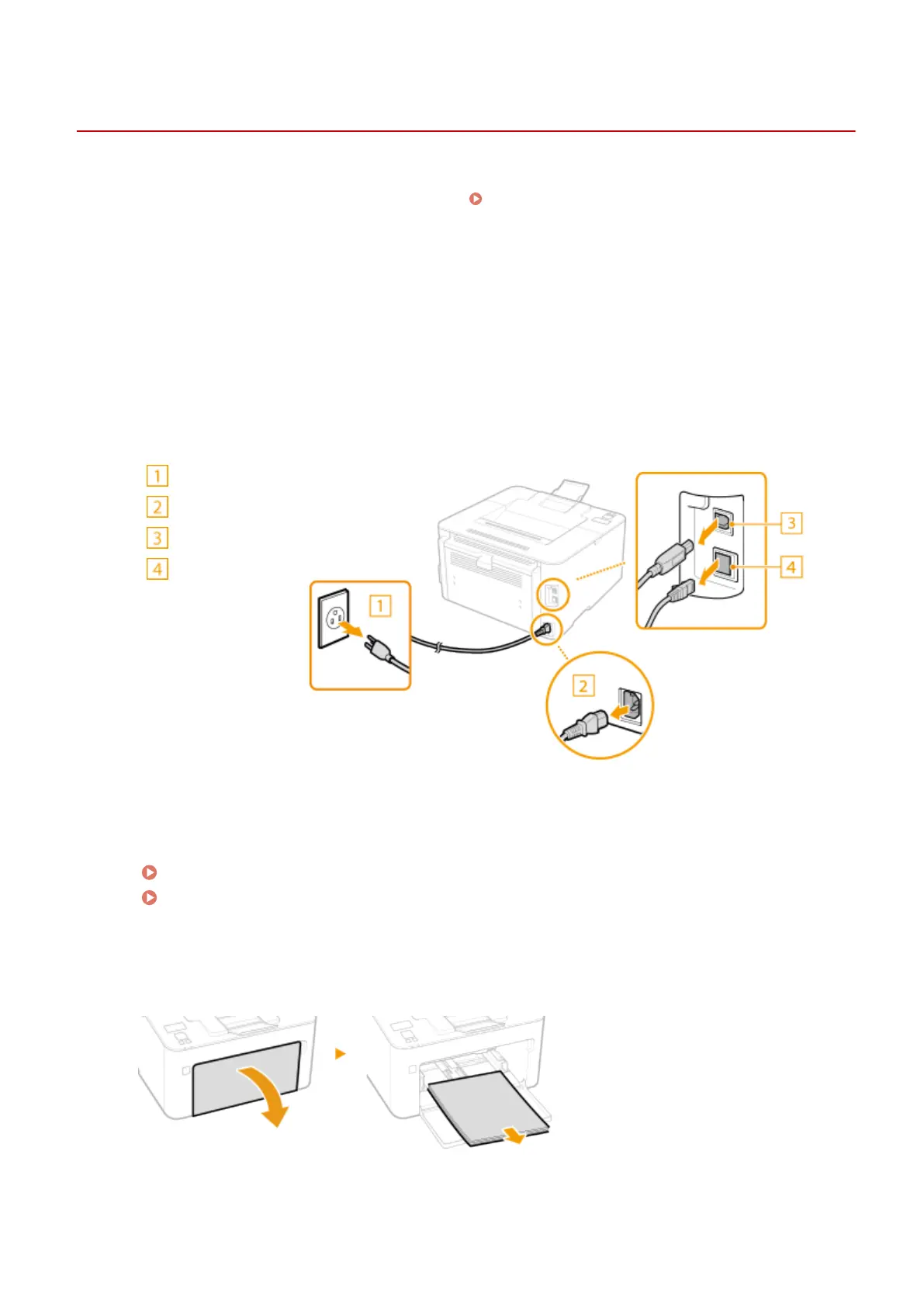
Disconnect the cables and cord from the machine in numerical order as in the
illustr
ation below.
● Whether the cables with "
*
" ar
e connected depends on your environment.
Power plug
Power cord
USB cable
*
LAN cable
*
3
When transporting the machine across a long distance, remove the toner cartridge
and the drum cartridge.
Procedure for Replacing the Toner Cartridge(P. 244)
Procedure for Replacing the Drum Cartridge(P. 247)
4
Open the front cover and remove any paper.
● If the paper guides ar
e extended, return them so that they t in the drawer.
5
Close the front cover, paper stopper, and all similar parts, and then move the
machine to a ne
w location.
Maintenance
251














 To Next Page