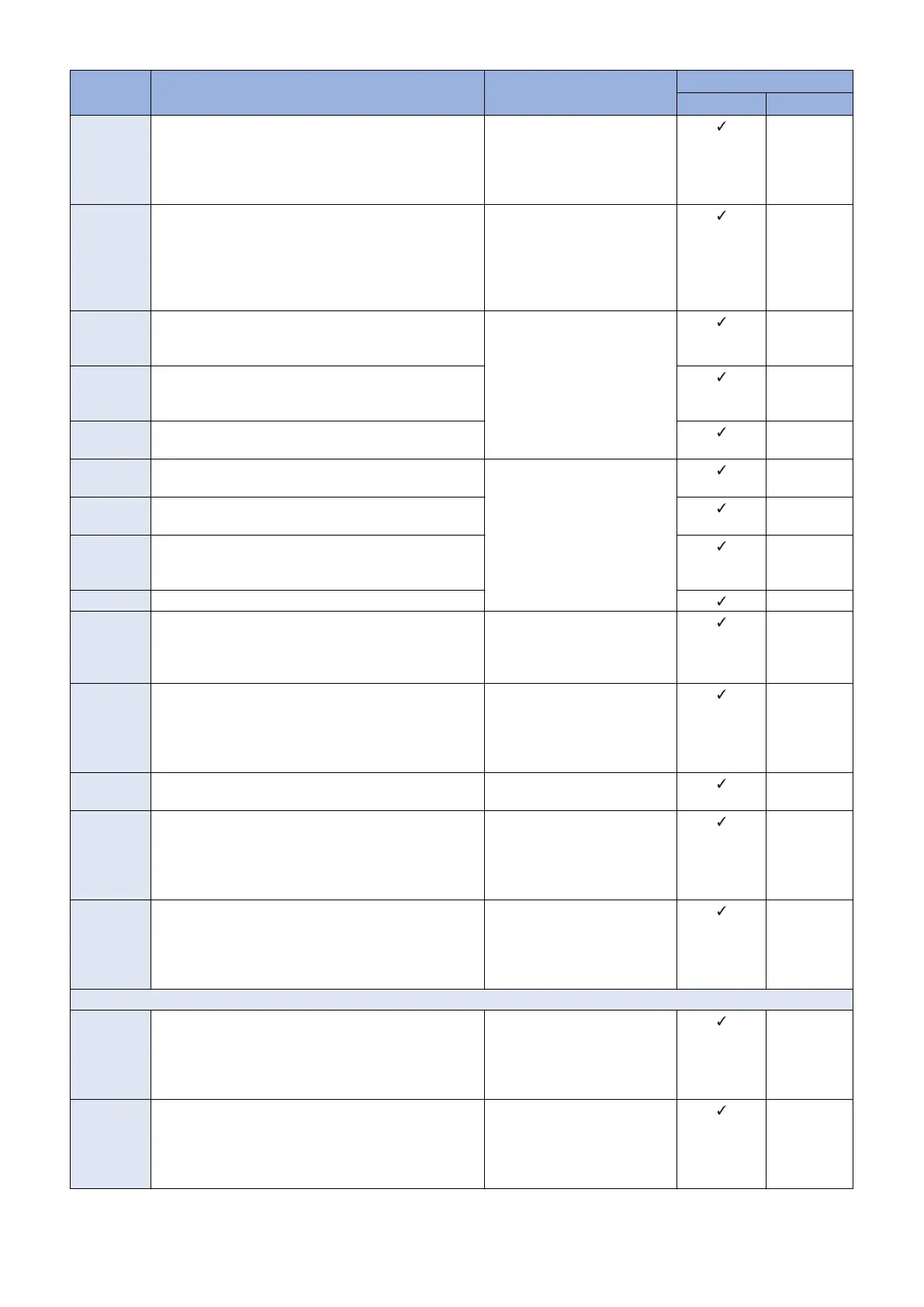
Error Code Description Remedy Cause of error
CDS server UPDATER
81xx1015 When firmware distribution time-out occurs.
A reception completion notification was not sent to CDS
within 24 hours after the start of the distribution. The de-
vice has been turned OFF, the network has been discon-
nected, etc.
Search the applicable firmware
again, and perform distribution
of the firmware.
-
81xx1016 Firmware update time-out occurred.
An update completion notification had not been sent to
CDS even after 2 hours since the start of the update.
Check the device to see if the
update has been completed.
When the update has ended in
failure, execute the operation
again if there is no problem with
the device.
-
81xx1017 When the firmware distribution information notification
showed an error in processing the distribution informa-
tion.
Contact the support department
of the sales company.
(Attach information on the time
of occurrence and the serial
number of the device.)
-
81xx1018 When the firmware distribution information notification
showed an error in processing the scheduled update in-
formation.
-
81xx1019 When the status of the scheduled update information is
"Set", "Finished", or "Failed".
-
81xx1020 When the status of the scheduled update information is
"Waiting to Transmit" or "New".
Contact the support department
of the sales company.
(Attach information on the time
of occurrence and the serial
number of the device.)
-
81xx1021 When the status of the scheduled update information is
"Set".
-
81xx1022 The scheduled update setting information differs be-
tween the input information and the distribution informa-
tion.
-
81xx1023 When the distribution status is "Cancel".
-
81xx1024 A forced automatic update was scheduled for distribution,
but it could not be performed because the firmware to be
distributed or the status of the device was changed.
Check the firmware to be distrib-
uted or the status of the device.
If necessary, schedule distribu-
tion again.
-
81xx1025 A time-out occurred when starting to apply the firmware. Contact the support department
of the sales company.
(Attach information on the time
of occurrence and the serial
number of the device.)
-
81xx1026 [Auto] is specified for the update method even though an
application time is specified.
Change the update method to
[Date & Time].
-
81xx1027 The application time has been set to a time earlier than
the time from which the distributed firmware can be ap-
plied (when a specific period of time has passed since the
distribution time).
Set the application time to a time
which is later than the time when
the specific period of time has
passed since the distribution
time.
-
81xx1028 The acquisition type of the input information is set to
[Special], and an error where the basic set was not found
has occurred more than the specified number of times
(the maximum number of times of authentication failure).
Contact the support department
of the sales company.
(Attach information on the time
of occurrence and the serial
number of the device.)
-
I/O
81xx2014 Device information corresponding to the target device
serial number does not exist.
(There is no relevant information on the device firmware
group.)
Contact the support department
of the sales company.
(Attach information on the time
of occurrence and the serial
number of the device.)
-
81xx2015 The error "The specified license access number does not
exist in LMS" occurred more than the specified number
of times (the maximum number of times of authentication
failure).
Contact the support department
of the sales company.
(Attach information on the time
of occurrence and the serial
number of the device.)
-
3. Technical Explanation (System)
71










 To Next Page