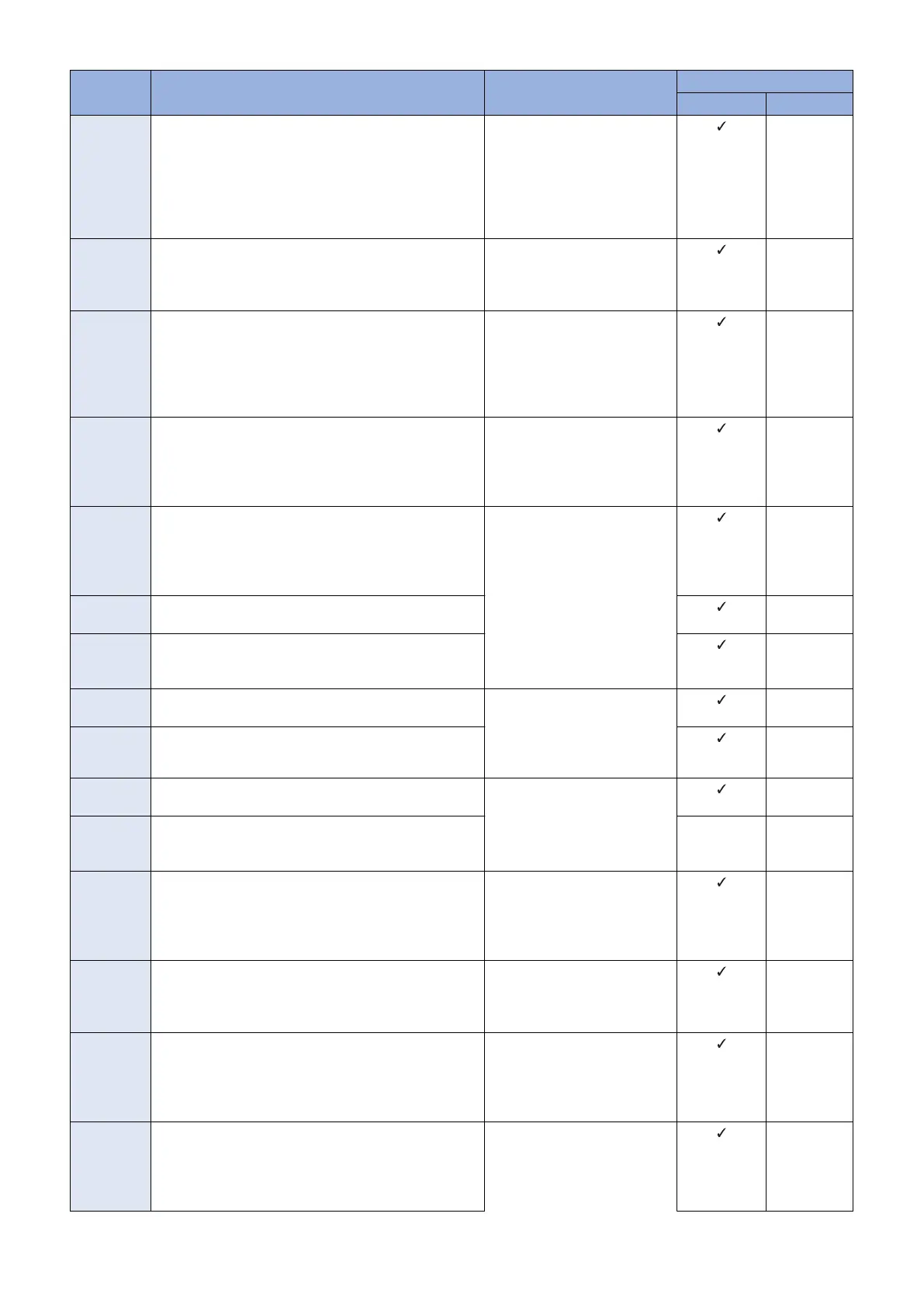
Error Code Description Remedy Cause of error
CDS server UPDATER
81xx1008 As to the device serial number in the data entry items,
there is no applicable device code product
Contact the support department
of the sales Company.
(Attach information on the time
of occurrence and the serial
number of the device.)
(Canon Inc. Only) Check regis-
tration of LMS.
-
81xx1009 The retrieval type in the data entry items is special and
there are no basic-set applicable to the registration ID and
Password (* When wrong registration ID or Password
was entered by an operator)
Enter correct ID and the pass-
word.
-
81xx100A The delivery status is Applying
After the firmware was updated and when an update
completion notification has not been sent to CDS, distri-
bution of the firmware was attempted again before update
time-out is processed in CDS.
After 2 hours and 30 minutes
have passed since the failed at-
tempt to distribute the firmware,
search the applicable firmware
again, and perform distribution
of the firmware.
-
81xx100B No approval information exists about EULA or the export
criteria when the delivery is determined
Contact the support department
of the sales company.
(Attach information on the time
of occurrence and the serial
number of the device.)
-
81xx100C The delivery status is Distributing/Distributed/Applying/
Finished/Failed
When the distribution status was not correct, distribution
information was obtained from CDS. (CDS has not been
notified of the status change due to a network failure, etc.)
Search the applicable firmware
again, and perform distribution
of the firmware.
-
81xx100D The delivery status is Distributing/Distributed/Applying/
Finished/Failed
-
8108100D When the distribution status was not correct, schedule
information was checked with CDS. (CDS has not been
notified of the status change due to a network
-
81xx100E The delivery status is New/Waiting to Distribute/Distrib-
uted/Applying/Finished/Failed
Contact the support department
of the sales company.
(Attach information on the time
of occurrence and the serial
number of the device.)
-
81xx100F The delivery code is other than Distributing.
(Firmware distribution)
-
81xx1010 The delivery status is New/Waiting to Distribute/Distrib-
uting/Applying/Finished/Failed
Search the applicable firmware
again, and perform distribution
of the firmware.
-
810B1010 An update start notification was sent to CDS with an in-
valid status. (The CDS server failed to receive the status
change due to a network error, etc.)
81xx1011 The delivery status is Distributing/Distributed/Applying/
Finished/Failed
Contact the support department
of the sales company.
(Attach information on the time
of occurrence and the serial
number of the device.)
-
81xx1012 Device is "Not applicable to CDS"
(Firmware distribution)
* It occurs only when a device that can access CDS is
managed.
Register the device as a CDS
device.
-
81xx1013 When the specified distribution time was within the time
frame of CDS distribution stop.
(Firmware distribution)
Contact the support department
of the sales company.
(Attach information on the time
of occurrence and the serial
number of the device.)
-
81xx1014 When confirmation of the firmware distribution settings
ended in time-out.
CDS was not accessed within 30 minutes after the distri-
bution time. The device has been turned OFF, the net-
work has been disconnected, etc.
Search the applicable firmware
again, and perform distribution
of the firmware.
-
3. Technical Explanation (System)
70










 To Next Page